


如需让用户登录,请从浏览器的密码管理工具中检索凭据,并使用这些凭据自动登录用户。对于拥有多个账号的用户,让他们使用账号选择器,只需点按一下即可选择账号。
自动登录
自动登录可能发生在您网站上的任何位置,不仅是首页,还包括其他叶级页。当用户通过搜索引擎访问您网站中的各个网页时,此功能非常有用。
如需启用自动登录,请执行以下操作:
- 获取凭证信息。
- 对用户进行身份验证。
- 更新界面或前往个性化页面。
获取凭证信息
' d='M96 183a64 64 0 0 1-23-23L17 64a128 128 0 0 0 111 192l55-96a64 64 0 0 1-87 23Z'/%3E%3Cpath fill='url(%23b)' d='M192 128a64 64 0 0 1-9 32l-55 96A128 128 0 0 0 239 64H128a64 64 0 0 1 64 64Z'/%3E%3Ccircle cx='128' cy='128' r='52' fill='%231a73e8'/%3E%3Cpath fill='url(%23c)' d='M96 73a64 64 0 0 1 32-9h111a128 128 0 0 0-222 0l56 96a64 64 0 0 1 23-87Z'/%3E%3C/svg%3E)
' xlink:href='%23A'%3E%3Cstop offset='.76' stop-opacity='0'/%3E%3Cstop offset='.95' stop-opacity='.5'/%3E%3Cstop offset='1'/%3E%3C/radialGradient%3E%3CradialGradient id='F' cx='2523' cy='4680' r='20243' gradientTransform='matrix(-.03715 .99931 -2.12836 -.07913 13579 3530)' xlink:href='%23A'%3E%3Cstop offset='0' stop-color='%2335c1f1'/%3E%3Cstop offset='.11' stop-color='%2334c1ed'/%3E%3Cstop offset='.23' stop-color='%232fc2df'/%3E%3Cstop offset='.31' stop-color='%232bc3d2'/%3E%3Cstop offset='.67' stop-color='%2336c752'/%3E%3C/radialGradient%3E%3CradialGradient id='G' cx='24247' cy='7758' r='9734' gradientTransform='matrix(.28109 .95968 -.78353 .22949 24510 -16292)' xlink:href='%23A'%3E%3Cstop offset='0' stop-color='%2366eb6e'/%3E%3Cstop offset='1' stop-color='%2366eb6e' stop-opacity='0'/%3E%3C/radialGradient%3E%3Cpath id='H' d='M24105 20053a9345 9345 0 01-1053 472 10202 10202 0 01-3590 646c-4732 0-8855-3255-8855-7432 0-1175 680-2193 1643-2729-4280 180-5380 4640-5380 7253 0 7387 6810 8137 8276 8137 791 0 1984-230 2704-456l130-44a12834 12834 0 006660-5282c220-350-168-757-535-565z'/%3E%3Cpath id='I' d='M11571 25141a7913 7913 0 01-2273-2137 8145 8145 0 01-1514-4740 8093 8093 0 013093-6395 8082 8082 0 011373-859c312-148 846-414 1554-404a3236 3236 0 012569 1297 3184 3184 0 01636 1866c0-21 2446-7960-8005-7960-4390 0-8004 4166-8004 7820 0 2319 538 4170 1212 5604a12833 12833 0 007684 6757 12795 12795 0 003908 610c1414 0 2774-233 4045-656a7575 7575 0 01-6278-803z'/%3E%3Cpath id='J' d='M16231 15886c-80 105-330 250-330 566 0 260 170 512 472 723 1438 1003 4149 868 4156 868a5954 5954 0 003027-839 6147 6147 0 001133-850 6180 6180 0 001910-4437c26-2242-796-3732-1133-4392-2120-4141-6694-6525-11668-6525-7011 0-12703 5635-12798 12620 47-3654 3679-6605 7996-6605 350 0 2346 34 4200 1007 1634 858 2490 1894 3086 2921 618 1067 728 2415 728 2952s-271 1333-780 1990z'/%3E%3Cuse fill='url(%23B)' xlink:href='%23H'/%3E%3Cuse fill='url(%23D)' opacity='.35' xlink:href='%23H'/%3E%3Cuse fill='url(%23C)' xlink:href='%23I'/%3E%3Cuse fill='url(%23E)' opacity='.4' xlink:href='%23I'/%3E%3Cuse fill='url(%23F)' xlink:href='%23J'/%3E%3Cuse fill='url(%23G)' xlink:href='%23J'/%3E%3C/svg%3E)
' gradientUnits='userSpaceOnUse'%3E%3Cstop offset='.2' stop-color='%239059ff' stop-opacity='0'/%3E%3Cstop offset='.3' stop-color='%238c4ff3' stop-opacity='.1'/%3E%3Cstop offset='.8' stop-color='%237716a8' stop-opacity='.5'/%3E%3Cstop offset='1' stop-color='%236e008b' stop-opacity='.6'/%3E%3C/radialGradient%3E%3CradialGradient id='ff-g' cx='239.1' cy='34.6' r='171.6' gradientUnits='userSpaceOnUse'%3E%3Cstop offset='0' stop-color='%23ffe226'/%3E%3Cstop offset='.1' stop-color='%23ffdb27'/%3E%3Cstop offset='.3' stop-color='%23ffc82a'/%3E%3Cstop offset='.5' stop-color='%23ffa930'/%3E%3Cstop offset='.7' stop-color='%23ff7e37'/%3E%3Cstop offset='.8' stop-color='%23ff7139'/%3E%3C/radialGradient%3E%3CradialGradient id='ff-h' cx='374' cy='-74.3' r='732.2' gradientUnits='userSpaceOnUse'%3E%3Cstop offset='.1' stop-color='%23fff44f'/%3E%3Cstop offset='.5' stop-color='%23ff980e'/%3E%3Cstop offset='.6' stop-color='%23ff5634'/%3E%3Cstop offset='.7' stop-color='%23ff3647'/%3E%3Cstop offset='.9' stop-color='%23e31587'/%3E%3C/radialGradient%3E%3CradialGradient id='ff-i' cx='304.6' cy='7.1' r='536.4' gradientTransform='rotate(84 303 4)' gradientUnits='userSpaceOnUse'%3E%3Cstop offset='0' stop-color='%23fff44f'/%3E%3Cstop offset='.1' stop-color='%23ffe847'/%3E%3Cstop offset='.2' stop-color='%23ffc830'/%3E%3Cstop offset='.3' stop-color='%23ff980e'/%3E%3Cstop offset='.4' stop-color='%23ff8b16'/%3E%3Cstop offset='.5' stop-color='%23ff672a'/%3E%3Cstop offset='.6' stop-color='%23ff3647'/%3E%3Cstop offset='.7' stop-color='%23e31587'/%3E%3C/radialGradient%3E%3CradialGradient id='ff-j' cx='235' cy='98.1' r='457.1' gradientUnits='userSpaceOnUse'%3E%3Cstop offset='.1' stop-color='%23fff44f'/%3E%3Cstop offset='.5' stop-color='%23ff980e'/%3E%3Cstop offset='.6' stop-color='%23ff5634'/%3E%3Cstop offset='.7' stop-color='%23ff3647'/%3E%3Cstop offset='.9' stop-color='%23e31587'/%3E%3C/radialGradient%3E%3CradialGradient id='ff-k' cx='355.7' cy='124.9' r='500.3' gradientUnits='userSpaceOnUse'%3E%3Cstop offset='.1' stop-color='%23fff44f'/%3E%3Cstop offset='.2' stop-color='%23ffe141'/%3E%3Cstop offset='.5' stop-color='%23ffaf1e'/%3E%3Cstop offset='.6' stop-color='%23ff980e'/%3E%3C/radialGradient%3E%3ClinearGradient id='ff-a' x1='446.9' y1='76.8' x2='47.9' y2='461.8' gradientUnits='userSpaceOnUse'%3E%3Cstop offset='.1' stop-color='%23fff44f'/%3E%3Cstop offset='.1' stop-color='%23ffe847'/%3E%3Cstop offset='.2' stop-color='%23ffc830'/%3E%3Cstop offset='.4' stop-color='%23ff980e'/%3E%3Cstop offset='.4' stop-color='%23ff8b16'/%3E%3Cstop offset='.5' stop-color='%23ff672a'/%3E%3Cstop offset='.5' stop-color='%23ff3647'/%3E%3Cstop offset='.7' stop-color='%23e31587'/%3E%3C/linearGradient%3E%3ClinearGradient id='ff-l' x1='442.1' y1='74.8' x2='102.6' y2='414.3' gradientUnits='userSpaceOnUse'%3E%3Cstop offset='.2' stop-color='%23fff44f' stop-opacity='.8'/%3E%3Cstop offset='.3' stop-color='%23fff44f' stop-opacity='.6'/%3E%3Cstop offset='.5' stop-color='%23fff44f' stop-opacity='.2'/%3E%3Cstop offset='.6' stop-color='%23fff44f' stop-opacity='0'/%3E%3C/linearGradient%3E%3C/defs%3E%3Cpath d='M479 166c-11-25-32-52-49-60a249 249 0 0 1 25 73c-27-68-73-95-111-155a255 255 0 0 1-8-14 44 44 0 0 1-4-9 1 1 0 0 0 0-1 1 1 0 0 0-1 0c-60 35-81 101-83 134a120 120 0 0 0-66 25 71 71 0 0 0-6-5 111 111 0 0 1-1-58c-25 11-44 29-58 44-9-12-9-52-8-60l-8 4a175 175 0 0 0-24 21 210 210 0 0 0-22 26 203 203 0 0 0-32 73l-1 2-2 15a229 229 0 0 0-4 34v1a240 240 0 0 0 477 40l1-9c5-41 0-84-15-121zM202 355l3 1-3-1zm55-145zm198-31z' fill='url(%23ff-a)'/%3E%3Cpath d='M479 166c-11-25-32-52-49-60 14 26 22 53 25 72v1a207 207 0 0 1-206 279c-113-3-212-87-231-197-3-17 0-26 2-40-2 11-3 14-4 34v1a240 240 0 0 0 477 40l1-9c5-41 0-84-15-121z' fill='url(%23ff-b)'/%3E%3Cpath d='M479 166c-11-25-32-52-49-60 14 26 22 53 25 72v1a207 207 0 0 1-206 279c-113-3-212-87-231-197-3-17 0-26 2-40-2 11-3 14-4 34v1a240 240 0 0 0 477 40l1-9c5-41 0-84-15-121z' fill='url(%23ff-c)'/%3E%3Cpath d='m362 195 1 1a130 130 0 0 0-22-29C266 92 322 5 331 0c-60 35-81 101-83 134l9-1c45 0 84 25 105 62z' fill='url(%23ff-d)'/%3E%3Cpath d='M257 210c-1 6-22 26-29 26-68 0-80 41-80 41 3 35 28 64 57 79l4 2 7 3a107 107 0 0 0 31 6c120 6 143-143 57-186 22-4 45 5 58 14-21-37-60-62-105-62l-9 1a120 120 0 0 0-66 25l17 16c16 16 58 33 58 35z' fill='url(%23ff-e)'/%3E%3Cpath d='M257 210c-1 6-22 26-29 26-68 0-80 41-80 41 3 35 28 64 57 79l4 2 7 3a107 107 0 0 0 31 6c120 6 143-143 57-186 22-4 45 5 58 14-21-37-60-62-105-62l-9 1a120 120 0 0 0-66 25l17 16c16 16 58 33 58 35z' fill='url(%23ff-f)'/%3E%3Cpath d='m171 151 5 3a111 111 0 0 1-1-58c-25 11-44 29-58 44 1 0 36 0 54 11z' fill='url(%23ff-g)'/%3E%3Cpath d='M18 261a242 242 0 0 0 231 197 207 207 0 0 0 206-279c8 56-20 110-64 146-86 71-169 43-186 31l-3-1c-50-24-71-70-67-110-42 0-57-35-57-35s38-28 89-4c46 22 90 4 90 4 0-2-42-19-58-35l-17-16a71 71 0 0 0-6-5l-5-3c-18-11-52-11-54-11-9-12-9-51-8-60l-8 4a175 175 0 0 0-24 21 210 210 0 0 0-22 26 203 203 0 0 0-32 73c0 1-9 38-5 57z' fill='url(%23ff-h)'/%3E%3Cpath d='M341 167a130 130 0 0 1 22 29 46 46 0 0 1 4 3c55 50 26 121 24 126 44-36 72-90 64-146-27-68-73-95-111-155a255 255 0 0 1-8-14 44 44 0 0 1-4-9 1 1 0 0 0 0-1 1 1 0 0 0-1 0c-9 5-65 92 10 167z' fill='url(%23ff-i)'/%3E%3Cpath d='M367 199a46 46 0 0 0-4-3l-1-1c-13-9-36-18-58-15 86 44 63 193-57 187a107 107 0 0 1-31-6 131 131 0 0 1-11-5c17 12 99 39 186-31 2-5 31-76-24-126z' fill='url(%23ff-j)'/%3E%3Cpath d='M148 277s12-41 80-41c7 0 28-20 29-26s-44 18-90-4c-51-24-89 4-89 4s15 35 57 35c-4 40 16 85 67 110l3 1c-29-15-54-44-57-79z' fill='url(%23ff-k)'/%3E%3Cpath d='M479 166c-11-25-32-52-49-60a249 249 0 0 1 25 73c-27-68-73-95-111-155a255 255 0 0 1-8-14 44 44 0 0 1-4-9 1 1 0 0 0 0-1 1 1 0 0 0-1 0c-60 35-81 101-83 134l9-1c45 0 84 25 105 62-13-9-36-18-58-14 86 43 63 192-57 186a107 107 0 0 1-31-6 131 131 0 0 1-11-5l-3-1 3 1c-29-15-54-44-57-79 0 0 12-41 80-41 7 0 28-20 29-26 0-2-42-19-58-35l-17-16a71 71 0 0 0-6-5 111 111 0 0 1-1-58c-25 11-44 29-58 44-9-12-9-52-8-60l-8 4a175 175 0 0 0-24 21 210 210 0 0 0-22 26 203 203 0 0 0-32 73l-1 2-2 15a279 279 0 0 0-4 34v1a240 240 0 0 0 477 40l1-9c5-41 0-84-15-121zm-24 13z' fill='url(%23ff-l)'/%3E%3C/svg%3E)
' xlink:href='%23s-b'%3E%3Cstop offset='0' stop-color='%2324a5f3' stop-opacity='0' /%3E%3Cstop offset='1' stop-color='%231e8ceb' /%3E%3C/radialGradient%3E%3CradialGradient id='s-j' cx='109.3' cy='13.8' r='93.1' gradientTransform='matrix(-.02 1.1 -1.04 -.02 137 -115)' xlink:href='%23s-b'%3E%3Cstop offset='0' stop-opacity='0' /%3E%3Cstop offset='1' stop-color='%235488d6' stop-opacity='0' /%3E%3Cstop offset='1' stop-color='%235d96eb' /%3E%3C/radialGradient%3E%3C/defs%3E%3Crect width='220' height='220' x='22' y='-107' fill='url(%23s-a)' ry='49' transform='matrix(.57 0 0 .57 187 256)' /%3E%3Cg transform='translate(194 190)'%3E%3Ccircle cx='67.8' cy='67.7' fill='url(%23s-c)' paint-order='stroke fill markers' r='54' /%3E%3Ccircle cx='-69.9' cy='69.3' fill='url(%23s-i)' transform='translate(138 -2)' r='54' /%3E%3C/g%3E%3Cellipse cx='120' cy='14.2' fill='url(%23s-j)' rx='93.1' ry='93.7' transform='matrix(.58 0 0 .58 192 250)' /%3E%3Cg transform='matrix(.58 0 0 .57 197 182)'%3E%3Cpath fill='%23cac7c8' d='M46 192h1l72-48-7-9-66 57Z' /%3E%3Cpath fill='%23fbfffc' d='M46 191v1l66-57-7-9-59 65Z' /%3E%3Cpath fill='url(%23s-d)' d='m119 144-7-9 66-57-59 66Z' /%3E%3Cpath fill='%23fb645c' d='m105 126 7 9 66-57-1-1-72 49Z' /%3E%3C/g%3E%3Cpath stroke='%23fff' stroke-linecap='round' stroke-miterlimit='1' stroke-width='1.3' d='m287 278 3-2m-12-17 8-2m-8-3h4m-4-13 8 2m-8 3h4m-1-13 7 3m-4-11 7 4m-2-11 6 6m0-12 6 7m1-11 4 6m4-10 3 7m5-9 2 7m15-7-1 7m10-5-3 7m11-4-4 7m11-2-5 6m16 7-7 4m10 4-7 3m10 6-8 1m8 16-8-2m5 10-7-3m4 11-7-4m2 11-6-5m0 11-5-6m-2 11-4-7m-4 11-3-8m-6 10-1-8m-16 8 2-8m-10 5 3-7m-11 4 4-7m-11 2 5-6m-8 3 3-3m4 8 2-3m5 8 2-4m6 7 1-4m8 5v-4m8 4v-4m9 3-1-4m9 1-2-4m9 0-2-4m9-2-3-3m8-4-3-2m8-5-4-2m7-6-4-1m5-8h-4m4-8h-4m3-9-4 1m1-9-4 2m-1-9-3 2m-2-9-3 3m-4-8-2 3m-5-8-2 4m-6-6-1 3m-8-5v4m-8-4v4m-9-2 1 3m-9 0 2 3m-9 1 2 3m-9 2 3 3m-8 4 3 2m-8 5 4 2m-7 6 4 1m-4 25 4-1m-2 5 7-3m-6 7 4-2m-2 6 7-4m-13-21h8m41-41v-8m0 99v-8m49-42h-8' transform='translate(-65 8)' /%3E%3C/svg%3E)
如需获取凭据信息,请调用 navigator.credentials.get()。通过提供 password 或 federated 来指定要请求的凭据类型。
始终使用 mediation: 'silent' 进行自动登录,以便在用户执行以下操作时轻松关闭该流程:
- 未存储任何凭证。
- 存储了多个凭证。
- 已退出账号。
在获取凭证之前,请务必检查用户是否已登录:
if (window.PasswordCredential || window.FederatedCredential) {
  if (!user.isSignedIn()) {
    navigator.credentials.get({
      password: true,
      federated: {
        providers: ['https://accounts.google.com'],
      },
      mediation: 'silent',
    });
    // ...
  }
}
navigator.credentials.get() 返回的 promise 会解析为凭据对象或 null。如需确定它是 PasswordCredential 还是 FederatedCredential,只需查看对象的 .type 属性,该属性将为 password 或 federated。
如果 .type 为 federated,则 .provider 属性是表示身份提供方的字符串。
对用户进行身份验证
获得凭证后,根据凭证类型(password 或 federated)运行身份验证流程:
    }).then(c => {
     if (c) {
       switch (c.type) {
         case 'password':
           return sendRequest(c);
           break;
         case 'federated':
           return gSignIn(c);
           break;
       }
     } else {
       return Promise.resolve();
     }
当 promise 解析后,检查您是否收到了凭证对象。 否则,则表示无法自动登录。 静默关闭自动登录流程。
更新界面
如果身份验证成功,请更新界面或将用户转到个性化页面:
    }).then(profile => {
     if (profile) {
       updateUI(profile);
     }
别忘了显示身份验证出错提示
为避免用户感到困惑,用户应在获取凭据对象时看到一条蓝色消息框,其中显示“正在登录”:
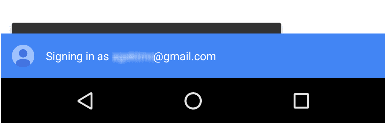
一个重要提示:如果您成功获取了凭据对象,但未能对用户进行身份验证,则应显示一条出错提示:
        }).catch(error => {
          showError('Sign-in Failed');
        });
      }
    }
完整代码示例
if (window.PasswordCredential || window.FederatedCredential) {
  if (!user.isSignedIn()) {
    navigator.credentials
      .get({
        password: true,
        federated: {
          providers: ['https://accounts.google.com'],
        },
        mediation: 'silent',
      })
      .then((c) => {
        if (c) {
          switch (c.type) {
            case 'password':
              return sendRequest(c);
              break;
            case 'federated':
              return gSignIn(c);
              break;
          }
        } else {
          return Promise.resolve();
        }
      })
      .then((profile) => {
        if (profile) {
          updateUI(profile);
        }
      })
      .catch((error) => {
        showError('Sign-in Failed');
      });
  }
}
通过账号选择器登录
如果用户需要中介或拥有多个账号,请使用账号选择器让用户登录,跳过普通登录表单,例如:
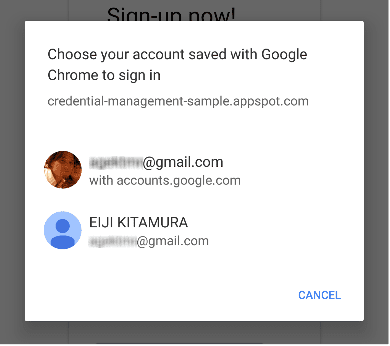
通过账号选择器登录的步骤与自动登录相同,只是在获取凭据信息时需要额外调用一次以显示账号选择器:
- 获取凭据信息并显示账号选择器。
- 对用户进行身份验证。
- 更新界面或前往个性化页面。
获取凭证信息并显示账号选择器
在响应定义的用户操作(例如,用户点按“登录”按钮)时显示账号选择器。调用 navigator.credentials.get(),并添加 mediation: 'optional' 或 mediation: 'required' 以显示账号选择器。
当 mediation 为 required 时,系统始终会向用户显示账号选择器以供登录。此选项可让拥有多个账号的用户轻松切换账号。
当 mediation 为 optional 时,系统会在 navigator.credentials.preventSilentAccess() 调用后明确向用户显示账号选择器,以便用户登录。这通常是为了确保在用户选择退出账号或取消注册后不会自动登录。
显示 mediation: 'optional' 的示例:
    var signin = document.querySelector('#signin');
    signin.addEventListener('click', e => {
     if (window.PasswordCredential || window.FederatedCredential) {
       navigator.credentials.get({
         password: true,
         federated: {
           providers: [
             'https://accounts.google.com'
           ]
         },
         mediation: 'optional'
       }).then(c => {
用户选择账号后,Promise 会使用凭据进行解析。
如果用户取消账号选择器,或者没有存储任何凭据,则 promise 会解析为 null。
在这种情况下,请回退到登录表单体验。
别忘了回退到登录表单
如果出现以下任一情况,您应回退到登录表单:
- 系统不会存储任何凭证。
- 用户关闭了账号选择器,未选择任何账号。
- 此 API 不可用。
    }).then(profile => {
        if (profile) {
          updateUI(profile);
        } else {
          location.href = '/signin';
        }
    }).catch(error => {
        location.href = '/signin';
    });
完整代码示例
var signin = document.querySelector('#signin');
signin.addEventListener('click', (e) => {
  if (window.PasswordCredential || window.FederatedCredential) {
    navigator.credentials
      .get({
        password: true,
        federated: {
          providers: ['https://accounts.google.com'],
        },
        mediation: 'optional',
      })
      .then((c) => {
        if (c) {
          switch (c.type) {
            case 'password':
              return sendRequest(c);
              break;
            case 'federated':
              return gSignIn(c);
              break;
          }
        } else {
          return Promise.resolve();
        }
      })
      .then((profile) => {
        if (profile) {
          updateUI(profile);
        } else {
          location.href = '/signin';
        }
      })
      .catch((error) => {
        location.href = '/signin';
      });
  }
});
联合登录
联合登录让用户只需点按一下即可登录,而无需记住您网站的其他登录详细信息。
如需实现联合登录,请执行以下操作:
- 使用第三方身份验证用户。
- 存储身份信息。
- 更新界面或进入个性化页面(与自动登录相同)。
使用第三方身份验证用户
当用户点按联合登录按钮时,使用 FederatedCredential 运行特定的身份提供方身份验证流程。
例如,如果提供方是 Google,请使用 Google 登录 JavaScript 库:
navigator.credentials
  .get({
    password: true,
    mediation: 'optional',
    federated: {
      providers: ['https://account.google.com'],
    },
  })
  .then(function (cred) {
    if (cred) {
      // Instantiate an auth object
      var auth2 = gapi.auth2.getAuthInstance();

      // Is this user already signed in?
      if (auth2.isSignedIn.get()) {
        var googleUser = auth2.currentUser.get();

        // Same user as in the credential object?
        if (googleUser.getBasicProfile().getEmail() === cred.id) {
          // Continue with the signed-in user.
          return Promise.resolve(googleUser);
        }
      }

      // Otherwise, run a new authentication flow.
      return auth2.signIn({
        login_hint: id || '',
      });
    }
  });
Google 登录会生成一个 ID 令牌作为身份验证证明。
一般来说,联合登录是基于 OpenID Connect 或 OAuth 等标准协议构建的。如需了解如何使用联合账号进行身份验证,请参阅相应联合身份提供方的文档。热门示例包括:
存储身份信息
身份验证完成后,您可以存储身份信息。
您将在此处存储的信息是来自身份提供方的 id 以及表示身份提供方的提供方字符串(name 和 iconURL 是可选的)。如需详细了解此信息,请参阅凭证管理规范。
如需存储联合账号详细信息,请使用用户标识符和提供商标识符实例化一个新的 FederatedCredential 对象。然后调用 navigator.credentials.store() 来存储身份信息。
成功联合后,同步或异步实例化 FederatedCredential:
同步方法示例:
// Create credential object synchronously.
var cred = new FederatedCredential({
  id: id, // id in IdP
  provider: 'https://account.google.com', // A string representing IdP
  name: name, // name in IdP
  iconURL: iconUrl, // Profile image url
});
异步方法示例:
// Create credential object asynchronously.
var cred = await navigator.credentials.create({
  federated: {
    id: id,
    provider: 'https://accounts.google.com',
    name: name,
    iconURL: iconUrl,
  },
});
然后存储凭证对象:
// Store it
navigator.credentials.store(cred).then(function () {
  // continuation
});
退出账号
在用户点按退出登录按钮时,让用户退出登录。 请先终止会话,然后为日后的访问关闭自动登录功能。 (如何终止会话完全由您决定。)
为日后的访问关闭自动登录功能
致电navigator.credentials.preventSilentAccess():
signoutUser();
if (navigator.credentials && navigator.credentials.preventSilentAccess) {
  navigator.credentials.preventSilentAccess();
}
这样可以确保在用户下次启用自动登录之前,系统不会自动登录。 如需恢复自动登录,用户可以选择从账号选择器中选择要登录的账号,从而有意登录。然后,用户会始终保持登录状态,直到他们明确退出账号。