A key aspects of Progressive Web Apps is that they're reliable; they can load assets quickly, keeping users engaged and providing feedback immediately, even under poor network conditions. How is that possible? Thanks to the service worker `fetch` event.
## The fetch event
Browser Support
- ' d='M96 183a64 64 0 0 1-23-23L17 64a128 128 0 0 0 111 192l55-96a64 64 0 0 1-87 23Z'/%3E%3Cpath fill='url(%23b)' d='M192 128a64 64 0 0 1-9 32l-55 96A128 128 0 0 0 239 64H128a64 64 0 0 1 64 64Z'/%3E%3Ccircle cx='128' cy='128' r='52' fill='%231a73e8'/%3E%3Cpath fill='url(%23c)' d='M96 73a64 64 0 0 1 32-9h111a128 128 0 0 0-222 0l56 96a64 64 0 0 1 23-87Z'/%3E%3C/svg%3E)
- ' xlink:href='%23A'%3E%3Cstop offset='.76' stop-opacity='0'/%3E%3Cstop offset='.95' stop-opacity='.5'/%3E%3Cstop offset='1'/%3E%3C/radialGradient%3E%3CradialGradient id='F' cx='2523' cy='4680' r='20243' gradientTransform='matrix(-.03715 .99931 -2.12836 -.07913 13579 3530)' xlink:href='%23A'%3E%3Cstop offset='0' stop-color='%2335c1f1'/%3E%3Cstop offset='.11' stop-color='%2334c1ed'/%3E%3Cstop offset='.23' stop-color='%232fc2df'/%3E%3Cstop offset='.31' stop-color='%232bc3d2'/%3E%3Cstop offset='.67' stop-color='%2336c752'/%3E%3C/radialGradient%3E%3CradialGradient id='G' cx='24247' cy='7758' r='9734' gradientTransform='matrix(.28109 .95968 -.78353 .22949 24510 -16292)' xlink:href='%23A'%3E%3Cstop offset='0' stop-color='%2366eb6e'/%3E%3Cstop offset='1' stop-color='%2366eb6e' stop-opacity='0'/%3E%3C/radialGradient%3E%3Cpath id='H' d='M24105 20053a9345 9345 0 01-1053 472 10202 10202 0 01-3590 646c-4732 0-8855-3255-8855-7432 0-1175 680-2193 1643-2729-4280 180-5380 4640-5380 7253 0 7387 6810 8137 8276 8137 791 0 1984-230 2704-456l130-44a12834 12834 0 006660-5282c220-350-168-757-535-565z'/%3E%3Cpath id='I' d='M11571 25141a7913 7913 0 01-2273-2137 8145 8145 0 01-1514-4740 8093 8093 0 013093-6395 8082 8082 0 011373-859c312-148 846-414 1554-404a3236 3236 0 012569 1297 3184 3184 0 01636 1866c0-21 2446-7960-8005-7960-4390 0-8004 4166-8004 7820 0 2319 538 4170 1212 5604a12833 12833 0 007684 6757 12795 12795 0 003908 610c1414 0 2774-233 4045-656a7575 7575 0 01-6278-803z'/%3E%3Cpath id='J' d='M16231 15886c-80 105-330 250-330 566 0 260 170 512 472 723 1438 1003 4149 868 4156 868a5954 5954 0 003027-839 6147 6147 0 001133-850 6180 6180 0 001910-4437c26-2242-796-3732-1133-4392-2120-4141-6694-6525-11668-6525-7011 0-12703 5635-12798 12620 47-3654 3679-6605 7996-6605 350 0 2346 34 4200 1007 1634 858 2490 1894 3086 2921 618 1067 728 2415 728 2952s-271 1333-780 1990z'/%3E%3Cuse fill='url(%23B)' xlink:href='%23H'/%3E%3Cuse fill='url(%23D)' opacity='.35' xlink:href='%23H'/%3E%3Cuse fill='url(%23C)' xlink:href='%23I'/%3E%3Cuse fill='url(%23E)' opacity='.4' xlink:href='%23I'/%3E%3Cuse fill='url(%23F)' xlink:href='%23J'/%3E%3Cuse fill='url(%23G)' xlink:href='%23J'/%3E%3C/svg%3E)
- ' gradientUnits='userSpaceOnUse'%3E%3Cstop offset='.2' stop-color='%239059ff' stop-opacity='0'/%3E%3Cstop offset='.3' stop-color='%238c4ff3' stop-opacity='.1'/%3E%3Cstop offset='.8' stop-color='%237716a8' stop-opacity='.5'/%3E%3Cstop offset='1' stop-color='%236e008b' stop-opacity='.6'/%3E%3C/radialGradient%3E%3CradialGradient id='ff-g' cx='239.1' cy='34.6' r='171.6' gradientUnits='userSpaceOnUse'%3E%3Cstop offset='0' stop-color='%23ffe226'/%3E%3Cstop offset='.1' stop-color='%23ffdb27'/%3E%3Cstop offset='.3' stop-color='%23ffc82a'/%3E%3Cstop offset='.5' stop-color='%23ffa930'/%3E%3Cstop offset='.7' stop-color='%23ff7e37'/%3E%3Cstop offset='.8' stop-color='%23ff7139'/%3E%3C/radialGradient%3E%3CradialGradient id='ff-h' cx='374' cy='-74.3' r='732.2' gradientUnits='userSpaceOnUse'%3E%3Cstop offset='.1' stop-color='%23fff44f'/%3E%3Cstop offset='.5' stop-color='%23ff980e'/%3E%3Cstop offset='.6' stop-color='%23ff5634'/%3E%3Cstop offset='.7' stop-color='%23ff3647'/%3E%3Cstop offset='.9' stop-color='%23e31587'/%3E%3C/radialGradient%3E%3CradialGradient id='ff-i' cx='304.6' cy='7.1' r='536.4' gradientTransform='rotate(84 303 4)' gradientUnits='userSpaceOnUse'%3E%3Cstop offset='0' stop-color='%23fff44f'/%3E%3Cstop offset='.1' stop-color='%23ffe847'/%3E%3Cstop offset='.2' stop-color='%23ffc830'/%3E%3Cstop offset='.3' stop-color='%23ff980e'/%3E%3Cstop offset='.4' stop-color='%23ff8b16'/%3E%3Cstop offset='.5' stop-color='%23ff672a'/%3E%3Cstop offset='.6' stop-color='%23ff3647'/%3E%3Cstop offset='.7' stop-color='%23e31587'/%3E%3C/radialGradient%3E%3CradialGradient id='ff-j' cx='235' cy='98.1' r='457.1' gradientUnits='userSpaceOnUse'%3E%3Cstop offset='.1' stop-color='%23fff44f'/%3E%3Cstop offset='.5' stop-color='%23ff980e'/%3E%3Cstop offset='.6' stop-color='%23ff5634'/%3E%3Cstop offset='.7' stop-color='%23ff3647'/%3E%3Cstop offset='.9' stop-color='%23e31587'/%3E%3C/radialGradient%3E%3CradialGradient id='ff-k' cx='355.7' cy='124.9' r='500.3' gradientUnits='userSpaceOnUse'%3E%3Cstop offset='.1' stop-color='%23fff44f'/%3E%3Cstop offset='.2' stop-color='%23ffe141'/%3E%3Cstop offset='.5' stop-color='%23ffaf1e'/%3E%3Cstop offset='.6' stop-color='%23ff980e'/%3E%3C/radialGradient%3E%3ClinearGradient id='ff-a' x1='446.9' y1='76.8' x2='47.9' y2='461.8' gradientUnits='userSpaceOnUse'%3E%3Cstop offset='.1' stop-color='%23fff44f'/%3E%3Cstop offset='.1' stop-color='%23ffe847'/%3E%3Cstop offset='.2' stop-color='%23ffc830'/%3E%3Cstop offset='.4' stop-color='%23ff980e'/%3E%3Cstop offset='.4' stop-color='%23ff8b16'/%3E%3Cstop offset='.5' stop-color='%23ff672a'/%3E%3Cstop offset='.5' stop-color='%23ff3647'/%3E%3Cstop offset='.7' stop-color='%23e31587'/%3E%3C/linearGradient%3E%3ClinearGradient id='ff-l' x1='442.1' y1='74.8' x2='102.6' y2='414.3' gradientUnits='userSpaceOnUse'%3E%3Cstop offset='.2' stop-color='%23fff44f' stop-opacity='.8'/%3E%3Cstop offset='.3' stop-color='%23fff44f' stop-opacity='.6'/%3E%3Cstop offset='.5' stop-color='%23fff44f' stop-opacity='.2'/%3E%3Cstop offset='.6' stop-color='%23fff44f' stop-opacity='0'/%3E%3C/linearGradient%3E%3C/defs%3E%3Cpath d='M479 166c-11-25-32-52-49-60a249 249 0 0 1 25 73c-27-68-73-95-111-155a255 255 0 0 1-8-14 44 44 0 0 1-4-9 1 1 0 0 0 0-1 1 1 0 0 0-1 0c-60 35-81 101-83 134a120 120 0 0 0-66 25 71 71 0 0 0-6-5 111 111 0 0 1-1-58c-25 11-44 29-58 44-9-12-9-52-8-60l-8 4a175 175 0 0 0-24 21 210 210 0 0 0-22 26 203 203 0 0 0-32 73l-1 2-2 15a229 229 0 0 0-4 34v1a240 240 0 0 0 477 40l1-9c5-41 0-84-15-121zM202 355l3 1-3-1zm55-145zm198-31z' fill='url(%23ff-a)'/%3E%3Cpath d='M479 166c-11-25-32-52-49-60 14 26 22 53 25 72v1a207 207 0 0 1-206 279c-113-3-212-87-231-197-3-17 0-26 2-40-2 11-3 14-4 34v1a240 240 0 0 0 477 40l1-9c5-41 0-84-15-121z' fill='url(%23ff-b)'/%3E%3Cpath d='M479 166c-11-25-32-52-49-60 14 26 22 53 25 72v1a207 207 0 0 1-206 279c-113-3-212-87-231-197-3-17 0-26 2-40-2 11-3 14-4 34v1a240 240 0 0 0 477 40l1-9c5-41 0-84-15-121z' fill='url(%23ff-c)'/%3E%3Cpath d='m362 195 1 1a130 130 0 0 0-22-29C266 92 322 5 331 0c-60 35-81 101-83 134l9-1c45 0 84 25 105 62z' fill='url(%23ff-d)'/%3E%3Cpath d='M257 210c-1 6-22 26-29 26-68 0-80 41-80 41 3 35 28 64 57 79l4 2 7 3a107 107 0 0 0 31 6c120 6 143-143 57-186 22-4 45 5 58 14-21-37-60-62-105-62l-9 1a120 120 0 0 0-66 25l17 16c16 16 58 33 58 35z' fill='url(%23ff-e)'/%3E%3Cpath d='M257 210c-1 6-22 26-29 26-68 0-80 41-80 41 3 35 28 64 57 79l4 2 7 3a107 107 0 0 0 31 6c120 6 143-143 57-186 22-4 45 5 58 14-21-37-60-62-105-62l-9 1a120 120 0 0 0-66 25l17 16c16 16 58 33 58 35z' fill='url(%23ff-f)'/%3E%3Cpath d='m171 151 5 3a111 111 0 0 1-1-58c-25 11-44 29-58 44 1 0 36 0 54 11z' fill='url(%23ff-g)'/%3E%3Cpath d='M18 261a242 242 0 0 0 231 197 207 207 0 0 0 206-279c8 56-20 110-64 146-86 71-169 43-186 31l-3-1c-50-24-71-70-67-110-42 0-57-35-57-35s38-28 89-4c46 22 90 4 90 4 0-2-42-19-58-35l-17-16a71 71 0 0 0-6-5l-5-3c-18-11-52-11-54-11-9-12-9-51-8-60l-8 4a175 175 0 0 0-24 21 210 210 0 0 0-22 26 203 203 0 0 0-32 73c0 1-9 38-5 57z' fill='url(%23ff-h)'/%3E%3Cpath d='M341 167a130 130 0 0 1 22 29 46 46 0 0 1 4 3c55 50 26 121 24 126 44-36 72-90 64-146-27-68-73-95-111-155a255 255 0 0 1-8-14 44 44 0 0 1-4-9 1 1 0 0 0 0-1 1 1 0 0 0-1 0c-9 5-65 92 10 167z' fill='url(%23ff-i)'/%3E%3Cpath d='M367 199a46 46 0 0 0-4-3l-1-1c-13-9-36-18-58-15 86 44 63 193-57 187a107 107 0 0 1-31-6 131 131 0 0 1-11-5c17 12 99 39 186-31 2-5 31-76-24-126z' fill='url(%23ff-j)'/%3E%3Cpath d='M148 277s12-41 80-41c7 0 28-20 29-26s-44 18-90-4c-51-24-89 4-89 4s15 35 57 35c-4 40 16 85 67 110l3 1c-29-15-54-44-57-79z' fill='url(%23ff-k)'/%3E%3Cpath d='M479 166c-11-25-32-52-49-60a249 249 0 0 1 25 73c-27-68-73-95-111-155a255 255 0 0 1-8-14 44 44 0 0 1-4-9 1 1 0 0 0 0-1 1 1 0 0 0-1 0c-60 35-81 101-83 134l9-1c45 0 84 25 105 62-13-9-36-18-58-14 86 43 63 192-57 186a107 107 0 0 1-31-6 131 131 0 0 1-11-5l-3-1 3 1c-29-15-54-44-57-79 0 0 12-41 80-41 7 0 28-20 29-26 0-2-42-19-58-35l-17-16a71 71 0 0 0-6-5 111 111 0 0 1-1-58c-25 11-44 29-58 44-9-12-9-52-8-60l-8 4a175 175 0 0 0-24 21 210 210 0 0 0-22 26 203 203 0 0 0-32 73l-1 2-2 15a279 279 0 0 0-4 34v1a240 240 0 0 0 477 40l1-9c5-41 0-84-15-121zm-24 13z' fill='url(%23ff-l)'/%3E%3C/svg%3E)
- ' xlink:href='%23s-b'%3E%3Cstop offset='0' stop-color='%2324a5f3' stop-opacity='0' /%3E%3Cstop offset='1' stop-color='%231e8ceb' /%3E%3C/radialGradient%3E%3CradialGradient id='s-j' cx='109.3' cy='13.8' r='93.1' gradientTransform='matrix(-.02 1.1 -1.04 -.02 137 -115)' xlink:href='%23s-b'%3E%3Cstop offset='0' stop-opacity='0' /%3E%3Cstop offset='1' stop-color='%235488d6' stop-opacity='0' /%3E%3Cstop offset='1' stop-color='%235d96eb' /%3E%3C/radialGradient%3E%3C/defs%3E%3Crect width='220' height='220' x='22' y='-107' fill='url(%23s-a)' ry='49' transform='matrix(.57 0 0 .57 187 256)' /%3E%3Cg transform='translate(194 190)'%3E%3Ccircle cx='67.8' cy='67.7' fill='url(%23s-c)' paint-order='stroke fill markers' r='54' /%3E%3Ccircle cx='-69.9' cy='69.3' fill='url(%23s-i)' transform='translate(138 -2)' r='54' /%3E%3C/g%3E%3Cellipse cx='120' cy='14.2' fill='url(%23s-j)' rx='93.1' ry='93.7' transform='matrix(.58 0 0 .58 192 250)' /%3E%3Cg transform='matrix(.58 0 0 .57 197 182)'%3E%3Cpath fill='%23cac7c8' d='M46 192h1l72-48-7-9-66 57Z' /%3E%3Cpath fill='%23fbfffc' d='M46 191v1l66-57-7-9-59 65Z' /%3E%3Cpath fill='url(%23s-d)' d='m119 144-7-9 66-57-59 66Z' /%3E%3Cpath fill='%23fb645c' d='m105 126 7 9 66-57-1-1-72 49Z' /%3E%3C/g%3E%3Cpath stroke='%23fff' stroke-linecap='round' stroke-miterlimit='1' stroke-width='1.3' d='m287 278 3-2m-12-17 8-2m-8-3h4m-4-13 8 2m-8 3h4m-1-13 7 3m-4-11 7 4m-2-11 6 6m0-12 6 7m1-11 4 6m4-10 3 7m5-9 2 7m15-7-1 7m10-5-3 7m11-4-4 7m11-2-5 6m16 7-7 4m10 4-7 3m10 6-8 1m8 16-8-2m5 10-7-3m4 11-7-4m2 11-6-5m0 11-5-6m-2 11-4-7m-4 11-3-8m-6 10-1-8m-16 8 2-8m-10 5 3-7m-11 4 4-7m-11 2 5-6m-8 3 3-3m4 8 2-3m5 8 2-4m6 7 1-4m8 5v-4m8 4v-4m9 3-1-4m9 1-2-4m9 0-2-4m9-2-3-3m8-4-3-2m8-5-4-2m7-6-4-1m5-8h-4m4-8h-4m3-9-4 1m1-9-4 2m-1-9-3 2m-2-9-3 3m-4-8-2 3m-5-8-2 4m-6-6-1 3m-8-5v4m-8-4v4m-9-2 1 3m-9 0 2 3m-9 1 2 3m-9 2 3 3m-8 4 3 2m-8 5 4 2m-7 6 4 1m-4 25 4-1m-2 5 7-3m-6 7 4-2m-2 6 7-4m-13-21h8m41-41v-8m0 99v-8m49-42h-8' transform='translate(-65 8)' /%3E%3C/svg%3E)
[Source](https://developer.mozilla.org/docs/Web/API/FetchEvent)
The [`fetch`](https://developer.mozilla.org/docs/Web/API/FetchEvent) event lets us intercept every network request made by the PWA in the service worker's scope, for both same-origin and cross-origin requests. In addition to navigation and asset requests, fetching from an installed service worker allows page visits after a site's first load to be rendered without network calls.
The `fetch` handler receives all requests from an app, including URLs and HTTP headers, and lets the app developer decide how to process them.
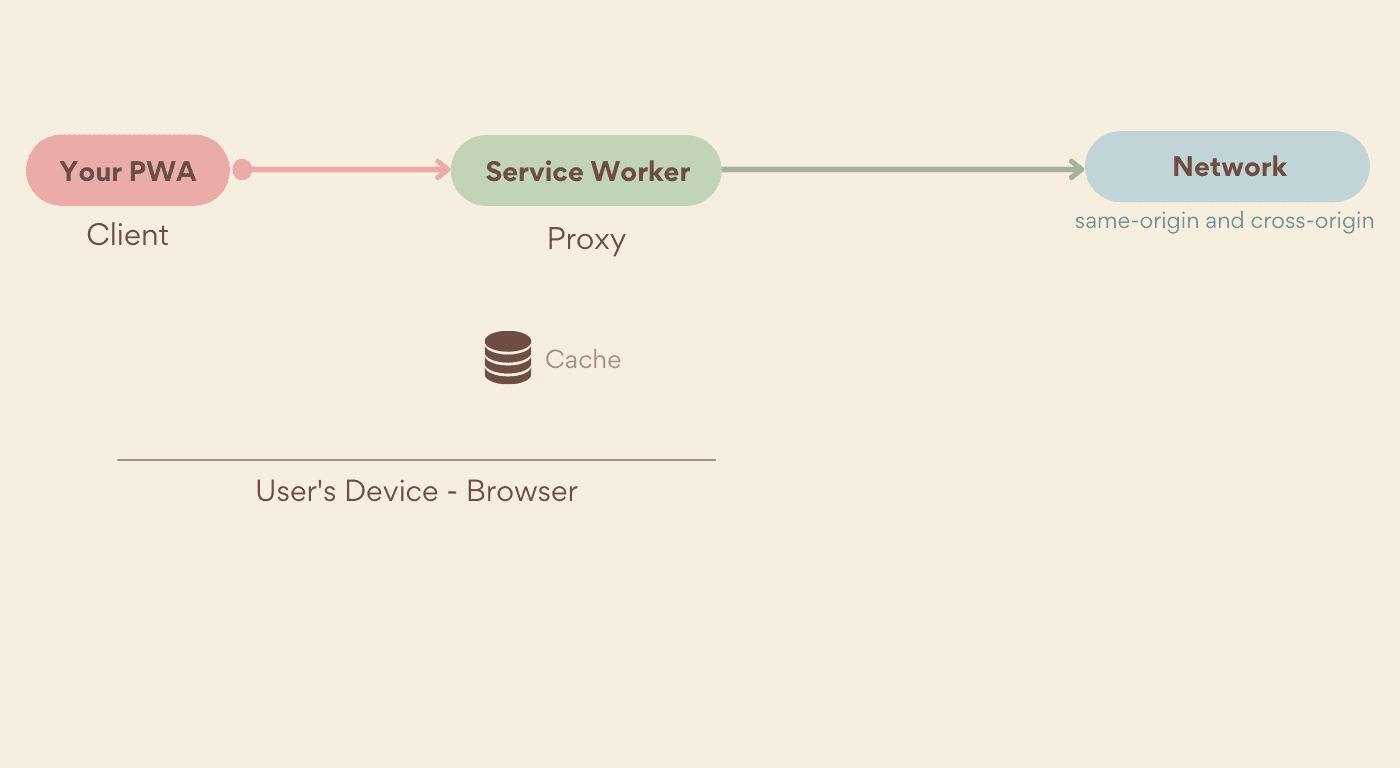
Your service worker can forward a request to the network, respond with a previously cached response, or create a new response. The choice is yours.
Here's a simple example:
```javascript
self.addEventListener("fetch", event => {
console.log(`URL requested: ${event.request.url}`);
});
```
> [!CAUTION]
> **Caution:** While you can have more than one fetch event handler per service worker, only one can respond per request. For example, you can have different handlers that will act on different URL patterns. They are executed in the order they were registered until one of them calls `respondWith()`.
## Responding to a request
When a request comes into your service worker, there are two things you can do; you can ignore it, which lets it go to the network, or you can respond to it. Responding to requests from within your service worker is how you're able to choose what, and how it gets returned to your PWA, even when the user is offline.
To respond to an incoming request, call `event.respondWith()` from within a `fetch` event handler, like this:
// fetch event handler in your service worker file
self.addEventListener("fetch", event => {
const response = .... // a response or a Promise of response
event.respondWith(response);
});
You must call `respondWith()` synchronously and you must return a [Response](https://developer.mozilla.org/docs/Web/API/Response) object. But you can't call `respondWith()` after the fetch event handler has finished, like within an async call. If you need to wait for the complete response, you can pass a Promise to `respondWith()` that resolves with a Response.
### Creating responses
Thanks to the [Fetch API](https://developer.mozilla.org/docs/Web/API/Fetch_API), you can create HTTP responses in your JavaScript code, and those responses can be cached using the Cache Storage API and returned as if they were coming from a web server.
To create a response, create a new `Response` object, setting its body and options such as status and headers:
```javascript
const simpleResponse = new Response("Body of the HTTP response");
const options = {
status: 200,
headers: {
'Content-type': 'text/html'
}
};
const htmlResponse = new Response("HTML content", options)
```
> [!WARNING]
> **Warning:** Be extra careful when creating responses with a service worker buggy code can lead to corner cases and hard to debug issues, such as the browser being unable to load the HTML document that renders your PWA. While debugging, you can always use your browser's reload button with the Shift key pressed, which will bypass the service worker; or use service worker devtools on supported browsers as we'll see in [Tools and Debug](https://web.dev/learn/pwa/tools-and-debug.md.txt).
### Responding from the cache
Now that you know how to serve HTTP responses from a service worker,
it's time to use the [Caching Storage interface](https://web.dev/learn/pwa/caching.md.txt) to store assets on the device.
You can use the cache storage API to check if the request received from the PWA is available in the cache, and if it is, respond to `respondWith()` with it.
To do that, you first need to search within the cache. The `match()` function, available at the top-level `caches` interface searches all stores in your origin, or on a single open cache object.
The `match()` function receives an HTTP request or a URL as an argument and it returns a promise that resolves with the Response associated with the corresponding key.
```javascript
// Global search on all caches in the current origin
caches.match(urlOrRequest).then(response => {
console.log(response ? response : "It's not in the cache");
});
// Cache-specific search
caches.open("pwa-assets").then(cache => {
cache.match(urlOrRequest).then(response => {
console.log(response ? response : "It's not in the cache");
});
});
```
> [!TIP]
> When using `match()` with `respondWith()`, the match promise will resolve either with the found item or with nothing. It will only reject if there was a problem that prevented the search operation from completing. To throw an error if no results are found, you'll need to inspect the results before returning a response to `respondWith()`.
## Caching strategies
Serving files only from the browser cache doesn't fit every use case. For example the user or the browser can evict the cache. That's why you should define your own strategies for delivering assets for your PWA.
You're not restricted to one caching strategy. You can define different ones for different URL patterns. For example, you can have one strategy for the minimum UI assets, another for API calls, and a third for image and data URLs.
To do this, read `event.request.url` in `ServiceWorkerGlobalScope.onfetch` and parse it through regular expressions or a [URL Pattern](https://web.dev/urlpattern). (At the time of writing, URL Pattern is not supported on all platforms).
The most common strategies are:
Cache First
: Searches for a cached response first and falls back to the network if one isn't found.
Network First
: Requests a response from the network first and if none is returned, checks for response in the cache.
Stale While Revalidate
: Serves a response from the cache, while in the background requests the latest version and saves it to the cache for the next time the asset is requested.
Network-Only
: Always replies with a response from the network or errors out. The cache is never consulted.
Cache-Only
: Always replies with a response from the cache or errors out. The network will never be consulted. The assets that will be served using this strategy must be added to the cache before they are requested.
### Cache first
Using this strategy, the service worker looks for the matching request in the cache and returns the corresponding Response if it's cached. Otherwise it retrieves the response from the network (optionally, updating the cache for future calls). If there is neither a cache response nor a network response, the request will error. Since serving assets without going to the network tends to be faster, this strategy prioritizes performance over freshness.
> [!NOTE]
> **Note:** Remember the cache storage interface won't return a Response object. The reference will be `undefined`, if the request is not cached.

```javascript
self.addEventListener("fetch", event => {
event.respondWith(
caches.match(event.request)
.then(cachedResponse => {
// It can update the cache to serve updated content on the next request
return cachedResponse || fetch(event.request);
}
)
)
});
```
### Network first
This strategy is the mirror of the Cache First strategy; it checks if the request can be fulfilled from the network and, if it can't, tries to retrieve it from the cache. Like cache first. If there is neither a network response nor a cache response, the request will error. Getting the response from the network is usually slower than getting it from the cache, this strategy prioritizes updated content instead of performance.

```javascript
self.addEventListener("fetch", event => {
event.respondWith(
fetch(event.request)
.catch(error => {
return caches.match(event.request) ;
})
);
});
```
### Stale while revalidate
The stale while revalidate strategy returns a cached response immediately, then checks the network for an update, replacing the cached response if one is found. This strategy always makes a network request, because even if a cached resource is found, it will try to update what was in the cache with what was received from the network, to use the updated version in the next request. This strategy, therefore, provides a way for you to benefit from the quick serving of the cache first strategy and update the cache in the background.
> [!NOTE]
> **Note:** With this strategy, the assets are updated in the background. This means your users won't get the new version of the assets until the next time that path is requested. At that time the strategy will again check if a new version exists and the cycle repeats.

```javascript
self.addEventListener('fetch', event => {
event.respondWith(
caches.match(event.request).then(cachedResponse => {
const networkFetch = fetch(event.request).then(response => {
// update the cache with a clone of the network response
const responseClone = response.clone()
caches.open(url.searchParams.get('name')).then(cache => {
cache.put(event.request, responseClone)
})
return response
}).catch(function (reason) {
console.error('ServiceWorker fetch failed: ', reason)
})
// prioritize cached response over network
return cachedResponse || networkFetch
}
)
)
})
```
> [!CAUTION]
> **Caution:** The Response's body is a [ReadableStream](https://developer.mozilla.org/docs/Web/API/ReadableStream) that can only be consumed once. That means that if you call `fetch()` to deliver the response to the PWA because the asset was not cached, you cannot reuse the same response for updating it in the cache. You need to call `Response.clone()` to use it twice.
### Network only
The network only strategy is similar to how browsers behave without a service worker or the Cache Storage API. Requests will only return a resource if it can be fetched from the network. This is often useful for resources like online-only API requests.

### Cache only
The cache only strategy ensures that requests never go to the network; all incoming requests are responded to with a pre-populated cache item. The following code uses the `fetch` event handler with the `match` method of the cache storage to respond cache only:
```javascript
self.addEventListener("fetch", event => {
event.respondWith(caches.match(event.request));
});
```
> [!NOTE]
> **Note:** With the cache only strategy you cache your assets before you need them, usually in the service worker's `install` event handler. Because this strategy never goes to the network, these assets will get updated only when you update your service worker and a new `install` event is fired.

### Custom strategies
While the above are common caching strategies, you are in charge of your service worker and how requests are handled. If none of these work for your needs, create your own.
You can, for example, use a network first strategy with a timeout to prioritize updated content, but only if the response appears within a threshold you set. You can also merge a cached response with a network response and build a complex response from the service worker.
## Updating assets
Keeping your PWA's cached assets up-to-date can be a challenge. While the stale while revalidate strategy is one way to do so, it's not the only one. In the [Update chapter](https://web.dev/learn/pwa/update.md.txt) you will learn different techniques to keep your app's content and assets updated.
## Resources
- [Fetch event on MDN](https://developer.mozilla.org/docs/Web/API/FetchEvent)
- [The Offline Cookbook](https://web.dev/articles/offline-cookbook.md.txt)
- [Cache Match on MDN](https://developer.mozilla.org/docs/Web/API/Cache/match)