##### [The CSS Podcast - 006: Color Part One](https://thecsspodcast.libsyn.com/006-color-part-1-usage)
Color is an important part of any website and in CSS there are many options for
specifying and manipulating colors.
How do you decide which color type to use?
How do you make your colors semi-transparent?
In this lesson,
you're going to learn which options you have to help you make the right decisions for your project and team.
CSS has [various different data types](https://developer.mozilla.org/docs/Web/CSS/CSS_Types),
such as strings and numbers.
Color is one of these types and uses other types,
such as numbers for its own definitions.
## Choosing colors
### Named colors
The simplest way for you to choose a color is by picking one of the
[148 named colors in CSS](https://developer.mozilla.org/docs/Web/CSS/named-color).
These are plain English names such as `purple`, `tomato`, and `goldenrod`. Some
of the most popular names, according to the
[Web Almanac](https://almanac.httparchive.org/en/2019/css), are `black`,
`white`, `red`, `blue`, and `gray`. Our favorites include `goldenrod`,
`aliceblue`, and `hotpink`.
### Numeric colors
While named colors can be convenient, you will likely need to use specific
colors that aren't available in that set. You can specify colors with numerical
values in a few different forms.
#### Hex colors
```css
h1 {
color: #b71540;
}
```
Hexadecimal notation (often shortened to hex) is a shorthand syntax for RGB,
which assigns a numeric value to red green and blue,
which are the three **primary colors**.
> [!NOTE]
> **Note:** According to the 2022 Web Almanac, [hex is the most popular color syntax type](https://almanac.httparchive.org/en/2022/css#colors).
The hexadecimal ranges are **0-9** and **A-F**.
When used in a six digit sequence,
they are translated to the RGB numerical ranges which are 0-255
which correspond to the red, green, and blue color channels respectively.
You can also define an alpha value with any numerical colors.
An alpha value is a percentage of transparency.
In hex code, you add another two digits to the six digit sequence,
making an eight digit sequence.
For example, to set black in hex code, write `#000000`.
To add a 50% transparency, change it to `#00000080`.
Because the hex scale is **0-9** and **A-F** , the transparency values are probably not quite what you'd expect them to be.
Here are some key, common values added to the black hex code, `#000000`:
- 0% alpha---which is fully transparent---is **00** : `#00000000`
- 50% alpha is **80** : `#00000080`
- 75% alpha is **BF** : `#000000BF`
To convert a two digit hex to a decimal,
take the first digit and multiply it by 16 (because hex is base 16),
then add the second digit. Using **BF** as an example for 75% alpha:
1. B is equal to 11, which when multiplied by 16 equals 176
2. F is equal to 15
3. 176 + 15 = 191
4. The alpha value is 191---75% of 255
> [!NOTE]
> **Note:** You can also write hex codes in a three digit shorthand. A three digit hex code is a shortcut to an equivalent six digit sequence. For example, `#a4e` is identical to `#aa44ee`. To add alpha, then `#a4e8` would expand to `#aa44ee88`.
#### RGB (Red, Green, Blue)
```css
h1 {
color: rgb(183 21 64);
}
```
RGB colors are defined with the
[`rgb()`](https://developer.mozilla.org/docs/Web/CSS/color_value/rgb) color function,
using either numbers or percentages as parameters.
The numbers need to be within the **0-255** range and the percentages are between **0% and 100%**.
RGB works on the 0-255 scale,
so 255 would be equivalent to 100%, and 0 to 0%.
To set black in RGB, define it as `rgb(0 0 0)`,
which is zero red, zero green and zero blue.
Black can also be defined as `rgb(0% 0% 0%)`.
White is the exact opposite: `rgb(255 255 255)` or `rgb(100% 100% 100%)`.
An alpha is set in `rgb()` in one of two ways.
Either add a `/` **after** the red, green and blue parameters,
or use the [`rgba()`](https://web.dev/%3Chttps://developer.mozilla.org/docs/Web/CSS/color_value/rgba()%3E) function.
The alpha can be defined with a percentage or a decimal between 0 and 1.
For example, to set a 50% alpha black in modern browsers, write: `rgb(0 0 0 / 50%)` or `rgb(0 0 0 / 0.5)`.
> [!NOTE]
> **Note:** You may also use commas instead of spaces to separate the channels in `rgb()` and `hsl()` notation. The commas used to be required for these functions, but that requirement has been removed for consistency with other color functions and with CSS in general.
#### HSL (Hue, Saturation, Lightness)
```css
h1 {
color: hsl(344 79% 40%);
}
```
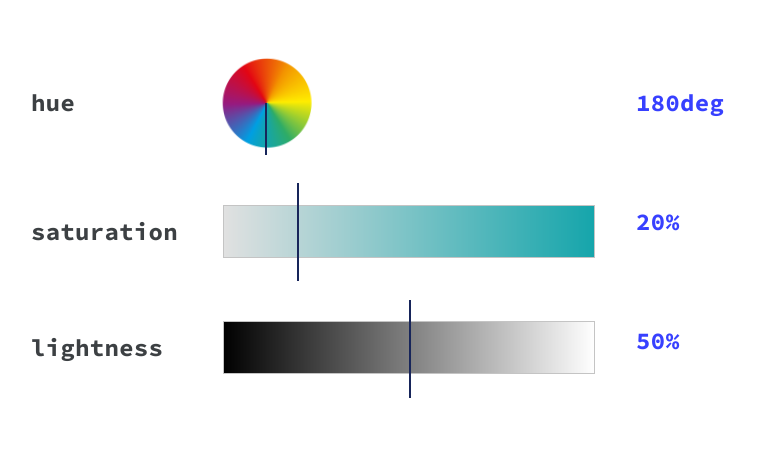
HSL stands for hue, saturation and lightness.
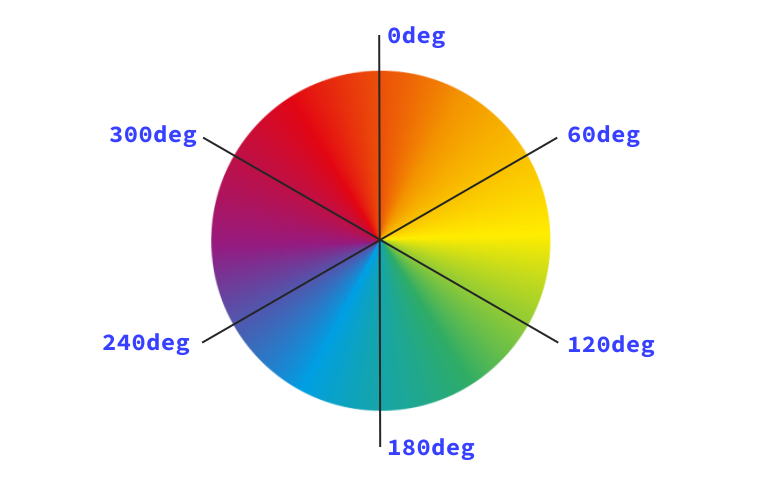
Hue describes the value on the color wheel, from 0 to 360 degrees, starting with red (being both 0 and 360).
A hue of 180, or 50% would be in the blue range.
It's the origin of the color that we see.
Saturation is how vibrant the selected hue is.
A fully desaturated color (with a saturation of `0%`) will appear grayscale.
And finally, lightness is the parameter which describes the scale from white to black of added light.
A lightness of `100%` will always give you white.
Using the [`hsl()`](https://web.dev/%3Chttps://developer.mozilla.org/docs/Web/CSS/color_value/hsl()%3E) color function,
you define a true black by writing `hsl(0 0% 0%)`, or even `hsl(0deg 0% 0%)`.
This is because the hue parameter defines the degree on the color wheel,
which if you use the number type, is **0-360** .
You can also use the angle type, which is (`0deg`) or `(0turn)`.
Both saturation and lightness are defined with percentages.
> [!NOTE]
> **Note:** [The angle type](https://developer.mozilla.org/docs/Web/CSS/angle) in CSS is great for defining hue because it represents the angle of the color wheel really well. This type accepts degrees, turns, radians and gradians. Browser Support
>
> - ' d='M96 183a64 64 0 0 1-23-23L17 64a128 128 0 0 0 111 192l55-96a64 64 0 0 1-87 23Z'/%3E%3Cpath fill='url(%23b)' d='M192 128a64 64 0 0 1-9 32l-55 96A128 128 0 0 0 239 64H128a64 64 0 0 1 64 64Z'/%3E%3Ccircle cx='128' cy='128' r='52' fill='%231a73e8'/%3E%3Cpath fill='url(%23c)' d='M96 73a64 64 0 0 1 32-9h111a128 128 0 0 0-222 0l56 96a64 64 0 0 1 23-87Z'/%3E%3C/svg%3E)
> - ' xlink:href='%23A'%3E%3Cstop offset='.76' stop-opacity='0'/%3E%3Cstop offset='.95' stop-opacity='.5'/%3E%3Cstop offset='1'/%3E%3C/radialGradient%3E%3CradialGradient id='F' cx='2523' cy='4680' r='20243' gradientTransform='matrix(-.03715 .99931 -2.12836 -.07913 13579 3530)' xlink:href='%23A'%3E%3Cstop offset='0' stop-color='%2335c1f1'/%3E%3Cstop offset='.11' stop-color='%2334c1ed'/%3E%3Cstop offset='.23' stop-color='%232fc2df'/%3E%3Cstop offset='.31' stop-color='%232bc3d2'/%3E%3Cstop offset='.67' stop-color='%2336c752'/%3E%3C/radialGradient%3E%3CradialGradient id='G' cx='24247' cy='7758' r='9734' gradientTransform='matrix(.28109 .95968 -.78353 .22949 24510 -16292)' xlink:href='%23A'%3E%3Cstop offset='0' stop-color='%2366eb6e'/%3E%3Cstop offset='1' stop-color='%2366eb6e' stop-opacity='0'/%3E%3C/radialGradient%3E%3Cpath id='H' d='M24105 20053a9345 9345 0 01-1053 472 10202 10202 0 01-3590 646c-4732 0-8855-3255-8855-7432 0-1175 680-2193 1643-2729-4280 180-5380 4640-5380 7253 0 7387 6810 8137 8276 8137 791 0 1984-230 2704-456l130-44a12834 12834 0 006660-5282c220-350-168-757-535-565z'/%3E%3Cpath id='I' d='M11571 25141a7913 7913 0 01-2273-2137 8145 8145 0 01-1514-4740 8093 8093 0 013093-6395 8082 8082 0 011373-859c312-148 846-414 1554-404a3236 3236 0 012569 1297 3184 3184 0 01636 1866c0-21 2446-7960-8005-7960-4390 0-8004 4166-8004 7820 0 2319 538 4170 1212 5604a12833 12833 0 007684 6757 12795 12795 0 003908 610c1414 0 2774-233 4045-656a7575 7575 0 01-6278-803z'/%3E%3Cpath id='J' d='M16231 15886c-80 105-330 250-330 566 0 260 170 512 472 723 1438 1003 4149 868 4156 868a5954 5954 0 003027-839 6147 6147 0 001133-850 6180 6180 0 001910-4437c26-2242-796-3732-1133-4392-2120-4141-6694-6525-11668-6525-7011 0-12703 5635-12798 12620 47-3654 3679-6605 7996-6605 350 0 2346 34 4200 1007 1634 858 2490 1894 3086 2921 618 1067 728 2415 728 2952s-271 1333-780 1990z'/%3E%3Cuse fill='url(%23B)' xlink:href='%23H'/%3E%3Cuse fill='url(%23D)' opacity='.35' xlink:href='%23H'/%3E%3Cuse fill='url(%23C)' xlink:href='%23I'/%3E%3Cuse fill='url(%23E)' opacity='.4' xlink:href='%23I'/%3E%3Cuse fill='url(%23F)' xlink:href='%23J'/%3E%3Cuse fill='url(%23G)' xlink:href='%23J'/%3E%3C/svg%3E)
> - ' gradientUnits='userSpaceOnUse'%3E%3Cstop offset='.2' stop-color='%239059ff' stop-opacity='0'/%3E%3Cstop offset='.3' stop-color='%238c4ff3' stop-opacity='.1'/%3E%3Cstop offset='.8' stop-color='%237716a8' stop-opacity='.5'/%3E%3Cstop offset='1' stop-color='%236e008b' stop-opacity='.6'/%3E%3C/radialGradient%3E%3CradialGradient id='ff-g' cx='239.1' cy='34.6' r='171.6' gradientUnits='userSpaceOnUse'%3E%3Cstop offset='0' stop-color='%23ffe226'/%3E%3Cstop offset='.1' stop-color='%23ffdb27'/%3E%3Cstop offset='.3' stop-color='%23ffc82a'/%3E%3Cstop offset='.5' stop-color='%23ffa930'/%3E%3Cstop offset='.7' stop-color='%23ff7e37'/%3E%3Cstop offset='.8' stop-color='%23ff7139'/%3E%3C/radialGradient%3E%3CradialGradient id='ff-h' cx='374' cy='-74.3' r='732.2' gradientUnits='userSpaceOnUse'%3E%3Cstop offset='.1' stop-color='%23fff44f'/%3E%3Cstop offset='.5' stop-color='%23ff980e'/%3E%3Cstop offset='.6' stop-color='%23ff5634'/%3E%3Cstop offset='.7' stop-color='%23ff3647'/%3E%3Cstop offset='.9' stop-color='%23e31587'/%3E%3C/radialGradient%3E%3CradialGradient id='ff-i' cx='304.6' cy='7.1' r='536.4' gradientTransform='rotate(84 303 4)' gradientUnits='userSpaceOnUse'%3E%3Cstop offset='0' stop-color='%23fff44f'/%3E%3Cstop offset='.1' stop-color='%23ffe847'/%3E%3Cstop offset='.2' stop-color='%23ffc830'/%3E%3Cstop offset='.3' stop-color='%23ff980e'/%3E%3Cstop offset='.4' stop-color='%23ff8b16'/%3E%3Cstop offset='.5' stop-color='%23ff672a'/%3E%3Cstop offset='.6' stop-color='%23ff3647'/%3E%3Cstop offset='.7' stop-color='%23e31587'/%3E%3C/radialGradient%3E%3CradialGradient id='ff-j' cx='235' cy='98.1' r='457.1' gradientUnits='userSpaceOnUse'%3E%3Cstop offset='.1' stop-color='%23fff44f'/%3E%3Cstop offset='.5' stop-color='%23ff980e'/%3E%3Cstop offset='.6' stop-color='%23ff5634'/%3E%3Cstop offset='.7' stop-color='%23ff3647'/%3E%3Cstop offset='.9' stop-color='%23e31587'/%3E%3C/radialGradient%3E%3CradialGradient id='ff-k' cx='355.7' cy='124.9' r='500.3' gradientUnits='userSpaceOnUse'%3E%3Cstop offset='.1' stop-color='%23fff44f'/%3E%3Cstop offset='.2' stop-color='%23ffe141'/%3E%3Cstop offset='.5' stop-color='%23ffaf1e'/%3E%3Cstop offset='.6' stop-color='%23ff980e'/%3E%3C/radialGradient%3E%3ClinearGradient id='ff-a' x1='446.9' y1='76.8' x2='47.9' y2='461.8' gradientUnits='userSpaceOnUse'%3E%3Cstop offset='.1' stop-color='%23fff44f'/%3E%3Cstop offset='.1' stop-color='%23ffe847'/%3E%3Cstop offset='.2' stop-color='%23ffc830'/%3E%3Cstop offset='.4' stop-color='%23ff980e'/%3E%3Cstop offset='.4' stop-color='%23ff8b16'/%3E%3Cstop offset='.5' stop-color='%23ff672a'/%3E%3Cstop offset='.5' stop-color='%23ff3647'/%3E%3Cstop offset='.7' stop-color='%23e31587'/%3E%3C/linearGradient%3E%3ClinearGradient id='ff-l' x1='442.1' y1='74.8' x2='102.6' y2='414.3' gradientUnits='userSpaceOnUse'%3E%3Cstop offset='.2' stop-color='%23fff44f' stop-opacity='.8'/%3E%3Cstop offset='.3' stop-color='%23fff44f' stop-opacity='.6'/%3E%3Cstop offset='.5' stop-color='%23fff44f' stop-opacity='.2'/%3E%3Cstop offset='.6' stop-color='%23fff44f' stop-opacity='0'/%3E%3C/linearGradient%3E%3C/defs%3E%3Cpath d='M479 166c-11-25-32-52-49-60a249 249 0 0 1 25 73c-27-68-73-95-111-155a255 255 0 0 1-8-14 44 44 0 0 1-4-9 1 1 0 0 0 0-1 1 1 0 0 0-1 0c-60 35-81 101-83 134a120 120 0 0 0-66 25 71 71 0 0 0-6-5 111 111 0 0 1-1-58c-25 11-44 29-58 44-9-12-9-52-8-60l-8 4a175 175 0 0 0-24 21 210 210 0 0 0-22 26 203 203 0 0 0-32 73l-1 2-2 15a229 229 0 0 0-4 34v1a240 240 0 0 0 477 40l1-9c5-41 0-84-15-121zM202 355l3 1-3-1zm55-145zm198-31z' fill='url(%23ff-a)'/%3E%3Cpath d='M479 166c-11-25-32-52-49-60 14 26 22 53 25 72v1a207 207 0 0 1-206 279c-113-3-212-87-231-197-3-17 0-26 2-40-2 11-3 14-4 34v1a240 240 0 0 0 477 40l1-9c5-41 0-84-15-121z' fill='url(%23ff-b)'/%3E%3Cpath d='M479 166c-11-25-32-52-49-60 14 26 22 53 25 72v1a207 207 0 0 1-206 279c-113-3-212-87-231-197-3-17 0-26 2-40-2 11-3 14-4 34v1a240 240 0 0 0 477 40l1-9c5-41 0-84-15-121z' fill='url(%23ff-c)'/%3E%3Cpath d='m362 195 1 1a130 130 0 0 0-22-29C266 92 322 5 331 0c-60 35-81 101-83 134l9-1c45 0 84 25 105 62z' fill='url(%23ff-d)'/%3E%3Cpath d='M257 210c-1 6-22 26-29 26-68 0-80 41-80 41 3 35 28 64 57 79l4 2 7 3a107 107 0 0 0 31 6c120 6 143-143 57-186 22-4 45 5 58 14-21-37-60-62-105-62l-9 1a120 120 0 0 0-66 25l17 16c16 16 58 33 58 35z' fill='url(%23ff-e)'/%3E%3Cpath d='M257 210c-1 6-22 26-29 26-68 0-80 41-80 41 3 35 28 64 57 79l4 2 7 3a107 107 0 0 0 31 6c120 6 143-143 57-186 22-4 45 5 58 14-21-37-60-62-105-62l-9 1a120 120 0 0 0-66 25l17 16c16 16 58 33 58 35z' fill='url(%23ff-f)'/%3E%3Cpath d='m171 151 5 3a111 111 0 0 1-1-58c-25 11-44 29-58 44 1 0 36 0 54 11z' fill='url(%23ff-g)'/%3E%3Cpath d='M18 261a242 242 0 0 0 231 197 207 207 0 0 0 206-279c8 56-20 110-64 146-86 71-169 43-186 31l-3-1c-50-24-71-70-67-110-42 0-57-35-57-35s38-28 89-4c46 22 90 4 90 4 0-2-42-19-58-35l-17-16a71 71 0 0 0-6-5l-5-3c-18-11-52-11-54-11-9-12-9-51-8-60l-8 4a175 175 0 0 0-24 21 210 210 0 0 0-22 26 203 203 0 0 0-32 73c0 1-9 38-5 57z' fill='url(%23ff-h)'/%3E%3Cpath d='M341 167a130 130 0 0 1 22 29 46 46 0 0 1 4 3c55 50 26 121 24 126 44-36 72-90 64-146-27-68-73-95-111-155a255 255 0 0 1-8-14 44 44 0 0 1-4-9 1 1 0 0 0 0-1 1 1 0 0 0-1 0c-9 5-65 92 10 167z' fill='url(%23ff-i)'/%3E%3Cpath d='M367 199a46 46 0 0 0-4-3l-1-1c-13-9-36-18-58-15 86 44 63 193-57 187a107 107 0 0 1-31-6 131 131 0 0 1-11-5c17 12 99 39 186-31 2-5 31-76-24-126z' fill='url(%23ff-j)'/%3E%3Cpath d='M148 277s12-41 80-41c7 0 28-20 29-26s-44 18-90-4c-51-24-89 4-89 4s15 35 57 35c-4 40 16 85 67 110l3 1c-29-15-54-44-57-79z' fill='url(%23ff-k)'/%3E%3Cpath d='M479 166c-11-25-32-52-49-60a249 249 0 0 1 25 73c-27-68-73-95-111-155a255 255 0 0 1-8-14 44 44 0 0 1-4-9 1 1 0 0 0 0-1 1 1 0 0 0-1 0c-60 35-81 101-83 134l9-1c45 0 84 25 105 62-13-9-36-18-58-14 86 43 63 192-57 186a107 107 0 0 1-31-6 131 131 0 0 1-11-5l-3-1 3 1c-29-15-54-44-57-79 0 0 12-41 80-41 7 0 28-20 29-26 0-2-42-19-58-35l-17-16a71 71 0 0 0-6-5 111 111 0 0 1-1-58c-25 11-44 29-58 44-9-12-9-52-8-60l-8 4a175 175 0 0 0-24 21 210 210 0 0 0-22 26 203 203 0 0 0-32 73l-1 2-2 15a279 279 0 0 0-4 34v1a240 240 0 0 0 477 40l1-9c5-41 0-84-15-121zm-24 13z' fill='url(%23ff-l)'/%3E%3C/svg%3E)
> - ' xlink:href='%23s-b'%3E%3Cstop offset='0' stop-color='%2324a5f3' stop-opacity='0' /%3E%3Cstop offset='1' stop-color='%231e8ceb' /%3E%3C/radialGradient%3E%3CradialGradient id='s-j' cx='109.3' cy='13.8' r='93.1' gradientTransform='matrix(-.02 1.1 -1.04 -.02 137 -115)' xlink:href='%23s-b'%3E%3Cstop offset='0' stop-opacity='0' /%3E%3Cstop offset='1' stop-color='%235488d6' stop-opacity='0' /%3E%3Cstop offset='1' stop-color='%235d96eb' /%3E%3C/radialGradient%3E%3C/defs%3E%3Crect width='220' height='220' x='22' y='-107' fill='url(%23s-a)' ry='49' transform='matrix(.57 0 0 .57 187 256)' /%3E%3Cg transform='translate(194 190)'%3E%3Ccircle cx='67.8' cy='67.7' fill='url(%23s-c)' paint-order='stroke fill markers' r='54' /%3E%3Ccircle cx='-69.9' cy='69.3' fill='url(%23s-i)' transform='translate(138 -2)' r='54' /%3E%3C/g%3E%3Cellipse cx='120' cy='14.2' fill='url(%23s-j)' rx='93.1' ry='93.7' transform='matrix(.58 0 0 .58 192 250)' /%3E%3Cg transform='matrix(.58 0 0 .57 197 182)'%3E%3Cpath fill='%23cac7c8' d='M46 192h1l72-48-7-9-66 57Z' /%3E%3Cpath fill='%23fbfffc' d='M46 191v1l66-57-7-9-59 65Z' /%3E%3Cpath fill='url(%23s-d)' d='m119 144-7-9 66-57-59 66Z' /%3E%3Cpath fill='%23fb645c' d='m105 126 7 9 66-57-1-1-72 49Z' /%3E%3C/g%3E%3Cpath stroke='%23fff' stroke-linecap='round' stroke-miterlimit='1' stroke-width='1.3' d='m287 278 3-2m-12-17 8-2m-8-3h4m-4-13 8 2m-8 3h4m-1-13 7 3m-4-11 7 4m-2-11 6 6m0-12 6 7m1-11 4 6m4-10 3 7m5-9 2 7m15-7-1 7m10-5-3 7m11-4-4 7m11-2-5 6m16 7-7 4m10 4-7 3m10 6-8 1m8 16-8-2m5 10-7-3m4 11-7-4m2 11-6-5m0 11-5-6m-2 11-4-7m-4 11-3-8m-6 10-1-8m-16 8 2-8m-10 5 3-7m-11 4 4-7m-11 2 5-6m-8 3 3-3m4 8 2-3m5 8 2-4m6 7 1-4m8 5v-4m8 4v-4m9 3-1-4m9 1-2-4m9 0-2-4m9-2-3-3m8-4-3-2m8-5-4-2m7-6-4-1m5-8h-4m4-8h-4m3-9-4 1m1-9-4 2m-1-9-3 2m-2-9-3 3m-4-8-2 3m-5-8-2 4m-6-6-1 3m-8-5v4m-8-4v4m-9-2 1 3m-9 0 2 3m-9 1 2 3m-9 2 3 3m-8 4 3 2m-8 5 4 2m-7 6 4 1m-4 25 4-1m-2 5 7-3m-6 7 4-2m-2 6 7-4m-13-21h8m41-41v-8m0 99v-8m49-42h-8' transform='translate(-65 8)' /%3E%3C/svg%3E)
>
> [Source](https://developer.mozilla.org/docs/Web/CSS/Reference/Values/angle)
Alpha is defined in `hsl()`,
in the same way as `rgb()` by adding a `/` after the hue, saturation and lightness parameters *or* by using the
[`hsla()`](https://web.dev/%3Chttps://developer.mozilla.org/docs/Web/CSS/color_value/hsla()%3E) function.
The alpha can be defined with a percentage or a decimal between 0 and 1.
For example, to set a 50% alpha black, use: `hsl(0 0% 0% / 50%)` or `hsl(0 0% 0% / 0.5)`.
Using the `hsla()` function, write: `hsla(0, 0%, 0%, 50%)` or `hsla(0, 0%, 0%, 0.5)`.
### High definition colors
RGB and HSL define colors in the sRGB gamut. Newer monitors support many more
colors than can be described by these formats, and outside of the sRGB gamut.
You can choose these colors with a variety of CSS functions.
> [!NOTE]
> **Note:** You can think of color gamuts as all the colors that can be defined, and color spaces as how you choose a color. Read more in the [High definition CSS color guide](https://developer.chrome.com/docs/css-ui/high-definition-css-color-guide).
#### The `color()` function
```css
h1 {
color: color(srgb 0.9 0.2 0.4);
}
```
The CSS `color()` function lets you choose a color in a specific color space.
The first argument is the color space to use, which defines the options for the
following channels. Like `rgb()`, you can set the alpha channel by setting a
number between `0` and `1`, or a percentage, after a `/`.
For example, the dark red RGB color in the previous code snippet, which is
defined as `rgb(183 21 64)`, can be defined with percentages as
`rgb(72% 8% 25%)`. You can use the `color()` function with the `srgb` keyword to
specify the same color with `color(srgb .72 .08 .25)`.
The `srgb` sets the color space and tells us that the next three arguments are
red, green, and blue. Values go from `0` to `1` instead of `0` to `255`.
Similar to `rgb()` we can set the alpha with a `/` and a percentage, or decimal
between `0` and `1`.
There are many color spaces that you can use with the `color()` function, each
with different strengths and use cases.
> [!NOTE]
> **Note:** Currently all defined color spaces have 3 channels plus alpha, but future additions to CSS may include color spaces with more or fewer channels, for example, CMYK.
#### Display P3
```css
h1 {
color: color(display-p3 0.9 0.2 0.4);
}
```
The Display P3 gamut contains 50% more colors than sRGB. You can specify all the colors in the Display P3 gamut with the Display P3 color space using the `color()` function.
To set black in Display P3, define it as `color(display-p3 0 0 0)`. After
specifying the `display-p3` color space for the `color()` function, you have
three channels: Red, green, and blue, similar to `color(srgb)`. But because the
channel values represent coordinates in a wider color space, the same channel
values will mean different things.
`color(srgb 1 .5 0)` is an orange color that is equivalent to
`color(display-p3 0.93596 0.52724 0.1983)`. We can make the orange even more
vibrant by extending it out of the sRGB space, to `color(display-p3 1 .5 0)`.
#### Oklab
Oklab is defined with the `oklab()` function, with channels of Lightness, `a`,
and `b`. It's useful for making smooth gradients and for adjusting a color's
saturation, while keeping the hue and lightness.
```css
h1 {
color: oklab(75% 0.1 0.1)
}
```
The lightness channel goes from `0` to `1` or `0%` to `100%`. Colors with a
lightness of `0` will always be black.
The `a` channel goes from `-0.4` to `0.4` or `0%` to `100%`. Lower values are
greener, and higher values are more red.
The `b` channel goes from `-0.4` to `0.4` or `0%` to `100%`. Lower values are
bluer, and higher values are more yellow.
#### OkLCh
OkLCh is the polar, or cylindrical form of OKLab, and is defined with channels
of Lightness, Chroma, and Hue. It is useful for adjusting colors in a
perceptually uniform way. This means that changes to the hue won't impact how
light or saturated a color appears.
```css
h1 {
color: oklch(80% 0.1 200)
}
```
You've worked with lightness and hue in HSL, and chroma is similar to
saturation. You can set black with `oklch(0 0 0)` and white with `oklch(1 0 0)`.
The lightness channel goes from `0` to `1` or `0%` to `100%`. Colors with a
lightness of `0` will always be black.
The chroma channel sets how vibrant a color is---0 or 0% will be desaturated, and
higher values will have more color. A value of `100%` is the same as `.4`, but
it's possible to quickly get outside of gamut with values close to `.4`.
Hue is specified in degrees, just like `hsl()`.
OkLCh isn't bounded by a gamut like Display P3, so you need to make sure you are making colors that can be displayed. `oklch(80% 50% 200)` is a bright blue that numerically looks like a reasonable color, but it is outside of the Display P3 gamut.
#### Other spaces
There are many ways to specify colors in CSS, and you don't need to learn them
all. `rgb()` and Hex formats are commonly used in design tools and in existing
code, and are useful to know. It's also helpful to be familiar with a format
that can be manipulated predictably. You can change `hsl` or `oklch` values
directly, and have a sense of what the resulting color will be.
Read more in
[Access more colors and new spaces](https://developer.chrome.com/docs/css-ui/access-colors-spaces#choosing_a_color_space).
### System colors
In addition to named colors like purple or teal, there are also special keywords
available:
- `transparent` is a fully transparent color. It is also the initial value of `background-color`
- `currentColor` is the contextual computed dynamic value of the `color` property. If you have a text color of `red`, and then set `border-color` to be `currentColor`, it will also be `red`. If the element that you define `currentColor` on doesn't have a value for color defined, `currentColor` will be computed by the cascade instead.
> [!NOTE]
> **Note:** System keywords are colors that are defined by your operating system theme. Some examples of these colors are `ButtonBorder`, which is the border color for controls, or Highlight, which is the highlight color of selected items. These are just two of [many options](https://developer.mozilla.org/docs/Web/CSS/system-color). All color keywords are case-insensitive, however you will often see system colors with capitalization to differentiate them from standard color keywords.
## Manipulating colors
While you may have a palette of colors to use on your site, you may need
variants of those colors for hover states, borders, and other UI elements. You
could specify each color, but CSS also provides ways to transform colors to
create these variants.
### `color-mix()`
To use the result of mixing two colors, you can use the `color-mix()` method.
This is useful for mixing a color with white or black to create a lighter or
darker variant.
To use `color-mix()`, you'll need to define the two colors, how you want them to
mix (the interpolation method), and how much of each color you want.
> [!NOTE]
> **Note:** As you learned earlier in this lesson, colors can be defined in many different ways. The same color can be defined as `rgb(100% 66% 76%)` and `oklch(82.425% 0.10622 0.56816)`. Finding the average of two colors will be different depending on what color space you do the calculation in. Different color spaces will give you different outcomes.
For color spaces that have a hue, you also get to decide which way around the
color wheel you want to go. The default is to use the `shorter` path, but you
can also choose `longer`, or `increasing` and `decreasing`.
Together, the color space and the direction are the interpolation method.
You can also provide the amount of each color to mix by.
> [!NOTE]
> **Note:** When creating colors dynamically, be careful to avoid generating color combinations that don't provide sufficient contrast.
### Relative color syntax
You can also work more directly with a color using relative color syntax, which
lets you take any color, and perform calculations on it to create a new color.
```css
h1 {
color: oklch(from red l c h);
}
```
Using the `oklch()` function means you will work with lightness, chroma, and hue
channels. After the keyword `from` you can specify any color in any syntax. This
then gives you each channel value to use as a letter. This will resolve to a red
color, without any adjustments.
To make adjustments, you can use the `calc()` function to change the channel
values, or just replace the channel completely. Here we use the same `red`
color, but define it with `oklch(62% 0.25 29)`.
```css
h1 {
color: oklch(from oklch(62% 0.25 29) calc(l / 2) c 180);
}
```
The lightness channel is `62% / 2`, or `31%` The chroma channel is unchanged, so
it is `0.25`. The hue channel is `180`. This creates the new color
`oklch(31% 0.25 180)`, a new dark green color.
You will often be using a custom property as the input color. This lets you
dynamically create color variations.
You can do this with any color function, and it's useful to do this with color
functions that have channels that describe the changes you'll want to make. For
example, if you want to adjust the lightness of a color, choose `oklch` or `hsl`,
as you can directly change the lightness channel.
```css
h1 {
color: oklch(from var(--primary-color) calc(l * 0.9) c h);
}
```
Using Relative Color Syntax, or RCS, you can create a palette of colors to use
for your site.
## Out of gamut colors
Your content will be shown on different screens that may or may not support wide
gamut colors. If you specify a color that isn't supported by a screen, it will
go through a process called gamut mapping to find a similar color that can be
displayed on the screen. If you want to define specific colors in those cases,
you can use the `color-gamut` media query.
## Where to use color in CSS rules
If a CSS property accepts the
[``](https://developer.mozilla.org/docs/Web/CSS/color_value) data type as a value,
it will accept any of the previously outlined methods of expressing color.
For styling text, use the `color`, `text-shadow` and `text-decoration-color` properties
which all accept color as the value or color as part of the value.
For backgrounds, you can set a color as the value for `background` or `background-color`.
Colors can also be used in gradients, such as `linear-gradient`.
Gradients are a type of image that can be programmatically defined in CSS.
Gradients accept two or more colors in any combination of color format, such as hex, rgb or hsl.
> [!NOTE]
> **Note:** There's lots to learn with gradients so we wrote [a whole lesson](https://web.dev/learn/css/gradients.md.txt) on how to use them.
Finally, `border-color`, and `outline-color` set the color for borders and outlines on your boxes.
The `box-shadow` property also accepts color as one of the values.
### Check your understanding
Test your knowledge of color
Which of the following are valid colors?
`rbga(400 0 1)` rbga is a typo of rgba and 400 is larger than it would accept anyway, making it invalid. `#0f08` 🎉 `#OOFZ2` This is not a hex value, it's only 5 numbers and includes an Z, making it invalid. `rgb(255, 0, 0)` 🎉 `hsl(180deg 50% 50%)` 🎉 `hotpink` 🎉 Spot the invalid hsl color.
`hsl(5, 0%, 90%)` This is a valid hsl value. `hsl(.5turn 40% 60%)` This is a valid hsl value. `hsl(0, 0, 0)` 🎉 You found it, the 2nd and 3rd values should be percentages. `hsl(2rad 50% 50%)` This is a valid hsl value. `hsl(0 0% 0% / 20%)` This is a valid hsl value.
## Resources
- [A handy demo showing how you can use angles with HSL](https://codepen.io/argyleink/pen/ExjReJa)
- [A comprehensive guide on color](https://css-tricks.com/nerds-guide-color-web/)
- [A comprehensive guide on wide gamut color](https://developer.chrome.com/articles/high-definition-css-color-guide)
- [\[video\] An explainer on how to read hex codes](https://www.youtube.com/watch?v=eqZqx6lRPe0)
- [How hexadecimal codes work](https://medium.com/basecs/hexs-and-other-magical-numbers-9785bc26b7ee)