 Rishabh Mehrotra [LinkedIn](https://www.linkedin.com/in/rishabh-mehrotra-4483a274) [Homepage](https://www.policybazaar.com/)  Aman Soni [LinkedIn](https://www.linkedin.com/in/amansoni211) [Homepage](https://www.policybazaar.com/)  Swetha Gopalakrishnan [X](https://twitter.com/swetha_go) [LinkedIn](https://www.linkedin.com/in/swetha-gopalakrishnan-5ba92936)
Published: May 21, 2025
Policybazaar is one of India's leading insurance platforms, with over 97 million
registered customers. About 80% of customers visit Policybazaar online every
month, so it's critical that their platforms offer smooth user experiences.
The team at Policybazaar noticed that a significant number of users were
visiting their website in the evenings, after the customer assistance team's
working hours. Instead of users having to wait until the next workday to get
answers or hiring overnight staff, Policybazaar wanted to implement a solution
to provide immediate service to those users.
Customers have a lot of questions about insurance plans, how they work and which
plan would meet their needs. Personalized questions are difficult to address
with an FAQ or rule-based chatbots. To address these needs, the team implemented
personalized assistance with generative AI.
73~%~
Users launched and engaged in quality conversations
2~x~
Higher click-through rate compared to previous call-to-action
10~x~
Faster inference with WebGPU
## Personalized assistance with Finova AI
To provide personalized answers and better customer assistance in English and
some users' native Indic language, Policybazaar built a text and voice powered
insurance assistant chatbot called Finova AI.
There were many steps to make this possible. Watch a detailed walkthrough in the
[Web AI use cases and strategies in the real world talk](https://io.google/2025/explore/technical-session-48)
from Google I/O 2025.
 This diagram demonstrates the high-level steps underlying Finova AI's implementation.
### 1. User input
First, the customer sends a message to the chatbot, either with text or by
voice. If they speak to the chatbot, the Web Speech API is used to convert
the voice to text.
### 2. Translate to English
The customer's message is sent to the Language Detector API. If the API detects
an Indic language, the input is sent to the Translator API for translation to
English.
Both of these APIs run inference client-side, which means the user input doesn't
leave the device during translation.
> [!NOTE]
> **Note:** Read about how these APIs were implemented by Policybazaar in the [built-in AI case study](https://developer.chrome.com/blog/pb-jiohotstar-translation-ai). Since these APIs were available for desktop at the time of implementation, Finova AI leveraged these APIs for desktop users.
### 3. Message is assessed with toxicity detection
A client-side toxicity detection model is used to assess if the customer's input
contains inappropriate or aggressive words. If it does, the customer is prompted
to rephrase the message. The message won't proceed to the next step if it
contains toxic language.
This helps maintain respectful conversations for the customer assistance staff
to review and follow-up on, if necessary.
### 4. Request is sent to the server
The translated query is then passed to a server-side model trained on
Policybazaar's data and returns an English response to the question.
Customers can get personalized answers and recommendations, as well as answers
to more complex questions about products.
### 5. Translate to customer's language
The Translator API, used to translate the initial query, translates the query
back to the customer's language, as detected by the Language Detector API.
Again, these APIs run client-side, so all of that work happens on their device.
This means customers are able to get assistance in their primary language, which
makes the chatbot accessible to non-English speakers.
## Hybrid architecture
Finova AI, which runs on both desktop and mobile platforms, relies on multiple
models to generate the end results. Policybazaar built a hybrid architecture,
where part of the solution runs client-side and part runs server-side.
There are a number of reasons you may want to implement hybrid architecture,
whether you're using only one or multiple models.
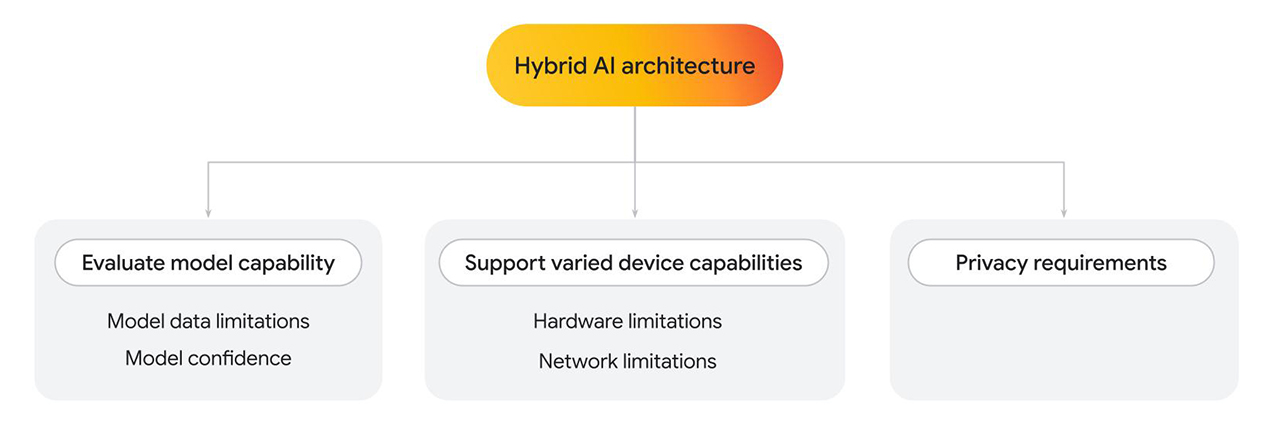
- **Evaluate client-side model capability.** Fall back to server-side where needed.
- **Model data limitations** : Language models can [vary greatly in size](https://web.dev/articles/llm-sizes.md.txt), which also determines specific capabilities. For example, consider a situation where a user asks a personal question related to a service you're providing. A client-side model may be able to answer the question, if it's trained in that specific area. However, if it can't, you can fallback to a server-side implementation, which is trained on a more complex and larger dataset.
- **Model confidence**: In classification models, such as content moderation or fraud detection, a client-side model may output a lower confidence score. In this case, you may want to fall back to a more powerful server-side model.
- **Support varied device capabilities** .
- **Hardware limitations**: Ideally, AI features would be accessible to all of your users. In reality, users use a wide range of devices, and not all devices can support AI inference. If a device is unable to support client-side inference, you can fall back to the server. With this approach, you can make your feature highly accessible, while minimizing cost and latency when possible.
- **Network limitations**: If the user is offline or on flaky networks but has a cached model on the browser, you can run the model client-side.
- **Privacy requirements** .
- You may have strict privacy requirements for your application. For example, if part of the user flow requires identity verification with personal information or face detection, opt for a client-side model to process data on the device and send the verification output (such as pass or fail) to the server-side model for next steps.
For Policybazaar, where low latency, cost efficiency, and privacy was required,
a client-side solution was used. Where more complex models trained on custom
data was needed, a server-side solution was used.
Here, we take a closer look at the client-side model implementation.
### Client-side toxicity detection
After the [messages are translated](https://web.dev/case-studies/policybazaar-ai.md.txt#2_translate_to_english), the
customer's message is passed to the TensorFlow.js
[toxicity detection model](https://github.com/tensorflow/tfjs-models/tree/master/toxicity), that runs client-side, on desktop and mobile. As the transcription is forwarded to human assistance staff for follow up, it's important to avoid toxic language. The messages are analyzed on the user's device before being sent to the server, followed by the final human assistance staff.
Additionally, client-side analysis allowed for removal of sensitive information.
User privacy is a top-tier priority, and client-side inference helps make that
possible.
There are several steps required for every message. With toxicity detection, in
addition to language detection and translation, each message would require
multiple round trips to the server. By performing these tasks client-side,
Policybazaar could significantly limit the projected feature cost.
Policybazaar switched from WebGL to a WebGPU backend (for supported browsers),
and the inference time improved by 10 times. Users received faster feedback to revise
their message, which lead to higher engagement and customer satisfaction.
```javascript
// Create an instance of the toxicity model.
const createToxicityModelInstance = async () => {
try {
//use WebGPU backend if available
if (navigator.gpu) {
await window.tf.setBackend('webgpu');
await window.tf.ready();
}
return await window.toxicity.load(0.9).then(model => {
return model;
}).catch(error => {
console.log(error);
return null;
});
} catch (er) {
console.error(er);
}
}
```
## High engagement and click-through rate
By combining multiple models with web APIs, Policybazaar successfully extended
customer assistance after business hours. Early results from a limited release
of this feature indicated high user engagement.
73% of users who opened the chatbot engaged in multi-question conversations
lasting several minutes, resulting in a low bounce rate. Furthermore, the pilot
program demonstrated a 2 times higher click-through rate to this new customer
assistance call-to-action, showing successful customer interaction with Finova
for their inquiries. Moreover, switching to a WebGPU backend for the client-side
toxicity detection sped up inference by 10 times, resulting in faster user
feedback.
73~%~
Users launched and engaged in quality conversations
2~x~
Higher click-through rate compared to previous call-to-action
10~x~
Faster inference with WebGPU
## Resources
If you're interested in extending the capabilities of your own web app with
client-side AI:
- Learn how to [implement client-side toxicity detection](https://web.dev/articles/ai-detect-toxicity-context.md.txt).
- Review a [collection of client-side AI demos](https://github.com/GoogleChromeLabs/web-ai-demos).
- Read about [Mediapipe](https://ai.google.dev/edge/mediapipe/solutions/guide) and [Transformers.js](https://huggingface.co/docs/transformers.js/index). You can work with pretrained models and integrate them in your application with JavaScript.
- The [AI collection on Chrome for Developers](https://developer.chrome.com/docs/ai) provides resources, best practices, and updates on the technologies powering AI on Chrome and beyond.
- This includes the case study on how [Policybazaar and JioHotstar use the Translator and Language Detector APIs to build multilingual experiences](https://developer.chrome.com/blog/pb-jiohotstar-translation-ai).
- Learn about [real-world examples for Web AI at I/O 2025](https://io.google/2025/explore/technical-session-48).