Text Fragments let you specify a text snippet in the URL fragment.
When navigating to a URL with such a text fragment, the browser can emphasize
and bring it to the user's attention.


![Thomas Steiner](https://web.dev/images/authors/thomassteiner.jpg) Thomas Steiner [GitHub](https://github.com/tomayac) [LinkedIn](https://www.linkedin.com/in/thomassteinerlinkedin) [Mastodon](https://toot.cafe/@tomayac) [Bluesky](https://bsky.app/profile/tomayac.com) [Homepage](https://blog.tomayac.com/)

<br />

## Fragment identifiers

Chrome 80 was a big release. It contained a number of highly anticipated features like
[ECMAScript Modules in Web Workers](https://web.dev/articles/module-workers),
[nullish coalescing](https://v8.dev/features/nullish-coalescing),
[optional chaining](https://v8.dev/features/optional-chaining), and more. The release was, as usual,
announced through a
[blog post](https://blog.chromium.org/2019/12/chrome-80-content-indexing-es-modules.html) on the
Chromium blog. You can see an excerpt of the blog post in the following screenshot.
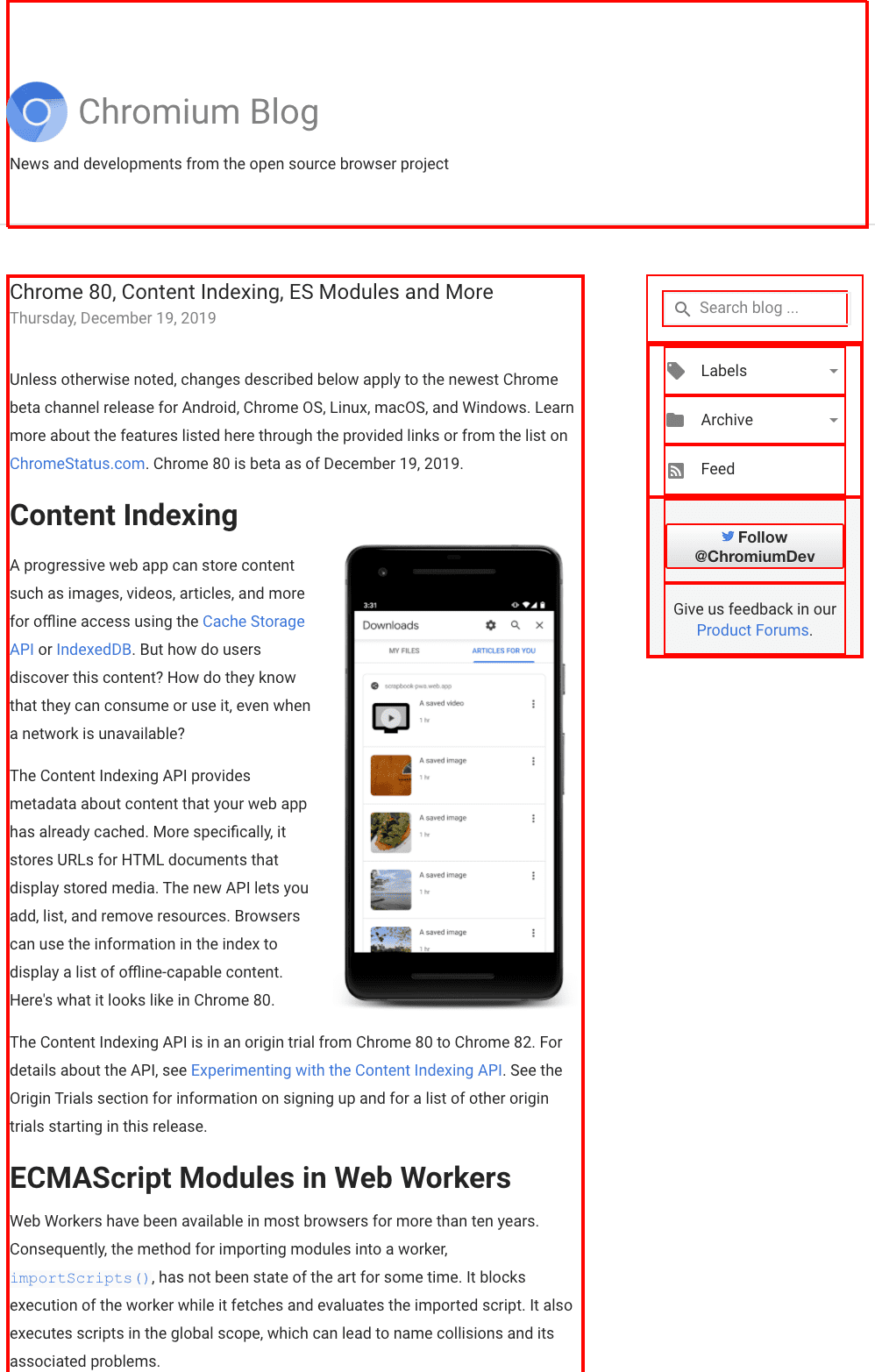
![](https://web.dev/static/articles/text-fragments/image/egsW6tkKWYI8IHE6JyMZ.png) Chromium blog post with red boxes around elements with an `id` attribute.

You are probably asking yourself what all the red boxes mean. They are the result of running the
following snippet in DevTools. It highlights all elements that have an `id` attribute.

    document.querySelectorAll('[id]').forEach((el) => {
      el.style.border = 'solid 2px red';
    });

I can place a deep link to any element highlighted with a red box thanks to the
[fragment identifier](https://developer.mozilla.org/docs/Web/HTTP/Basics_of_HTTP/Identifying_resources_on_the_Web#Fragment)
which I then use in the [hash](https://developer.mozilla.org/docs/Web/API/URL/hash) of the
page's URL. Assuming I wanted to deep link to the *Give us feedback in our
[Product Forums](http://support.google.com/bin/static.py?page=portal_groups.cs)* box in the
aside, I could do so by handcrafting the URL
[`https://blog.chromium.org/2019/12/chrome-80-content-indexing-es-modules.html#HTML1`](https://blog.chromium.org/2019/12/chrome-80-content-indexing-es-modules.html#HTML1).
As you can see in the Elements panel of the Developer Tools, the element in question has an `id`
attribute with the value `HTML1`.
![](https://web.dev/static/articles/text-fragments/image/whVXhhrYwA55S3i4J3l5.png) Dev Tools showing the `id` of an element.

If I parse this URL with JavaScript's `URL()` constructor, the different components are revealed.
Notice the `hash` property with the value `#HTML1`.

    new URL('https://blog.chromium.org/2019/12/chrome-80-content-indexing-es-modules.html#HTML1');
    /* Creates a new `URL` object
    URL {
      hash: "#HTML1"
      host: "blog.chromium.org"
      hostname: "blog.chromium.org"
      href: "https://blog.chromium.org/2019/12/chrome-80-content-indexing-es-modules.html#HTML1"
      origin: "https://blog.chromium.org"
      password: ""
      pathname: "/2019/12/chrome-80-content-indexing-es-modules.html"
      port: ""
      protocol: "https:"
      search: ""
      searchParams: URLSearchParams {}
      username: ""
    }
    */

The fact though that I had to open the Developer Tools to find the `id` of an element speaks volumes
about the probability this particular section of the page was meant to be linked to by the author of
the blog post.

What if I want to link to something without an `id`? Say I want to link to the *ECMAScript Modules
in Web Workers* heading. As you can see in the following screenshot, the `<h1>` in question does not
have an `id` attribute, meaning there is no way I can link to this heading. This is the problem that
Text Fragments solve.
![](https://web.dev/static/articles/text-fragments/image/1g4rTS1q5LKHEHnDoF9o.png) Dev Tools showing a heading without an `id`.

## Text Fragments

The [Text Fragments](https://wicg.github.io/ScrollToTextFragment/) proposal adds support for
specifying a text snippet in the URL hash. When navigating to a URL with such a text fragment, the
user agent can emphasize and bring it to the user's attention.

### Browser compatibility


Browser Support

- ![Chrome: 89.](data:image/svg+xml,%3Csvg xmlns='http://www.w3.org/2000/svg' width='24' height='24' viewBox='-10 -10 276 276'%3E%3ClinearGradient id='a' x1='145' x2='34' y1='253' y2='61' gradientUnits='userSpaceOnUse'%3E%3Cstop offset='0' stop-color='%231e8e3e'/%3E%3Cstop offset='1' stop-color='%2334a853'/%3E%3C/linearGradient%3E%3ClinearGradient id='b' x1='111' x2='222' y1='254' y2='62' gradientUnits='userSpaceOnUse'%3E%3Cstop offset='0' stop-color='%23fcc934'/%3E%3Cstop offset='1' stop-color='%23fbbc04'/%3E%3C/linearGradient%3E%3ClinearGradient id='c' x1='17' x2='239' y1='80' y2='80' gradientUnits='userSpaceOnUse'%3E%3Cstop offset='0' stop-color='%23d93025'/%3E%3Cstop offset='1' stop-color='%23ea4335'/%3E%3C/linearGradient%3E%3Ccircle cx='128' cy='128' r='64' fill='%23fff'/%3E%3Cpath fill='url(%23a)' d='M96 183a64 64 0 0 1-23-23L17 64a128 128 0 0 0 111 192l55-96a64 64 0 0 1-87 23Z'/%3E%3Cpath fill='url(%23b)' d='M192 128a64 64 0 0 1-9 32l-55 96A128 128 0 0 0 239 64H128a64 64 0 0 1 64 64Z'/%3E%3Ccircle cx='128' cy='128' r='52' fill='%231a73e8'/%3E%3Cpath fill='url(%23c)' d='M96 73a64 64 0 0 1 32-9h111a128 128 0 0 0-222 0l56 96a64 64 0 0 1 23-87Z'/%3E%3C/svg%3E)
- ![Edge: 89.](data:image/svg+xml,%3Csvg xmlns='http://www.w3.org/2000/svg' xmlns:xlink='http://www.w3.org/1999/xlink' width='24' height='24' viewBox='0 0 27600 27600'%3E%3ClinearGradient id='A' gradientUnits='userSpaceOnUse'/%3E%3ClinearGradient id='B' x1='6870' x2='24704' y1='18705' y2='18705' xlink:href='%23A'%3E%3Cstop offset='0' stop-color='%230c59a4'/%3E%3Cstop offset='1' stop-color='%23114a8b'/%3E%3C/linearGradient%3E%3ClinearGradient id='C' x1='16272' x2='5133' y1='10968' y2='23102' xlink:href='%23A'%3E%3Cstop offset='0' stop-color='%231b9de2'/%3E%3Cstop offset='.16' stop-color='%231595df'/%3E%3Cstop offset='.67' stop-color='%230680d7'/%3E%3Cstop offset='1' stop-color='%230078d4'/%3E%3C/linearGradient%3E%3CradialGradient id='D' cx='16720' cy='18747' r='9538' xlink:href='%23A'%3E%3Cstop offset='.72' stop-opacity='0'/%3E%3Cstop offset='.95' stop-opacity='.53'/%3E%3Cstop offset='1'/%3E%3C/radialGradient%3E%3CradialGradient id='E' cx='7130' cy='19866' r='14324' gradientTransform='matrix(.14843 -.98892 .79688 .1196 -8759 25542)' xlink:href='%23A'%3E%3Cstop offset='.76' stop-opacity='0'/%3E%3Cstop offset='.95' stop-opacity='.5'/%3E%3Cstop offset='1'/%3E%3C/radialGradient%3E%3CradialGradient id='F' cx='2523' cy='4680' r='20243' gradientTransform='matrix(-.03715 .99931 -2.12836 -.07913 13579 3530)' xlink:href='%23A'%3E%3Cstop offset='0' stop-color='%2335c1f1'/%3E%3Cstop offset='.11' stop-color='%2334c1ed'/%3E%3Cstop offset='.23' stop-color='%232fc2df'/%3E%3Cstop offset='.31' stop-color='%232bc3d2'/%3E%3Cstop offset='.67' stop-color='%2336c752'/%3E%3C/radialGradient%3E%3CradialGradient id='G' cx='24247' cy='7758' r='9734' gradientTransform='matrix(.28109 .95968 -.78353 .22949 24510 -16292)' xlink:href='%23A'%3E%3Cstop offset='0' stop-color='%2366eb6e'/%3E%3Cstop offset='1' stop-color='%2366eb6e' stop-opacity='0'/%3E%3C/radialGradient%3E%3Cpath id='H' d='M24105 20053a9345 9345 0 01-1053 472 10202 10202 0 01-3590 646c-4732 0-8855-3255-8855-7432 0-1175 680-2193 1643-2729-4280 180-5380 4640-5380 7253 0 7387 6810 8137 8276 8137 791 0 1984-230 2704-456l130-44a12834 12834 0 006660-5282c220-350-168-757-535-565z'/%3E%3Cpath id='I' d='M11571 25141a7913 7913 0 01-2273-2137 8145 8145 0 01-1514-4740 8093 8093 0 013093-6395 8082 8082 0 011373-859c312-148 846-414 1554-404a3236 3236 0 012569 1297 3184 3184 0 01636 1866c0-21 2446-7960-8005-7960-4390 0-8004 4166-8004 7820 0 2319 538 4170 1212 5604a12833 12833 0 007684 6757 12795 12795 0 003908 610c1414 0 2774-233 4045-656a7575 7575 0 01-6278-803z'/%3E%3Cpath id='J' d='M16231 15886c-80 105-330 250-330 566 0 260 170 512 472 723 1438 1003 4149 868 4156 868a5954 5954 0 003027-839 6147 6147 0 001133-850 6180 6180 0 001910-4437c26-2242-796-3732-1133-4392-2120-4141-6694-6525-11668-6525-7011 0-12703 5635-12798 12620 47-3654 3679-6605 7996-6605 350 0 2346 34 4200 1007 1634 858 2490 1894 3086 2921 618 1067 728 2415 728 2952s-271 1333-780 1990z'/%3E%3Cuse fill='url(%23B)' xlink:href='%23H'/%3E%3Cuse fill='url(%23D)' opacity='.35' xlink:href='%23H'/%3E%3Cuse fill='url(%23C)' xlink:href='%23I'/%3E%3Cuse fill='url(%23E)' opacity='.4' xlink:href='%23I'/%3E%3Cuse fill='url(%23F)' xlink:href='%23J'/%3E%3Cuse fill='url(%23G)' xlink:href='%23J'/%3E%3C/svg%3E)
- ![Firefox: 131.](data:image/svg+xml,%3Csvg xmlns='http://www.w3.org/2000/svg' width='24' height='24' viewBox='0 0 512 512'%3E%3Cdefs%3E%3CradialGradient id='ff-b' cx='428.5' cy='55.1' r='501' gradientUnits='userSpaceOnUse'%3E%3Cstop offset='.1' stop-color='%23ffbd4f'/%3E%3Cstop offset='.2' stop-color='%23ffac31'/%3E%3Cstop offset='.3' stop-color='%23ff9d17'/%3E%3Cstop offset='.3' stop-color='%23ff980e'/%3E%3Cstop offset='.4' stop-color='%23ff563b'/%3E%3Cstop offset='.5' stop-color='%23ff3750'/%3E%3Cstop offset='.7' stop-color='%23f5156c'/%3E%3Cstop offset='.8' stop-color='%23eb0878'/%3E%3Cstop offset='.9' stop-color='%23e50080'/%3E%3C/radialGradient%3E%3CradialGradient id='ff-c' cx='245.4' cy='259.9' r='501' gradientUnits='userSpaceOnUse'%3E%3Cstop offset='.3' stop-color='%23960e18'/%3E%3Cstop offset='.3' stop-color='%23b11927' stop-opacity='.7'/%3E%3Cstop offset='.4' stop-color='%23db293d' stop-opacity='.3'/%3E%3Cstop offset='.5' stop-color='%23f5334b' stop-opacity='.1'/%3E%3Cstop offset='.5' stop-color='%23ff3750' stop-opacity='0'/%3E%3C/radialGradient%3E%3CradialGradient id='ff-d' cx='305.8' cy='-58.6' r='363' gradientUnits='userSpaceOnUse'%3E%3Cstop offset='.1' stop-color='%23fff44f'/%3E%3Cstop offset='.3' stop-color='%23ffdc3e'/%3E%3Cstop offset='.5' stop-color='%23ff9d12'/%3E%3Cstop offset='.5' stop-color='%23ff980e'/%3E%3C/radialGradient%3E%3CradialGradient id='ff-e' cx='190' cy='390.8' r='238.6' gradientUnits='userSpaceOnUse'%3E%3Cstop offset='.3' stop-color='%233a8ee6'/%3E%3Cstop offset='.5' stop-color='%235c79f0'/%3E%3Cstop offset='.7' stop-color='%239059ff'/%3E%3Cstop offset='1' stop-color='%23c139e6'/%3E%3C/radialGradient%3E%3CradialGradient id='ff-f' cx='252.2' cy='201.3' r='126.5' gradientTransform='matrix(1 0 0 1 -48 31)' gradientUnits='userSpaceOnUse'%3E%3Cstop offset='.2' stop-color='%239059ff' stop-opacity='0'/%3E%3Cstop offset='.3' stop-color='%238c4ff3' stop-opacity='.1'/%3E%3Cstop offset='.8' stop-color='%237716a8' stop-opacity='.5'/%3E%3Cstop offset='1' stop-color='%236e008b' stop-opacity='.6'/%3E%3C/radialGradient%3E%3CradialGradient id='ff-g' cx='239.1' cy='34.6' r='171.6' gradientUnits='userSpaceOnUse'%3E%3Cstop offset='0' stop-color='%23ffe226'/%3E%3Cstop offset='.1' stop-color='%23ffdb27'/%3E%3Cstop offset='.3' stop-color='%23ffc82a'/%3E%3Cstop offset='.5' stop-color='%23ffa930'/%3E%3Cstop offset='.7' stop-color='%23ff7e37'/%3E%3Cstop offset='.8' stop-color='%23ff7139'/%3E%3C/radialGradient%3E%3CradialGradient id='ff-h' cx='374' cy='-74.3' r='732.2' gradientUnits='userSpaceOnUse'%3E%3Cstop offset='.1' stop-color='%23fff44f'/%3E%3Cstop offset='.5' stop-color='%23ff980e'/%3E%3Cstop offset='.6' stop-color='%23ff5634'/%3E%3Cstop offset='.7' stop-color='%23ff3647'/%3E%3Cstop offset='.9' stop-color='%23e31587'/%3E%3C/radialGradient%3E%3CradialGradient id='ff-i' cx='304.6' cy='7.1' r='536.4' gradientTransform='rotate(84 303 4)' gradientUnits='userSpaceOnUse'%3E%3Cstop offset='0' stop-color='%23fff44f'/%3E%3Cstop offset='.1' stop-color='%23ffe847'/%3E%3Cstop offset='.2' stop-color='%23ffc830'/%3E%3Cstop offset='.3' stop-color='%23ff980e'/%3E%3Cstop offset='.4' stop-color='%23ff8b16'/%3E%3Cstop offset='.5' stop-color='%23ff672a'/%3E%3Cstop offset='.6' stop-color='%23ff3647'/%3E%3Cstop offset='.7' stop-color='%23e31587'/%3E%3C/radialGradient%3E%3CradialGradient id='ff-j' cx='235' cy='98.1' r='457.1' gradientUnits='userSpaceOnUse'%3E%3Cstop offset='.1' stop-color='%23fff44f'/%3E%3Cstop offset='.5' stop-color='%23ff980e'/%3E%3Cstop offset='.6' stop-color='%23ff5634'/%3E%3Cstop offset='.7' stop-color='%23ff3647'/%3E%3Cstop offset='.9' stop-color='%23e31587'/%3E%3C/radialGradient%3E%3CradialGradient id='ff-k' cx='355.7' cy='124.9' r='500.3' gradientUnits='userSpaceOnUse'%3E%3Cstop offset='.1' stop-color='%23fff44f'/%3E%3Cstop offset='.2' stop-color='%23ffe141'/%3E%3Cstop offset='.5' stop-color='%23ffaf1e'/%3E%3Cstop offset='.6' stop-color='%23ff980e'/%3E%3C/radialGradient%3E%3ClinearGradient id='ff-a' x1='446.9' y1='76.8' x2='47.9' y2='461.8' gradientUnits='userSpaceOnUse'%3E%3Cstop offset='.1' stop-color='%23fff44f'/%3E%3Cstop offset='.1' stop-color='%23ffe847'/%3E%3Cstop offset='.2' stop-color='%23ffc830'/%3E%3Cstop offset='.4' stop-color='%23ff980e'/%3E%3Cstop offset='.4' stop-color='%23ff8b16'/%3E%3Cstop offset='.5' stop-color='%23ff672a'/%3E%3Cstop offset='.5' stop-color='%23ff3647'/%3E%3Cstop offset='.7' stop-color='%23e31587'/%3E%3C/linearGradient%3E%3ClinearGradient id='ff-l' x1='442.1' y1='74.8' x2='102.6' y2='414.3' gradientUnits='userSpaceOnUse'%3E%3Cstop offset='.2' stop-color='%23fff44f' stop-opacity='.8'/%3E%3Cstop offset='.3' stop-color='%23fff44f' stop-opacity='.6'/%3E%3Cstop offset='.5' stop-color='%23fff44f' stop-opacity='.2'/%3E%3Cstop offset='.6' stop-color='%23fff44f' stop-opacity='0'/%3E%3C/linearGradient%3E%3C/defs%3E%3Cpath d='M479 166c-11-25-32-52-49-60a249 249 0 0 1 25 73c-27-68-73-95-111-155a255 255 0 0 1-8-14 44 44 0 0 1-4-9 1 1 0 0 0 0-1 1 1 0 0 0-1 0c-60 35-81 101-83 134a120 120 0 0 0-66 25 71 71 0 0 0-6-5 111 111 0 0 1-1-58c-25 11-44 29-58 44-9-12-9-52-8-60l-8 4a175 175 0 0 0-24 21 210 210 0 0 0-22 26 203 203 0 0 0-32 73l-1 2-2 15a229 229 0 0 0-4 34v1a240 240 0 0 0 477 40l1-9c5-41 0-84-15-121zM202 355l3 1-3-1zm55-145zm198-31z' fill='url(%23ff-a)'/%3E%3Cpath d='M479 166c-11-25-32-52-49-60 14 26 22 53 25 72v1a207 207 0 0 1-206 279c-113-3-212-87-231-197-3-17 0-26 2-40-2 11-3 14-4 34v1a240 240 0 0 0 477 40l1-9c5-41 0-84-15-121z' fill='url(%23ff-b)'/%3E%3Cpath d='M479 166c-11-25-32-52-49-60 14 26 22 53 25 72v1a207 207 0 0 1-206 279c-113-3-212-87-231-197-3-17 0-26 2-40-2 11-3 14-4 34v1a240 240 0 0 0 477 40l1-9c5-41 0-84-15-121z' fill='url(%23ff-c)'/%3E%3Cpath d='m362 195 1 1a130 130 0 0 0-22-29C266 92 322 5 331 0c-60 35-81 101-83 134l9-1c45 0 84 25 105 62z' fill='url(%23ff-d)'/%3E%3Cpath d='M257 210c-1 6-22 26-29 26-68 0-80 41-80 41 3 35 28 64 57 79l4 2 7 3a107 107 0 0 0 31 6c120 6 143-143 57-186 22-4 45 5 58 14-21-37-60-62-105-62l-9 1a120 120 0 0 0-66 25l17 16c16 16 58 33 58 35z' fill='url(%23ff-e)'/%3E%3Cpath d='M257 210c-1 6-22 26-29 26-68 0-80 41-80 41 3 35 28 64 57 79l4 2 7 3a107 107 0 0 0 31 6c120 6 143-143 57-186 22-4 45 5 58 14-21-37-60-62-105-62l-9 1a120 120 0 0 0-66 25l17 16c16 16 58 33 58 35z' fill='url(%23ff-f)'/%3E%3Cpath d='m171 151 5 3a111 111 0 0 1-1-58c-25 11-44 29-58 44 1 0 36 0 54 11z' fill='url(%23ff-g)'/%3E%3Cpath d='M18 261a242 242 0 0 0 231 197 207 207 0 0 0 206-279c8 56-20 110-64 146-86 71-169 43-186 31l-3-1c-50-24-71-70-67-110-42 0-57-35-57-35s38-28 89-4c46 22 90 4 90 4 0-2-42-19-58-35l-17-16a71 71 0 0 0-6-5l-5-3c-18-11-52-11-54-11-9-12-9-51-8-60l-8 4a175 175 0 0 0-24 21 210 210 0 0 0-22 26 203 203 0 0 0-32 73c0 1-9 38-5 57z' fill='url(%23ff-h)'/%3E%3Cpath d='M341 167a130 130 0 0 1 22 29 46 46 0 0 1 4 3c55 50 26 121 24 126 44-36 72-90 64-146-27-68-73-95-111-155a255 255 0 0 1-8-14 44 44 0 0 1-4-9 1 1 0 0 0 0-1 1 1 0 0 0-1 0c-9 5-65 92 10 167z' fill='url(%23ff-i)'/%3E%3Cpath d='M367 199a46 46 0 0 0-4-3l-1-1c-13-9-36-18-58-15 86 44 63 193-57 187a107 107 0 0 1-31-6 131 131 0 0 1-11-5c17 12 99 39 186-31 2-5 31-76-24-126z' fill='url(%23ff-j)'/%3E%3Cpath d='M148 277s12-41 80-41c7 0 28-20 29-26s-44 18-90-4c-51-24-89 4-89 4s15 35 57 35c-4 40 16 85 67 110l3 1c-29-15-54-44-57-79z' fill='url(%23ff-k)'/%3E%3Cpath d='M479 166c-11-25-32-52-49-60a249 249 0 0 1 25 73c-27-68-73-95-111-155a255 255 0 0 1-8-14 44 44 0 0 1-4-9 1 1 0 0 0 0-1 1 1 0 0 0-1 0c-60 35-81 101-83 134l9-1c45 0 84 25 105 62-13-9-36-18-58-14 86 43 63 192-57 186a107 107 0 0 1-31-6 131 131 0 0 1-11-5l-3-1 3 1c-29-15-54-44-57-79 0 0 12-41 80-41 7 0 28-20 29-26 0-2-42-19-58-35l-17-16a71 71 0 0 0-6-5 111 111 0 0 1-1-58c-25 11-44 29-58 44-9-12-9-52-8-60l-8 4a175 175 0 0 0-24 21 210 210 0 0 0-22 26 203 203 0 0 0-32 73l-1 2-2 15a279 279 0 0 0-4 34v1a240 240 0 0 0 477 40l1-9c5-41 0-84-15-121zm-24 13z' fill='url(%23ff-l)'/%3E%3C/svg%3E)
- ![Safari: 18.2.](data:image/svg+xml,%3Csvg xmlns='http://www.w3.org/2000/svg' xmlns:xlink='http://www.w3.org/1999/xlink' width='24' height='24' viewBox='195 190 135 135'%3E%3Cdefs%3E%3ClinearGradient id='s-a' x1='132.6' x2='134.4' y1='111.7' y2='-105.3' xlink:href='%23s-b'%3E%3Cstop offset='0' stop-color='%23d2d2d2' /%3E%3Cstop offset='.5' stop-color='%23f2f2f2' /%3E%3Cstop offset='1' stop-color='%23fff' /%3E%3C/linearGradient%3E%3ClinearGradient id='s-b' gradientUnits='userSpaceOnUse' /%3E%3ClinearGradient id='s-c' x1='65.4' x2='67.4' y1='115.7' y2='17.1' xlink:href='%23s-b'%3E%3Cstop offset='0' stop-color='%23005ad5' /%3E%3Cstop offset='.2' stop-color='%230875f0' /%3E%3Cstop offset='.3' stop-color='%23218cee' /%3E%3Cstop offset='.6' stop-color='%2327a5f3' /%3E%3Cstop offset='.8' stop-color='%2325aaf2' /%3E%3Cstop offset='1' stop-color='%2321aaef' /%3E%3C/linearGradient%3E%3ClinearGradient id='s-d' x1='158.7' x2='176.3' y1='96.7' y2='79.5' xlink:href='%23s-b'%3E%3Cstop offset='0' stop-color='%23c72e24' /%3E%3Cstop offset='1' stop-color='%23fd3b2f' /%3E%3C/linearGradient%3E%3CradialGradient id='s-i' cx='-69.9' cy='69.3' r='54' gradientTransform='matrix(.9 -.01 .04 2.72 -9 -120)' xlink:href='%23s-b'%3E%3Cstop offset='0' stop-color='%2324a5f3' stop-opacity='0' /%3E%3Cstop offset='1' stop-color='%231e8ceb' /%3E%3C/radialGradient%3E%3CradialGradient id='s-j' cx='109.3' cy='13.8' r='93.1' gradientTransform='matrix(-.02 1.1 -1.04 -.02 137 -115)' xlink:href='%23s-b'%3E%3Cstop offset='0' stop-opacity='0' /%3E%3Cstop offset='1' stop-color='%235488d6' stop-opacity='0' /%3E%3Cstop offset='1' stop-color='%235d96eb' /%3E%3C/radialGradient%3E%3C/defs%3E%3Crect width='220' height='220' x='22' y='-107' fill='url(%23s-a)' ry='49' transform='matrix(.57 0 0 .57 187 256)' /%3E%3Cg transform='translate(194 190)'%3E%3Ccircle cx='67.8' cy='67.7' fill='url(%23s-c)' paint-order='stroke fill markers' r='54' /%3E%3Ccircle cx='-69.9' cy='69.3' fill='url(%23s-i)' transform='translate(138 -2)' r='54' /%3E%3C/g%3E%3Cellipse cx='120' cy='14.2' fill='url(%23s-j)' rx='93.1' ry='93.7' transform='matrix(.58 0 0 .58 192 250)' /%3E%3Cg transform='matrix(.58 0 0 .57 197 182)'%3E%3Cpath fill='%23cac7c8' d='M46 192h1l72-48-7-9-66 57Z' /%3E%3Cpath fill='%23fbfffc' d='M46 191v1l66-57-7-9-59 65Z' /%3E%3Cpath fill='url(%23s-d)' d='m119 144-7-9 66-57-59 66Z' /%3E%3Cpath fill='%23fb645c' d='m105 126 7 9 66-57-1-1-72 49Z' /%3E%3C/g%3E%3Cpath stroke='%23fff' stroke-linecap='round' stroke-miterlimit='1' stroke-width='1.3' d='m287 278 3-2m-12-17 8-2m-8-3h4m-4-13 8 2m-8 3h4m-1-13 7 3m-4-11 7 4m-2-11 6 6m0-12 6 7m1-11 4 6m4-10 3 7m5-9 2 7m15-7-1 7m10-5-3 7m11-4-4 7m11-2-5 6m16 7-7 4m10 4-7 3m10 6-8 1m8 16-8-2m5 10-7-3m4 11-7-4m2 11-6-5m0 11-5-6m-2 11-4-7m-4 11-3-8m-6 10-1-8m-16 8 2-8m-10 5 3-7m-11 4 4-7m-11 2 5-6m-8 3 3-3m4 8 2-3m5 8 2-4m6 7 1-4m8 5v-4m8 4v-4m9 3-1-4m9 1-2-4m9 0-2-4m9-2-3-3m8-4-3-2m8-5-4-2m7-6-4-1m5-8h-4m4-8h-4m3-9-4 1m1-9-4 2m-1-9-3 2m-2-9-3 3m-4-8-2 3m-5-8-2 4m-6-6-1 3m-8-5v4m-8-4v4m-9-2 1 3m-9 0 2 3m-9 1 2 3m-9 2 3 3m-8 4 3 2m-8 5 4 2m-7 6 4 1m-4 25 4-1m-2 5 7-3m-6 7 4-2m-2 6 7-4m-13-21h8m41-41v-8m0 99v-8m49-42h-8' transform='translate(-65 8)' /%3E%3C/svg%3E)

[Source](https://developer.mozilla.org/docs/Web/CSS/Reference/Selectors/::target-text)

<br />

> [!TIP]
> **Success:** These links used to not work when served across [client-side redirects](https://developer.mozilla.org/docs/Web/HTTP/Redirections#Alternative_way_of_specifying_redirections) that some common services like Twitter use. This issue was tracked as [crbug.com/1055455](https://crbug.com/1055455) and is now fixed. Regular [HTTP redirects](https://developer.mozilla.org/docs/Web/HTTP/Redirections#Principle) always worked fine.

For [security](https://web.dev/articles/text-fragments#security) reasons, the feature requires links to be opened in a
[`noopener`](https://developer.mozilla.org/docs/Web/HTML/Link_types/noopener) context.
Therefore, make sure to include
[`rel="noopener"`](https://developer.mozilla.org/docs/Web/HTML/Element/a#attr-rel) in your
`<a>` anchor markup or add
[`noopener`](https://developer.mozilla.org/docs/Web/API/Window/open#noopener) to your
`Window.open()` list of window functionality features.

### `start`

In its simplest form, the syntax of Text Fragments is as follows: The hash symbol `#` followed by
`:~:text=` and finally `start`, which represents the
[percent-encoded](https://developer.mozilla.org/docs/Web/JavaScript/Reference/Global_Objects/encodeURIComponent)
text I want to link to.

    #:~:text=start

For example, say that I want to link to the *ECMAScript Modules in Web Workers* heading in the
[blog post announcing features in Chrome 80](https://blog.chromium.org/2019/12/chrome-80-content-indexing-es-modules.html),
the URL in this case would be:

[`https://blog.chromium.org/2019/12/chrome-80-content-indexing-es-modules.html#:~:text=ECMAScript%20Modules%20in%20Web%20Workers`](https://blog.chromium.org/2019/12/chrome-80-content-indexing-es-modules.html#:~:text=ECMAScript%20Modules%20in%20Web%20Workers)

The text fragment is emphasized like this.
If you click the link in a supporting browser like Chrome, the text fragment is highlighted and
scrolls into view:
![](https://web.dev/static/articles/text-fragments/image/D3jwPrJlvN3FmJo3pADt.png) Text fragment scrolled into view and highlighted.

### `start` and `end`

Now what if I want to link to the entire *section* titled *ECMAScript Modules in Web Workers*, not
just its heading? Percent-encoding the entire text of the section would make the resulting URL
impracticably long.

Luckily there is a better way. Rather than the entire text, I can frame a
specific part of the text with the `start,end` syntax. I specify a couple of
percent-encoded words at the beginning of the text fragment, and a couple of
percent-encoded words at the end of the text fragment, separated
by a comma.

That looks like this:

[`https://blog.chromium.org/2019/12/chrome-80-content-indexing-es-modules.html#:~:text=ECMAScript%20Modules%20in%20Web%20Workers,ES%20Modules%20in%20Web%20Workers.`](https://blog.chromium.org/2019/12/chrome-80-content-indexing-es-modules.html#:~:text=ECMAScript%20Modules%20in%20Web%20Workers,ES%20Modules%20in%20Web%20Workers.).

For `start`, I have `ECMAScript%20Modules%20in%20Web%20Workers`, then a comma, followed
by `ES%20Modules%20in%20Web%20Workers.` as `end`. When you click through on a supporting browser
like Chrome, the whole section is highlighted and scrolled into view:
![](https://web.dev/static/articles/text-fragments/image/2yTYmKnjHTnqXkcmHF1F.png) Text fragment scrolled into view and highlighted.

Now you may wonder about my choice of `start` and `end`. Actually, the slightly shorter URL
[`https://blog.chromium.org/2019/12/chrome-80-content-indexing-es-modules.html#:~:text=ECMAScript%20Modules,Web%20Workers.`](https://blog.chromium.org/2019/12/chrome-80-content-indexing-es-modules.html#:~:text=ECMAScript%20Modules,Web%20Workers.)
with only two words on each side would have worked, too. Compare `start` and `end` with the
previous values.

If I take it one step further and now use only one word for both `start` and `end`, you can
see that I am in trouble. The URL
[`https://blog.chromium.org/2019/12/chrome-80-content-indexing-es-modules.html#:~:text=ECMAScript,Workers.`](https://blog.chromium.org/2019/12/chrome-80-content-indexing-es-modules.html#:~:text=ECMAScript,Workers.)
is even shorter now, but the highlighted text fragment is no longer the originally chosen one. The
highlighting stops at the first occurrence of the word `Workers.`, which is correct, but not what I
intended to highlight. The problem is that the chosen section is not uniquely identified by the
current one-word `start` and `end` values:
![](https://web.dev/static/articles/text-fragments/image/GGbbtHBpsoFyubnISyZw.png) Non-intended text fragment scrolled into view and highlighted.

### `prefix-` and `-suffix`

Using long enough values for `start` and `end` is one solution for obtaining a unique link.
In some situations, however, this is not possible. On a side note, why did I choose the
Chrome 80 release blog post as my example? The answer is that in this release Text Fragments
were introduced:
![Blog post text: Text URL Fragments. Users or authors can now link to a specific portion of a page using a text fragment provided in a URL. When the page is loaded, the browser highlights the text and scrolls the fragment into view. For example, the URL below loads a wiki page for 'Cat' and scrolls to the content listed in the `text` parameter.](https://web.dev/static/articles/text-fragments/image/blog-post-text-text-url-67d2c112b0147.png) Text Fragments announcement blog post excerpt.

Notice how in the screenshot above the word "text" appears four times. The forth occurrence is
written in a green code font. If I wanted to link to this particular word, I would set `start`
to `text`. Since the word "text" is, well, only one word, there cannot be a `end`. What now? The
URL
[`https://blog.chromium.org/2019/12/chrome-80-content-indexing-es-modules.html#:~:text=text`](https://blog.chromium.org/2019/12/chrome-80-content-indexing-es-modules.html#:~:text=text)
matches at the first occurrence of the word "Text" already in the heading:
![](https://web.dev/static/articles/text-fragments/image/nXxCskUwdCxwxejPSSZW.png) Text Fragment matching at the first occurrence of "Text".

> [!CAUTION]
> **Caution:** Note that text fragment matching is case-insensitive.

Luckily there is a solution. In cases like this, I can specify a `prefix-` and a `-suffix`. The
word before the green code font "text" is "the", and the word after is "parameter". None of the
other three occurrences of the word "text" has the same surrounding words. Armed with this
knowledge, I can tweak the previous URL and add the `prefix-` and the `-suffix`. Like the other
parameters, they, too, need to be percent-encoded and can contain more than one word.
[`https://blog.chromium.org/2019/12/chrome-80-content-indexing-es-modules.html#:~:text=the-,text,-parameter`](https://blog.chromium.org/2019/12/chrome-80-content-indexing-es-modules.html#:~:text=the-,text,-parameter).
To allow the parser to clearly identify the `prefix-` and the `-suffix`, they need to be separated
from the `start` and the optional `end` with a dash `-`.
![](https://web.dev/static/articles/text-fragments/image/J3L5BVSMmzGY6xdkabP6.png) Text Fragment matching at the chosen occurrence of "text".

### The full syntax

The full syntax of Text Fragments follows. (Square brackets indicate an optional parameter.)
The values for all parameters need to be percent-encoded. This is especially important for the dash
`-`, ampersand `&`, and comma `,` characters, so they are not being interpreted as part of the text
directive syntax.

    #:~:text=[prefix-,]start[,end][,-suffix]

Each of `prefix-`, `start`, `end`, and `-suffix` can only match text within a single
[block-level element](https://developer.mozilla.org/docs/Web/HTML/Block-level_elements#Elements),
but full `start,end` ranges *can* span multiple blocks. For example,
`:~:text=The quick,lazy dog` fails to match in the following example, because the starting
string "The quick" does not appear within a single, uninterrupted block-level element:

    <div>
      The
      <div></div>
      quick brown fox
    </div>
    <div>jumped over the lazy dog</div>

It does, however, match in this example:

    <div>The quick brown fox</div>
    <div>jumped over the lazy dog</div>

### Creating Text Fragment URLs with a browser extension

Creating Text Fragments URLs by hand is tedious, especially when it comes to making sure they are
unique. If you really want to, the specification has some tips and lists the exact
[steps for generating Text Fragment URLs](https://wicg.github.io/ScrollToTextFragment/#generating-text-fragment-directives).
We provide an open-source browser extension called
[Link to Text Fragment](https://github.com/GoogleChromeLabs/link-to-text-fragment) that lets you
link to any text by selecting it, and then clicking "Copy Link to Selected Text" in the context
menu. This extension is available for the following browsers:

- [Link to Text Fragment for Google Chrome](https://chrome.google.com/webstore/detail/link-to-text-fragment/pbcodcjpfjdpcineamnnmbkkmkdpajjg)
- [Link to Text Fragment for Microsoft Edge](https://microsoftedge.microsoft.com/addons/detail/link-to-text-fragment/pmdldpbcbobaamgkpkghjigngamlolag)
- [Link to Text Fragment for Mozilla Firefox](https://addons.mozilla.org/firefox/addon/link-to-text-fragment/)
- [Link to Text Fragment for Apple Safari](https://apps.apple.com/app/link-to-text-fragment/id1532224396)

![](https://web.dev/static/articles/text-fragments/image/ASLtFCPoHvyTKrAtKAv4.png) [Link to Text Fragment](https://github.com/GoogleChromeLabs/link-to-text-fragment) browser extension.

### Multiple text fragments in one URL

Note that multiple text fragments can appear in one URL. The particular text fragments need to be
separated by an ampersand character `&`. Here is an example link with three text fragments:
[`https://blog.chromium.org/2019/12/chrome-80-content-indexing-es-modules.html#:~:text=Text%20URL%20Fragments&text=text,-parameter&text=:~:text=On%20islands,%20birds%20can%20contribute%20as%20much%20as%2060%25%20of%20a%20cat's%20diet`](https://blog.chromium.org/2019/12/chrome-80-content-indexing-es-modules.html#:~:text=Text%20URL%20Fragments&text=text,-parameter&text=:~:text=On%20islands,%20birds%20can%20contribute%20as%20much%20as%2060%25%20of%20a%20cat's%20diet).
![](https://web.dev/static/articles/text-fragments/image/ffsq7aoSoVd9q6r5cquY.png) Three text fragments in one URL.

### Mixing element and text fragments

Traditional element fragments can be combined with text fragments. It's perfectly fine to have both
in the same URL, for example, to provide a meaningful fallback in case the original text on the page
changes, so that the text fragment does not match anymore. The URL
[`https://blog.chromium.org/2019/12/chrome-80-content-indexing-es-modules.html#HTML1:~:text=Give%20us%20feedback%20in%20our%20Product%20Forums.`](https://blog.chromium.org/2019/12/chrome-80-content-indexing-es-modules.html#HTML1:~:text=Give%20us%20feedback%20in%20our%20Product%20Forums.)
linking to the *Give us feedback in our
[Product Forums](http://support.google.com/bin/static.py?page=portal_groups.cs)* section
contains both an element fragment (`HTML1`), as well as a text fragment
(`text=Give%20us%20feedback%20in%20our%20Product%20Forums.`):
![](https://web.dev/static/articles/text-fragments/image/JRKCM6Ihrq8sgRZRiymr.png) Linking with both element fragment and text fragment.

### The fragment directive

There is one element of the syntax I have not explained yet: the fragment directive `:~:`. To avoid
compatibility issues with existing URL element fragments as shown, the
[Text Fragments specification](https://wicg.github.io/ScrollToTextFragment/) introduces the fragment
directive. The fragment directive is a portion of the URL fragment delimited by the code sequence
`:~:`. It's reserved for user agent instructions, such as `text=`, and is stripped from the URL
during loading so that author scripts cannot directly interact with it. User agent instructions are
also called *directives* . In the concrete case, `text=` is therefore called a *text directive*.

### Feature detection

To detect support, test for the read-only `fragmentDirective` property on `document`. The fragment
directive is a mechanism for URLs to specify instructions directed to the browser rather than the
document. It's meant to avoid direct interaction with author script, so that future user agent
instructions can be added without fear of introducing breaking changes to existing content. One
potential example of such future additions could be translation hints.

    if ('fragmentDirective' in document) {
      // Text Fragments is supported.
    }

> [!NOTE]
> **Note:** From Chrome 80 to Chrome 85, the `fragmentDirective` property was defined on `Location.prototype`. For details on this change, see [WICG/scroll-to-text-fragment#130](https://github.com/WICG/scroll-to-text-fragment/issues/130).

Feature detection is mainly intended for cases where links are dynamically
generated (for example by search engines) to avoid serving text fragments links
to browsers that don't support them.

### Styling text fragments

By default, browsers style text fragments the same way they style
[`mark`](https://developer.mozilla.org/docs/Web/HTML/Element/mark) (typically
black on yellow, the CSS [system colors](https://developer.mozilla.org/docs/Web/CSS/color_value#system_colors)
for `mark`). The user-agent stylesheet contains CSS that looks like this:

    :root::target-text {
      color: MarkText;
      background: Mark;
    }

As you can see, the browser exposes a pseudo selector
[`::target-text`](https://drafts.csswg.org/css-pseudo/#selectordef-target-text) that you can use to
customize the applied highlighting. For example, you could design your text fragments to be black
text on a red background. As always, be sure to
[check the color contrast](https://developer.chrome.com/docs/devtools/accessibility/reference#contrast)
so your override styling does not cause accessibility issues and make sure the highlighting actually
visually stands out from the rest of the content.

    :root::target-text {
      color: black;
      background-color: red;
    }

### Polyfill

The Text Fragments feature can be polyfilled to some extent. We provide a
[polyfill](https://github.com/GoogleChromeLabs/text-fragments-polyfill), which
is used internally by the [extension](https://github.com/GoogleChromeLabs/link-to-text-fragment),
for browsers that don't provide built-in support for Text Fragments where the
functionality is implemented in JavaScript.

### Programmatic Text Fragment link generation

The [polyfill](https://github.com/GoogleChromeLabs/text-fragments-polyfill)
contains a file `fragment-generation-utils.js` that you can import and use to
generate Text Fragment links. This is outlined in the code sample:

    const { generateFragment } = await import('https://unpkg.com/text-fragments-polyfill/dist/fragment-generation-utils.js');
    const result = generateFragment(window.getSelection());
    if (result.status === 0) {
      let url = `${location.origin}${location.pathname}${location.search}`;
      const fragment = result.fragment;
      const prefix = fragment.prefix ?
        `${encodeURIComponent(fragment.prefix)}-,` :
        '';
      const suffix = fragment.suffix ?
        `,-${encodeURIComponent(fragment.suffix)}` :
        '';
      const start = encodeURIComponent(fragment.textStart);
      const end = fragment.textEnd ?
        `,${encodeURIComponent(fragment.textEnd)}` :
        '';
      url += `#:~:text=${prefix}${start}${end}${suffix}`;
      console.log(url);
    }

### Obtaining Text Fragments for analytics purposes

Plenty of sites use the fragment for routing, which is why browsers strip out Text Fragments
so as to not break those pages. There is an
[acknowledged need](https://github.com/WICG/scroll-to-text-fragment/issues/128)
to expose Text Fragments links to pages, for example, for analytics purposes,
but the proposed solution is not implemented yet.
As a workaround for now, you can use the following code to extract information.

    new URL(performance.getEntries().find(({ type }) => type === 'navigate').name).hash;

### Security

Text fragment directives are invoked only on full (non-same-page) navigations
that are the result of a
[user activation](https://html.spec.whatwg.org/multipage/interaction.html#tracking-user-activation).
Additionally, navigations originating from a different origin than the destination requires the
navigation to take place in a
[`noopener`](https://html.spec.whatwg.org/multipage/links.html#link-type-noopener) context, such
that the destination page is known to be sufficiently isolated. Text fragment directives are only
applied to the main frame. This means that text isn't be searched inside iframes, and iframe
navigation doesn't invoke a text fragment.

### Privacy

It's important that implementations of the Text Fragments specification don't leak whether a text
fragment was found on a page or not. While element fragments are fully under the control of the
original page author, text fragments can be created by anyone. Remember how in my example
there was no way to link to the *ECMAScript Modules in Web Workers* heading, since the `<h1>` did
not have an `id`, but how anyone, including me, could just link to anywhere by carefully crafting
the text fragment?

Imagine I ran an evil ad network `evil-ads.example.com`. Further imagine that in one of my ad
iframes I dynamically created a hidden cross-origin iframe to `dating.example.com` with a Text
Fragment URL
`dating.example.com#:~:text=Log%20Out`
once the user interacts with the ad. If the text "Log Out" is found, I know the victim is
logged in to `dating.example.com`, which I could use for user profiling. Since a naive Text
Fragments implementation might decide that a successful match should cause a focus switch, on
`evil-ads.example.com` I could listen for the `blur` event and thus know when a match occurred. In
Chrome, we have implemented Text Fragments in such a way that such a scenario cannot happen.

Another attack might be to exploit network traffic based on scroll position. Assume I had access to
network traffic logs of my victim, like as the administrator of a company intranet. Now imagine there
existed a long human resources document *What to Do If You Suffer From...* and then a list of
conditions like *burn out* , *anxiety* , etc. I could place a tracking pixel next to each item on the
list. If I then determine that loading the document temporally co-occurs with the loading of the
tracking pixel next to, say, the *burn out* item, I can then, as the intranet administrator, determine that
an employee has clicked through on a text fragment link with `:~:text=burn%20out` that the employee
may have assumed was confidential and not visible to anyone. Since this example is somewhat
contrived to begin with and since its exploitation requires *very* specific preconditions to be met,
the Chrome security team evaluated the risk of implementing scroll on navigation to be manageable.
Other user agents may decide to show a manual scroll UI element instead.

For sites that want to opt-out, Chromium supports a
[Document Policy](https://wicg.github.io/document-policy/)
header value that they can send so user agents won't process Text Fragment URLs.

    Document-Policy: force-load-at-top

## Disabling text fragments

The easiest way for disabling the feature is by using an extension that can inject HTTP response
headers, for example,
[ModHeader](https://chrome.google.com/webstore/detail/modheader/idgpnmonknjnojddfkpgkljpfnnfcklj)
(not a Google product), to insert a response (*not* request) header as follows:

    Document-Policy: force-load-at-top

Another, more involved, way to opt out is by using the enterprise setting
[`ScrollToTextFragmentEnabled`](https://cloud.google.com/docs/chrome-enterprise/policies/?policy=ScrollToTextFragmentEnabled).
To do this on macOS, paste the following command in the terminal.

    defaults write com.google.Chrome ScrollToTextFragmentEnabled -bool false

On Windows, follow the documentation on the
[Google Chrome Enterprise Help](https://support.google.com/chrome/a/answer/9131254) support
site.

> [!CAUTION]
> **Caution:** Only try this when you know what you are doing.

## Text fragments in web search

For some searches, the search engine Google provides a quick answer or summary with a content
snippet from a relevant website. These *featured snippets* are most likely to show up when a search
is in the form of a question. Clicking a featured snippet takes the user directly to the featured
snippet text on the source web page. This works thanks to automatically created Text Fragments URLs.
![](https://web.dev/static/articles/text-fragments/image/KbZgnGxZOOymLxYPZyGH.png) Google Search results page showing a featured snippet. The status bar shows the Text Fragments URL. ![](https://web.dev/static/articles/text-fragments/image/4Q7zk9xBnb2uw8GRaLnU.png) After clicking through, the relevant section of the page is scrolled into view.

## Conclusion

Text Fragments URL is a powerful feature to link to arbitrary text on webpages. The scholarly
community can use it to provide highly accurate citation or reference links. Search engines can use
it to deeplink to text results on pages. Social networking sites can use it to let users share
specific passages of a webpage rather than inaccessible screenshots. I hope you start
[using Text Fragment URLs](https://blog.chromium.org/2019/12/chrome-80-content-indexing-es-modules.html#:%7E:text=Text%20URL%20Fragments&text=text,-parameter&text=:%7E:text=On%20islands,%20birds%20can%20contribute%20as%20much%20as%2060%%20of%20a%20cat's%20diet)
and find them as useful as I do. Be sure to install the
[Link to Text Fragment](https://github.com/GoogleChromeLabs/link-to-text-fragment) browser
extension.

## Related links

- [Spec draft](https://wicg.github.io/scroll-to-text-fragment/)
- [TAG Review](https://github.com/w3ctag/design-reviews/issues/392)
- [Chrome Platform Status entry](https://chromestatus.com/feature/4733392803332096)
- [Chrome tracking bug](https://crbug.com/919204)
- [Intent to Ship thread](https://groups.google.com/a/chromium.org/d/topic/blink-dev/zlLSxQ9BA8Y/discussion)
- [WebKit-Dev thread](https://lists.webkit.org/pipermail/webkit-dev/2019-December/030978.html)
- [Mozilla standards position thread](https://github.com/mozilla/standards-positions/issues/194)

## Acknowledgements

Text Fragments was implemented and specified by [Nick Burris](https://github.com/nickburris) and
[David Bokan](https://github.com/bokand), with contributions from
[Grant Wang](https://github.com/grantjwang). Thanks to [Joe Medley](https://github.com/jpmedley) for
the thorough review of this document.