Learn how to use readable, writable, and transform streams with the Streams API.
 Thomas Steiner [GitHub](https://github.com/tomayac) [LinkedIn](https://www.linkedin.com/in/thomassteinerlinkedin) [Mastodon](https://toot.cafe/@tomayac) [Bluesky](https://bsky.app/profile/tomayac.com) [Homepage](https://blog.tomayac.com/)
The Streams API allows you to programmatically access streams of data received over the network
or created by whatever means locally and
process them with JavaScript. Streaming involves breaking down a resource that you want to receive, send, or transform
into small chunks, and then processing these chunks bit by bit. While streaming is something
browsers do anyway when receiving assets like HTML or videos to be shown on webpages, this
capability has never been available to JavaScript before `fetch` with streams was introduced in 2015.
Note Streaming is technically possible with `XMLHttpRequest`, but it's a
less than optimal solution. [Here's a GitHub gist showing a good example of 'XMLHttpRequest'](https://gist.github.com/igrigorik/5736866).
Previously, if you wanted to process a resource of some kind (be it a video, or a text file, etc.),
you would have to download the entire file, wait for it to be deserialized into a suitable format,
and then process it. With streams being available to
JavaScript, this all changes. You can now process raw data with JavaScript progressively as
soon as it is available on the client, without needing to generate a buffer, string, or blob.
This unlocks a number of use cases, some of which I list below:
- **Video effects:** piping a readable video stream through a transform stream that applies effects in real time.
- **Data (de)compression:** piping a file stream through a transform stream that selectively (de)compresses it.
- **Image decoding:** piping an HTTP response stream through a transform stream that decodes bytes into bitmap data, and then through another transform stream that translates bitmaps into PNGs. If installed inside the `fetch` handler of a service worker, this allows you to transparently polyfill new image formats like AVIF.
## Browser support
### ReadableStream and WritableStream
Browser Support
- ' d='M96 183a64 64 0 0 1-23-23L17 64a128 128 0 0 0 111 192l55-96a64 64 0 0 1-87 23Z'/%3E%3Cpath fill='url(%23b)' d='M192 128a64 64 0 0 1-9 32l-55 96A128 128 0 0 0 239 64H128a64 64 0 0 1 64 64Z'/%3E%3Ccircle cx='128' cy='128' r='52' fill='%231a73e8'/%3E%3Cpath fill='url(%23c)' d='M96 73a64 64 0 0 1 32-9h111a128 128 0 0 0-222 0l56 96a64 64 0 0 1 23-87Z'/%3E%3C/svg%3E)
- ' xlink:href='%23A'%3E%3Cstop offset='.76' stop-opacity='0'/%3E%3Cstop offset='.95' stop-opacity='.5'/%3E%3Cstop offset='1'/%3E%3C/radialGradient%3E%3CradialGradient id='F' cx='2523' cy='4680' r='20243' gradientTransform='matrix(-.03715 .99931 -2.12836 -.07913 13579 3530)' xlink:href='%23A'%3E%3Cstop offset='0' stop-color='%2335c1f1'/%3E%3Cstop offset='.11' stop-color='%2334c1ed'/%3E%3Cstop offset='.23' stop-color='%232fc2df'/%3E%3Cstop offset='.31' stop-color='%232bc3d2'/%3E%3Cstop offset='.67' stop-color='%2336c752'/%3E%3C/radialGradient%3E%3CradialGradient id='G' cx='24247' cy='7758' r='9734' gradientTransform='matrix(.28109 .95968 -.78353 .22949 24510 -16292)' xlink:href='%23A'%3E%3Cstop offset='0' stop-color='%2366eb6e'/%3E%3Cstop offset='1' stop-color='%2366eb6e' stop-opacity='0'/%3E%3C/radialGradient%3E%3Cpath id='H' d='M24105 20053a9345 9345 0 01-1053 472 10202 10202 0 01-3590 646c-4732 0-8855-3255-8855-7432 0-1175 680-2193 1643-2729-4280 180-5380 4640-5380 7253 0 7387 6810 8137 8276 8137 791 0 1984-230 2704-456l130-44a12834 12834 0 006660-5282c220-350-168-757-535-565z'/%3E%3Cpath id='I' d='M11571 25141a7913 7913 0 01-2273-2137 8145 8145 0 01-1514-4740 8093 8093 0 013093-6395 8082 8082 0 011373-859c312-148 846-414 1554-404a3236 3236 0 012569 1297 3184 3184 0 01636 1866c0-21 2446-7960-8005-7960-4390 0-8004 4166-8004 7820 0 2319 538 4170 1212 5604a12833 12833 0 007684 6757 12795 12795 0 003908 610c1414 0 2774-233 4045-656a7575 7575 0 01-6278-803z'/%3E%3Cpath id='J' d='M16231 15886c-80 105-330 250-330 566 0 260 170 512 472 723 1438 1003 4149 868 4156 868a5954 5954 0 003027-839 6147 6147 0 001133-850 6180 6180 0 001910-4437c26-2242-796-3732-1133-4392-2120-4141-6694-6525-11668-6525-7011 0-12703 5635-12798 12620 47-3654 3679-6605 7996-6605 350 0 2346 34 4200 1007 1634 858 2490 1894 3086 2921 618 1067 728 2415 728 2952s-271 1333-780 1990z'/%3E%3Cuse fill='url(%23B)' xlink:href='%23H'/%3E%3Cuse fill='url(%23D)' opacity='.35' xlink:href='%23H'/%3E%3Cuse fill='url(%23C)' xlink:href='%23I'/%3E%3Cuse fill='url(%23E)' opacity='.4' xlink:href='%23I'/%3E%3Cuse fill='url(%23F)' xlink:href='%23J'/%3E%3Cuse fill='url(%23G)' xlink:href='%23J'/%3E%3C/svg%3E)
- ' gradientUnits='userSpaceOnUse'%3E%3Cstop offset='.2' stop-color='%239059ff' stop-opacity='0'/%3E%3Cstop offset='.3' stop-color='%238c4ff3' stop-opacity='.1'/%3E%3Cstop offset='.8' stop-color='%237716a8' stop-opacity='.5'/%3E%3Cstop offset='1' stop-color='%236e008b' stop-opacity='.6'/%3E%3C/radialGradient%3E%3CradialGradient id='ff-g' cx='239.1' cy='34.6' r='171.6' gradientUnits='userSpaceOnUse'%3E%3Cstop offset='0' stop-color='%23ffe226'/%3E%3Cstop offset='.1' stop-color='%23ffdb27'/%3E%3Cstop offset='.3' stop-color='%23ffc82a'/%3E%3Cstop offset='.5' stop-color='%23ffa930'/%3E%3Cstop offset='.7' stop-color='%23ff7e37'/%3E%3Cstop offset='.8' stop-color='%23ff7139'/%3E%3C/radialGradient%3E%3CradialGradient id='ff-h' cx='374' cy='-74.3' r='732.2' gradientUnits='userSpaceOnUse'%3E%3Cstop offset='.1' stop-color='%23fff44f'/%3E%3Cstop offset='.5' stop-color='%23ff980e'/%3E%3Cstop offset='.6' stop-color='%23ff5634'/%3E%3Cstop offset='.7' stop-color='%23ff3647'/%3E%3Cstop offset='.9' stop-color='%23e31587'/%3E%3C/radialGradient%3E%3CradialGradient id='ff-i' cx='304.6' cy='7.1' r='536.4' gradientTransform='rotate(84 303 4)' gradientUnits='userSpaceOnUse'%3E%3Cstop offset='0' stop-color='%23fff44f'/%3E%3Cstop offset='.1' stop-color='%23ffe847'/%3E%3Cstop offset='.2' stop-color='%23ffc830'/%3E%3Cstop offset='.3' stop-color='%23ff980e'/%3E%3Cstop offset='.4' stop-color='%23ff8b16'/%3E%3Cstop offset='.5' stop-color='%23ff672a'/%3E%3Cstop offset='.6' stop-color='%23ff3647'/%3E%3Cstop offset='.7' stop-color='%23e31587'/%3E%3C/radialGradient%3E%3CradialGradient id='ff-j' cx='235' cy='98.1' r='457.1' gradientUnits='userSpaceOnUse'%3E%3Cstop offset='.1' stop-color='%23fff44f'/%3E%3Cstop offset='.5' stop-color='%23ff980e'/%3E%3Cstop offset='.6' stop-color='%23ff5634'/%3E%3Cstop offset='.7' stop-color='%23ff3647'/%3E%3Cstop offset='.9' stop-color='%23e31587'/%3E%3C/radialGradient%3E%3CradialGradient id='ff-k' cx='355.7' cy='124.9' r='500.3' gradientUnits='userSpaceOnUse'%3E%3Cstop offset='.1' stop-color='%23fff44f'/%3E%3Cstop offset='.2' stop-color='%23ffe141'/%3E%3Cstop offset='.5' stop-color='%23ffaf1e'/%3E%3Cstop offset='.6' stop-color='%23ff980e'/%3E%3C/radialGradient%3E%3ClinearGradient id='ff-a' x1='446.9' y1='76.8' x2='47.9' y2='461.8' gradientUnits='userSpaceOnUse'%3E%3Cstop offset='.1' stop-color='%23fff44f'/%3E%3Cstop offset='.1' stop-color='%23ffe847'/%3E%3Cstop offset='.2' stop-color='%23ffc830'/%3E%3Cstop offset='.4' stop-color='%23ff980e'/%3E%3Cstop offset='.4' stop-color='%23ff8b16'/%3E%3Cstop offset='.5' stop-color='%23ff672a'/%3E%3Cstop offset='.5' stop-color='%23ff3647'/%3E%3Cstop offset='.7' stop-color='%23e31587'/%3E%3C/linearGradient%3E%3ClinearGradient id='ff-l' x1='442.1' y1='74.8' x2='102.6' y2='414.3' gradientUnits='userSpaceOnUse'%3E%3Cstop offset='.2' stop-color='%23fff44f' stop-opacity='.8'/%3E%3Cstop offset='.3' stop-color='%23fff44f' stop-opacity='.6'/%3E%3Cstop offset='.5' stop-color='%23fff44f' stop-opacity='.2'/%3E%3Cstop offset='.6' stop-color='%23fff44f' stop-opacity='0'/%3E%3C/linearGradient%3E%3C/defs%3E%3Cpath d='M479 166c-11-25-32-52-49-60a249 249 0 0 1 25 73c-27-68-73-95-111-155a255 255 0 0 1-8-14 44 44 0 0 1-4-9 1 1 0 0 0 0-1 1 1 0 0 0-1 0c-60 35-81 101-83 134a120 120 0 0 0-66 25 71 71 0 0 0-6-5 111 111 0 0 1-1-58c-25 11-44 29-58 44-9-12-9-52-8-60l-8 4a175 175 0 0 0-24 21 210 210 0 0 0-22 26 203 203 0 0 0-32 73l-1 2-2 15a229 229 0 0 0-4 34v1a240 240 0 0 0 477 40l1-9c5-41 0-84-15-121zM202 355l3 1-3-1zm55-145zm198-31z' fill='url(%23ff-a)'/%3E%3Cpath d='M479 166c-11-25-32-52-49-60 14 26 22 53 25 72v1a207 207 0 0 1-206 279c-113-3-212-87-231-197-3-17 0-26 2-40-2 11-3 14-4 34v1a240 240 0 0 0 477 40l1-9c5-41 0-84-15-121z' fill='url(%23ff-b)'/%3E%3Cpath d='M479 166c-11-25-32-52-49-60 14 26 22 53 25 72v1a207 207 0 0 1-206 279c-113-3-212-87-231-197-3-17 0-26 2-40-2 11-3 14-4 34v1a240 240 0 0 0 477 40l1-9c5-41 0-84-15-121z' fill='url(%23ff-c)'/%3E%3Cpath d='m362 195 1 1a130 130 0 0 0-22-29C266 92 322 5 331 0c-60 35-81 101-83 134l9-1c45 0 84 25 105 62z' fill='url(%23ff-d)'/%3E%3Cpath d='M257 210c-1 6-22 26-29 26-68 0-80 41-80 41 3 35 28 64 57 79l4 2 7 3a107 107 0 0 0 31 6c120 6 143-143 57-186 22-4 45 5 58 14-21-37-60-62-105-62l-9 1a120 120 0 0 0-66 25l17 16c16 16 58 33 58 35z' fill='url(%23ff-e)'/%3E%3Cpath d='M257 210c-1 6-22 26-29 26-68 0-80 41-80 41 3 35 28 64 57 79l4 2 7 3a107 107 0 0 0 31 6c120 6 143-143 57-186 22-4 45 5 58 14-21-37-60-62-105-62l-9 1a120 120 0 0 0-66 25l17 16c16 16 58 33 58 35z' fill='url(%23ff-f)'/%3E%3Cpath d='m171 151 5 3a111 111 0 0 1-1-58c-25 11-44 29-58 44 1 0 36 0 54 11z' fill='url(%23ff-g)'/%3E%3Cpath d='M18 261a242 242 0 0 0 231 197 207 207 0 0 0 206-279c8 56-20 110-64 146-86 71-169 43-186 31l-3-1c-50-24-71-70-67-110-42 0-57-35-57-35s38-28 89-4c46 22 90 4 90 4 0-2-42-19-58-35l-17-16a71 71 0 0 0-6-5l-5-3c-18-11-52-11-54-11-9-12-9-51-8-60l-8 4a175 175 0 0 0-24 21 210 210 0 0 0-22 26 203 203 0 0 0-32 73c0 1-9 38-5 57z' fill='url(%23ff-h)'/%3E%3Cpath d='M341 167a130 130 0 0 1 22 29 46 46 0 0 1 4 3c55 50 26 121 24 126 44-36 72-90 64-146-27-68-73-95-111-155a255 255 0 0 1-8-14 44 44 0 0 1-4-9 1 1 0 0 0 0-1 1 1 0 0 0-1 0c-9 5-65 92 10 167z' fill='url(%23ff-i)'/%3E%3Cpath d='M367 199a46 46 0 0 0-4-3l-1-1c-13-9-36-18-58-15 86 44 63 193-57 187a107 107 0 0 1-31-6 131 131 0 0 1-11-5c17 12 99 39 186-31 2-5 31-76-24-126z' fill='url(%23ff-j)'/%3E%3Cpath d='M148 277s12-41 80-41c7 0 28-20 29-26s-44 18-90-4c-51-24-89 4-89 4s15 35 57 35c-4 40 16 85 67 110l3 1c-29-15-54-44-57-79z' fill='url(%23ff-k)'/%3E%3Cpath d='M479 166c-11-25-32-52-49-60a249 249 0 0 1 25 73c-27-68-73-95-111-155a255 255 0 0 1-8-14 44 44 0 0 1-4-9 1 1 0 0 0 0-1 1 1 0 0 0-1 0c-60 35-81 101-83 134l9-1c45 0 84 25 105 62-13-9-36-18-58-14 86 43 63 192-57 186a107 107 0 0 1-31-6 131 131 0 0 1-11-5l-3-1 3 1c-29-15-54-44-57-79 0 0 12-41 80-41 7 0 28-20 29-26 0-2-42-19-58-35l-17-16a71 71 0 0 0-6-5 111 111 0 0 1-1-58c-25 11-44 29-58 44-9-12-9-52-8-60l-8 4a175 175 0 0 0-24 21 210 210 0 0 0-22 26 203 203 0 0 0-32 73l-1 2-2 15a279 279 0 0 0-4 34v1a240 240 0 0 0 477 40l1-9c5-41 0-84-15-121zm-24 13z' fill='url(%23ff-l)'/%3E%3C/svg%3E)
- ' xlink:href='%23s-b'%3E%3Cstop offset='0' stop-color='%2324a5f3' stop-opacity='0' /%3E%3Cstop offset='1' stop-color='%231e8ceb' /%3E%3C/radialGradient%3E%3CradialGradient id='s-j' cx='109.3' cy='13.8' r='93.1' gradientTransform='matrix(-.02 1.1 -1.04 -.02 137 -115)' xlink:href='%23s-b'%3E%3Cstop offset='0' stop-opacity='0' /%3E%3Cstop offset='1' stop-color='%235488d6' stop-opacity='0' /%3E%3Cstop offset='1' stop-color='%235d96eb' /%3E%3C/radialGradient%3E%3C/defs%3E%3Crect width='220' height='220' x='22' y='-107' fill='url(%23s-a)' ry='49' transform='matrix(.57 0 0 .57 187 256)' /%3E%3Cg transform='translate(194 190)'%3E%3Ccircle cx='67.8' cy='67.7' fill='url(%23s-c)' paint-order='stroke fill markers' r='54' /%3E%3Ccircle cx='-69.9' cy='69.3' fill='url(%23s-i)' transform='translate(138 -2)' r='54' /%3E%3C/g%3E%3Cellipse cx='120' cy='14.2' fill='url(%23s-j)' rx='93.1' ry='93.7' transform='matrix(.58 0 0 .58 192 250)' /%3E%3Cg transform='matrix(.58 0 0 .57 197 182)'%3E%3Cpath fill='%23cac7c8' d='M46 192h1l72-48-7-9-66 57Z' /%3E%3Cpath fill='%23fbfffc' d='M46 191v1l66-57-7-9-59 65Z' /%3E%3Cpath fill='url(%23s-d)' d='m119 144-7-9 66-57-59 66Z' /%3E%3Cpath fill='%23fb645c' d='m105 126 7 9 66-57-1-1-72 49Z' /%3E%3C/g%3E%3Cpath stroke='%23fff' stroke-linecap='round' stroke-miterlimit='1' stroke-width='1.3' d='m287 278 3-2m-12-17 8-2m-8-3h4m-4-13 8 2m-8 3h4m-1-13 7 3m-4-11 7 4m-2-11 6 6m0-12 6 7m1-11 4 6m4-10 3 7m5-9 2 7m15-7-1 7m10-5-3 7m11-4-4 7m11-2-5 6m16 7-7 4m10 4-7 3m10 6-8 1m8 16-8-2m5 10-7-3m4 11-7-4m2 11-6-5m0 11-5-6m-2 11-4-7m-4 11-3-8m-6 10-1-8m-16 8 2-8m-10 5 3-7m-11 4 4-7m-11 2 5-6m-8 3 3-3m4 8 2-3m5 8 2-4m6 7 1-4m8 5v-4m8 4v-4m9 3-1-4m9 1-2-4m9 0-2-4m9-2-3-3m8-4-3-2m8-5-4-2m7-6-4-1m5-8h-4m4-8h-4m3-9-4 1m1-9-4 2m-1-9-3 2m-2-9-3 3m-4-8-2 3m-5-8-2 4m-6-6-1 3m-8-5v4m-8-4v4m-9-2 1 3m-9 0 2 3m-9 1 2 3m-9 2 3 3m-8 4 3 2m-8 5 4 2m-7 6 4 1m-4 25 4-1m-2 5 7-3m-6 7 4-2m-2 6 7-4m-13-21h8m41-41v-8m0 99v-8m49-42h-8' transform='translate(-65 8)' /%3E%3C/svg%3E)
[Source](https://developer.mozilla.org/docs/Web/API/ReadableStream)
### TransformStream
Browser Support
- ' d='M96 183a64 64 0 0 1-23-23L17 64a128 128 0 0 0 111 192l55-96a64 64 0 0 1-87 23Z'/%3E%3Cpath fill='url(%23b)' d='M192 128a64 64 0 0 1-9 32l-55 96A128 128 0 0 0 239 64H128a64 64 0 0 1 64 64Z'/%3E%3Ccircle cx='128' cy='128' r='52' fill='%231a73e8'/%3E%3Cpath fill='url(%23c)' d='M96 73a64 64 0 0 1 32-9h111a128 128 0 0 0-222 0l56 96a64 64 0 0 1 23-87Z'/%3E%3C/svg%3E)
- ' xlink:href='%23A'%3E%3Cstop offset='.76' stop-opacity='0'/%3E%3Cstop offset='.95' stop-opacity='.5'/%3E%3Cstop offset='1'/%3E%3C/radialGradient%3E%3CradialGradient id='F' cx='2523' cy='4680' r='20243' gradientTransform='matrix(-.03715 .99931 -2.12836 -.07913 13579 3530)' xlink:href='%23A'%3E%3Cstop offset='0' stop-color='%2335c1f1'/%3E%3Cstop offset='.11' stop-color='%2334c1ed'/%3E%3Cstop offset='.23' stop-color='%232fc2df'/%3E%3Cstop offset='.31' stop-color='%232bc3d2'/%3E%3Cstop offset='.67' stop-color='%2336c752'/%3E%3C/radialGradient%3E%3CradialGradient id='G' cx='24247' cy='7758' r='9734' gradientTransform='matrix(.28109 .95968 -.78353 .22949 24510 -16292)' xlink:href='%23A'%3E%3Cstop offset='0' stop-color='%2366eb6e'/%3E%3Cstop offset='1' stop-color='%2366eb6e' stop-opacity='0'/%3E%3C/radialGradient%3E%3Cpath id='H' d='M24105 20053a9345 9345 0 01-1053 472 10202 10202 0 01-3590 646c-4732 0-8855-3255-8855-7432 0-1175 680-2193 1643-2729-4280 180-5380 4640-5380 7253 0 7387 6810 8137 8276 8137 791 0 1984-230 2704-456l130-44a12834 12834 0 006660-5282c220-350-168-757-535-565z'/%3E%3Cpath id='I' d='M11571 25141a7913 7913 0 01-2273-2137 8145 8145 0 01-1514-4740 8093 8093 0 013093-6395 8082 8082 0 011373-859c312-148 846-414 1554-404a3236 3236 0 012569 1297 3184 3184 0 01636 1866c0-21 2446-7960-8005-7960-4390 0-8004 4166-8004 7820 0 2319 538 4170 1212 5604a12833 12833 0 007684 6757 12795 12795 0 003908 610c1414 0 2774-233 4045-656a7575 7575 0 01-6278-803z'/%3E%3Cpath id='J' d='M16231 15886c-80 105-330 250-330 566 0 260 170 512 472 723 1438 1003 4149 868 4156 868a5954 5954 0 003027-839 6147 6147 0 001133-850 6180 6180 0 001910-4437c26-2242-796-3732-1133-4392-2120-4141-6694-6525-11668-6525-7011 0-12703 5635-12798 12620 47-3654 3679-6605 7996-6605 350 0 2346 34 4200 1007 1634 858 2490 1894 3086 2921 618 1067 728 2415 728 2952s-271 1333-780 1990z'/%3E%3Cuse fill='url(%23B)' xlink:href='%23H'/%3E%3Cuse fill='url(%23D)' opacity='.35' xlink:href='%23H'/%3E%3Cuse fill='url(%23C)' xlink:href='%23I'/%3E%3Cuse fill='url(%23E)' opacity='.4' xlink:href='%23I'/%3E%3Cuse fill='url(%23F)' xlink:href='%23J'/%3E%3Cuse fill='url(%23G)' xlink:href='%23J'/%3E%3C/svg%3E)
- ' gradientUnits='userSpaceOnUse'%3E%3Cstop offset='.2' stop-color='%239059ff' stop-opacity='0'/%3E%3Cstop offset='.3' stop-color='%238c4ff3' stop-opacity='.1'/%3E%3Cstop offset='.8' stop-color='%237716a8' stop-opacity='.5'/%3E%3Cstop offset='1' stop-color='%236e008b' stop-opacity='.6'/%3E%3C/radialGradient%3E%3CradialGradient id='ff-g' cx='239.1' cy='34.6' r='171.6' gradientUnits='userSpaceOnUse'%3E%3Cstop offset='0' stop-color='%23ffe226'/%3E%3Cstop offset='.1' stop-color='%23ffdb27'/%3E%3Cstop offset='.3' stop-color='%23ffc82a'/%3E%3Cstop offset='.5' stop-color='%23ffa930'/%3E%3Cstop offset='.7' stop-color='%23ff7e37'/%3E%3Cstop offset='.8' stop-color='%23ff7139'/%3E%3C/radialGradient%3E%3CradialGradient id='ff-h' cx='374' cy='-74.3' r='732.2' gradientUnits='userSpaceOnUse'%3E%3Cstop offset='.1' stop-color='%23fff44f'/%3E%3Cstop offset='.5' stop-color='%23ff980e'/%3E%3Cstop offset='.6' stop-color='%23ff5634'/%3E%3Cstop offset='.7' stop-color='%23ff3647'/%3E%3Cstop offset='.9' stop-color='%23e31587'/%3E%3C/radialGradient%3E%3CradialGradient id='ff-i' cx='304.6' cy='7.1' r='536.4' gradientTransform='rotate(84 303 4)' gradientUnits='userSpaceOnUse'%3E%3Cstop offset='0' stop-color='%23fff44f'/%3E%3Cstop offset='.1' stop-color='%23ffe847'/%3E%3Cstop offset='.2' stop-color='%23ffc830'/%3E%3Cstop offset='.3' stop-color='%23ff980e'/%3E%3Cstop offset='.4' stop-color='%23ff8b16'/%3E%3Cstop offset='.5' stop-color='%23ff672a'/%3E%3Cstop offset='.6' stop-color='%23ff3647'/%3E%3Cstop offset='.7' stop-color='%23e31587'/%3E%3C/radialGradient%3E%3CradialGradient id='ff-j' cx='235' cy='98.1' r='457.1' gradientUnits='userSpaceOnUse'%3E%3Cstop offset='.1' stop-color='%23fff44f'/%3E%3Cstop offset='.5' stop-color='%23ff980e'/%3E%3Cstop offset='.6' stop-color='%23ff5634'/%3E%3Cstop offset='.7' stop-color='%23ff3647'/%3E%3Cstop offset='.9' stop-color='%23e31587'/%3E%3C/radialGradient%3E%3CradialGradient id='ff-k' cx='355.7' cy='124.9' r='500.3' gradientUnits='userSpaceOnUse'%3E%3Cstop offset='.1' stop-color='%23fff44f'/%3E%3Cstop offset='.2' stop-color='%23ffe141'/%3E%3Cstop offset='.5' stop-color='%23ffaf1e'/%3E%3Cstop offset='.6' stop-color='%23ff980e'/%3E%3C/radialGradient%3E%3ClinearGradient id='ff-a' x1='446.9' y1='76.8' x2='47.9' y2='461.8' gradientUnits='userSpaceOnUse'%3E%3Cstop offset='.1' stop-color='%23fff44f'/%3E%3Cstop offset='.1' stop-color='%23ffe847'/%3E%3Cstop offset='.2' stop-color='%23ffc830'/%3E%3Cstop offset='.4' stop-color='%23ff980e'/%3E%3Cstop offset='.4' stop-color='%23ff8b16'/%3E%3Cstop offset='.5' stop-color='%23ff672a'/%3E%3Cstop offset='.5' stop-color='%23ff3647'/%3E%3Cstop offset='.7' stop-color='%23e31587'/%3E%3C/linearGradient%3E%3ClinearGradient id='ff-l' x1='442.1' y1='74.8' x2='102.6' y2='414.3' gradientUnits='userSpaceOnUse'%3E%3Cstop offset='.2' stop-color='%23fff44f' stop-opacity='.8'/%3E%3Cstop offset='.3' stop-color='%23fff44f' stop-opacity='.6'/%3E%3Cstop offset='.5' stop-color='%23fff44f' stop-opacity='.2'/%3E%3Cstop offset='.6' stop-color='%23fff44f' stop-opacity='0'/%3E%3C/linearGradient%3E%3C/defs%3E%3Cpath d='M479 166c-11-25-32-52-49-60a249 249 0 0 1 25 73c-27-68-73-95-111-155a255 255 0 0 1-8-14 44 44 0 0 1-4-9 1 1 0 0 0 0-1 1 1 0 0 0-1 0c-60 35-81 101-83 134a120 120 0 0 0-66 25 71 71 0 0 0-6-5 111 111 0 0 1-1-58c-25 11-44 29-58 44-9-12-9-52-8-60l-8 4a175 175 0 0 0-24 21 210 210 0 0 0-22 26 203 203 0 0 0-32 73l-1 2-2 15a229 229 0 0 0-4 34v1a240 240 0 0 0 477 40l1-9c5-41 0-84-15-121zM202 355l3 1-3-1zm55-145zm198-31z' fill='url(%23ff-a)'/%3E%3Cpath d='M479 166c-11-25-32-52-49-60 14 26 22 53 25 72v1a207 207 0 0 1-206 279c-113-3-212-87-231-197-3-17 0-26 2-40-2 11-3 14-4 34v1a240 240 0 0 0 477 40l1-9c5-41 0-84-15-121z' fill='url(%23ff-b)'/%3E%3Cpath d='M479 166c-11-25-32-52-49-60 14 26 22 53 25 72v1a207 207 0 0 1-206 279c-113-3-212-87-231-197-3-17 0-26 2-40-2 11-3 14-4 34v1a240 240 0 0 0 477 40l1-9c5-41 0-84-15-121z' fill='url(%23ff-c)'/%3E%3Cpath d='m362 195 1 1a130 130 0 0 0-22-29C266 92 322 5 331 0c-60 35-81 101-83 134l9-1c45 0 84 25 105 62z' fill='url(%23ff-d)'/%3E%3Cpath d='M257 210c-1 6-22 26-29 26-68 0-80 41-80 41 3 35 28 64 57 79l4 2 7 3a107 107 0 0 0 31 6c120 6 143-143 57-186 22-4 45 5 58 14-21-37-60-62-105-62l-9 1a120 120 0 0 0-66 25l17 16c16 16 58 33 58 35z' fill='url(%23ff-e)'/%3E%3Cpath d='M257 210c-1 6-22 26-29 26-68 0-80 41-80 41 3 35 28 64 57 79l4 2 7 3a107 107 0 0 0 31 6c120 6 143-143 57-186 22-4 45 5 58 14-21-37-60-62-105-62l-9 1a120 120 0 0 0-66 25l17 16c16 16 58 33 58 35z' fill='url(%23ff-f)'/%3E%3Cpath d='m171 151 5 3a111 111 0 0 1-1-58c-25 11-44 29-58 44 1 0 36 0 54 11z' fill='url(%23ff-g)'/%3E%3Cpath d='M18 261a242 242 0 0 0 231 197 207 207 0 0 0 206-279c8 56-20 110-64 146-86 71-169 43-186 31l-3-1c-50-24-71-70-67-110-42 0-57-35-57-35s38-28 89-4c46 22 90 4 90 4 0-2-42-19-58-35l-17-16a71 71 0 0 0-6-5l-5-3c-18-11-52-11-54-11-9-12-9-51-8-60l-8 4a175 175 0 0 0-24 21 210 210 0 0 0-22 26 203 203 0 0 0-32 73c0 1-9 38-5 57z' fill='url(%23ff-h)'/%3E%3Cpath d='M341 167a130 130 0 0 1 22 29 46 46 0 0 1 4 3c55 50 26 121 24 126 44-36 72-90 64-146-27-68-73-95-111-155a255 255 0 0 1-8-14 44 44 0 0 1-4-9 1 1 0 0 0 0-1 1 1 0 0 0-1 0c-9 5-65 92 10 167z' fill='url(%23ff-i)'/%3E%3Cpath d='M367 199a46 46 0 0 0-4-3l-1-1c-13-9-36-18-58-15 86 44 63 193-57 187a107 107 0 0 1-31-6 131 131 0 0 1-11-5c17 12 99 39 186-31 2-5 31-76-24-126z' fill='url(%23ff-j)'/%3E%3Cpath d='M148 277s12-41 80-41c7 0 28-20 29-26s-44 18-90-4c-51-24-89 4-89 4s15 35 57 35c-4 40 16 85 67 110l3 1c-29-15-54-44-57-79z' fill='url(%23ff-k)'/%3E%3Cpath d='M479 166c-11-25-32-52-49-60a249 249 0 0 1 25 73c-27-68-73-95-111-155a255 255 0 0 1-8-14 44 44 0 0 1-4-9 1 1 0 0 0 0-1 1 1 0 0 0-1 0c-60 35-81 101-83 134l9-1c45 0 84 25 105 62-13-9-36-18-58-14 86 43 63 192-57 186a107 107 0 0 1-31-6 131 131 0 0 1-11-5l-3-1 3 1c-29-15-54-44-57-79 0 0 12-41 80-41 7 0 28-20 29-26 0-2-42-19-58-35l-17-16a71 71 0 0 0-6-5 111 111 0 0 1-1-58c-25 11-44 29-58 44-9-12-9-52-8-60l-8 4a175 175 0 0 0-24 21 210 210 0 0 0-22 26 203 203 0 0 0-32 73l-1 2-2 15a279 279 0 0 0-4 34v1a240 240 0 0 0 477 40l1-9c5-41 0-84-15-121zm-24 13z' fill='url(%23ff-l)'/%3E%3C/svg%3E)
- ' xlink:href='%23s-b'%3E%3Cstop offset='0' stop-color='%2324a5f3' stop-opacity='0' /%3E%3Cstop offset='1' stop-color='%231e8ceb' /%3E%3C/radialGradient%3E%3CradialGradient id='s-j' cx='109.3' cy='13.8' r='93.1' gradientTransform='matrix(-.02 1.1 -1.04 -.02 137 -115)' xlink:href='%23s-b'%3E%3Cstop offset='0' stop-opacity='0' /%3E%3Cstop offset='1' stop-color='%235488d6' stop-opacity='0' /%3E%3Cstop offset='1' stop-color='%235d96eb' /%3E%3C/radialGradient%3E%3C/defs%3E%3Crect width='220' height='220' x='22' y='-107' fill='url(%23s-a)' ry='49' transform='matrix(.57 0 0 .57 187 256)' /%3E%3Cg transform='translate(194 190)'%3E%3Ccircle cx='67.8' cy='67.7' fill='url(%23s-c)' paint-order='stroke fill markers' r='54' /%3E%3Ccircle cx='-69.9' cy='69.3' fill='url(%23s-i)' transform='translate(138 -2)' r='54' /%3E%3C/g%3E%3Cellipse cx='120' cy='14.2' fill='url(%23s-j)' rx='93.1' ry='93.7' transform='matrix(.58 0 0 .58 192 250)' /%3E%3Cg transform='matrix(.58 0 0 .57 197 182)'%3E%3Cpath fill='%23cac7c8' d='M46 192h1l72-48-7-9-66 57Z' /%3E%3Cpath fill='%23fbfffc' d='M46 191v1l66-57-7-9-59 65Z' /%3E%3Cpath fill='url(%23s-d)' d='m119 144-7-9 66-57-59 66Z' /%3E%3Cpath fill='%23fb645c' d='m105 126 7 9 66-57-1-1-72 49Z' /%3E%3C/g%3E%3Cpath stroke='%23fff' stroke-linecap='round' stroke-miterlimit='1' stroke-width='1.3' d='m287 278 3-2m-12-17 8-2m-8-3h4m-4-13 8 2m-8 3h4m-1-13 7 3m-4-11 7 4m-2-11 6 6m0-12 6 7m1-11 4 6m4-10 3 7m5-9 2 7m15-7-1 7m10-5-3 7m11-4-4 7m11-2-5 6m16 7-7 4m10 4-7 3m10 6-8 1m8 16-8-2m5 10-7-3m4 11-7-4m2 11-6-5m0 11-5-6m-2 11-4-7m-4 11-3-8m-6 10-1-8m-16 8 2-8m-10 5 3-7m-11 4 4-7m-11 2 5-6m-8 3 3-3m4 8 2-3m5 8 2-4m6 7 1-4m8 5v-4m8 4v-4m9 3-1-4m9 1-2-4m9 0-2-4m9-2-3-3m8-4-3-2m8-5-4-2m7-6-4-1m5-8h-4m4-8h-4m3-9-4 1m1-9-4 2m-1-9-3 2m-2-9-3 3m-4-8-2 3m-5-8-2 4m-6-6-1 3m-8-5v4m-8-4v4m-9-2 1 3m-9 0 2 3m-9 1 2 3m-9 2 3 3m-8 4 3 2m-8 5 4 2m-7 6 4 1m-4 25 4-1m-2 5 7-3m-6 7 4-2m-2 6 7-4m-13-21h8m41-41v-8m0 99v-8m49-42h-8' transform='translate(-65 8)' /%3E%3C/svg%3E)
[Source](https://developer.mozilla.org/docs/Web/API/TransformStream)
> [!NOTE]
> **Note:** For additional support, there is a [polyfill](https://github.com/MattiasBuelens/web-streams-polyfill) available. If possible, load the polyfill conditionally and only if the built-in feature is not available.
## Core concepts
Before I go into details on the various types of streams, let me introduce some core concepts.
### Chunks
A chunk is a **single piece of data** that is written to or read from a stream. It can be of any
type; streams can even contain chunks of different types. Most of the time, a chunk will not be the most atomic
unit of data for a given stream. For example, a byte stream might contain chunks consisting of 16
KiB `Uint8Array` units, instead of single bytes.
### Readable streams
A readable stream represents a source of data from which you can read. In other words, data **comes
out** of a readable stream. Concretely, a readable stream is an instance of the `ReadableStream`
class.
### Writable streams
A writable stream represents a destination for data into which you can write. In other words, data
**goes in** to a writable stream. Concretely, a writable stream is an instance of the
`WritableStream` class.
### Transform streams
A transform stream consists of a **pair of streams** : a writable stream, known as its writable side,
and a readable stream, known as its readable side.
A real-world metaphor for this would be a
[simultaneous interpreter](https://wikipedia.org/wiki/Simultaneous_interpretation)
who translates from one language to another on-the-fly.
In a manner specific to the transform stream, writing
to the writable side results in new data being made available for reading from the
readable side. Concretely, any object with a `writable` property and a `readable` property can serve
as a transform stream. However, the standard `TransformStream` class makes it easier to create
such a pair that is properly entangled.
### Pipe chains
Streams are primarily used by **piping** them to each other. A readable stream can be piped directly
to a writable stream, using the readable stream's `pipeTo()` method, or it can be piped through one
or more transform streams first, using the readable stream's `pipeThrough()` method. A **set of
streams piped together** in this way is referred to as a pipe chain.
### Backpressure
Once a pipe chain is constructed, it will propagate signals regarding how fast chunks should flow
through it. If any step in the chain cannot yet accept chunks, it propagates a signal backwards
through the pipe chain, until eventually the original source is told to stop producing chunks so
fast. This process of **normalizing flow** is called backpressure.
### Teeing
A readable stream can be teed (named after the shape of an uppercase 'T') using its `tee()` method.
This will **lock** the stream, that is, make it no longer directly usable; however, it will create **two new
streams**, called branches, which can be consumed independently.
Teeing also is important because streams cannot be rewound or restarted, more about this later.
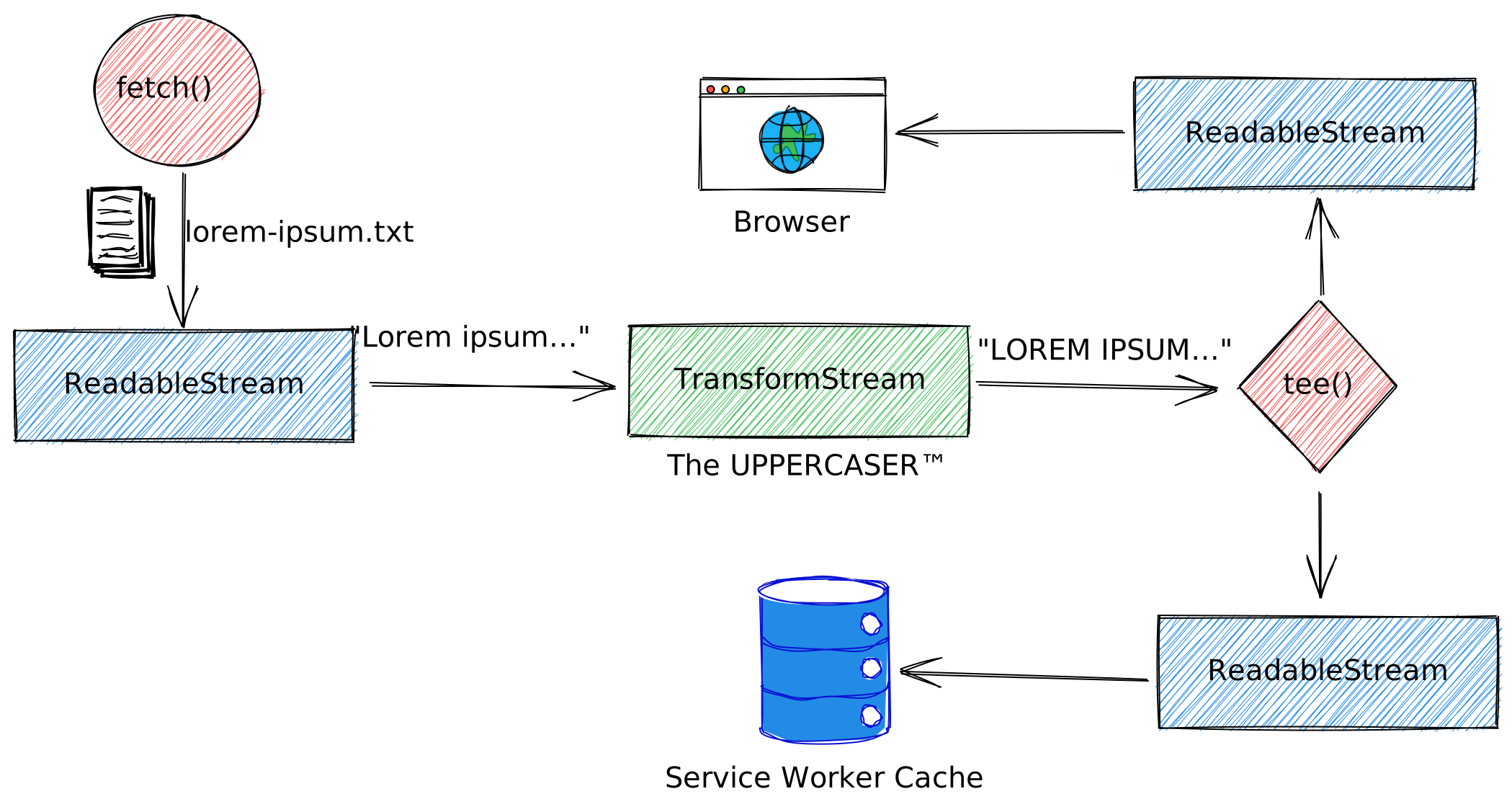 A pipe chain routing a readable stream going from a call, to the fetch API, through a transform stream, then teed and sent to both a browser for the first resulting readable stream and to the service worker cache for the second resulting readable stream.
## The mechanics of a readable stream
A readable stream is a data source represented in JavaScript by a
[`ReadableStream`](https://developer.mozilla.org/docs/Web/API/ReadableStream) object that
flows from an underlying source. The
[`ReadableStream()`](https://developer.mozilla.org/docs/Web/API/ReadableStream/ReadableStream)
constructor creates and returns a readable stream object from the given handlers. There are two
types of underlying source:
- **Push sources** constantly push data at you when you have accessed them, and it is up to you to start, pause, or cancel access to the stream. Examples include live video streams, server-sent events, or WebSockets.
- **Pull sources** require you to explicitly request data from them once connected to. Examples include HTTP operations via `fetch()` or `XMLHttpRequest` calls.
Stream data is read sequentially in small pieces called **chunks** .
The chunks placed in a stream are said to be **enqueued** . This means they are waiting in a queue
ready to be read. An **internal queue** keeps track of the chunks that have not yet been read.
A **queuing strategy** is an object that determines how a stream should signal backpressure based on
the state of its internal queue. The queuing strategy assigns a size to each chunk, and compares the
total size of all chunks in the queue to a specified number, known as the **high water mark**.
The chunks inside the stream are read by a **reader** . This reader retrieves the data one chunk at a
time, allowing you to do whatever kind of operation you want to do on it. The reader plus the other
processing code that goes along with it is called a **consumer**.
The next construct in this context is called a **controller**. Each readable stream has an associated
controller that, as the name suggests, allows you to control the stream.
Only one reader can read a stream at a time; when a reader is created and starts reading a stream
(that is, becomes an **active reader** ), it is **locked** to it. If you want another reader to take over
reading your stream, you typically need to **release** the first reader before you do anything else
(although you can **tee** streams).
### Creating a readable stream
You create a readable stream by calling its constructor
[`ReadableStream()`](https://developer.mozilla.org/docs/Web/API/ReadableStream/ReadableStream).
The constructor has an optional argument `underlyingSource`, which represents an object
with methods and properties that define how the constructed stream instance will behave.
#### The `underlyingSource`
This can use the following optional, developer-defined methods:
- `start(controller)`: Called immediately when the object is constructed. The method can access the stream source, and do anything else required to set up the stream functionality. If this process is to be done asynchronously, the method can return a promise to signal success or failure. The `controller` parameter passed to this method is a [`ReadableStreamDefaultController`](https://developer.mozilla.org/docs/Web/API/ReadableStreamDefaultController).
- `pull(controller)`: Can be used to control the stream as more chunks are fetched. It is called repeatedly as long as the stream's internal queue of chunks is not full, up until the queue reaches its high water mark. If the result of calling `pull()` is a promise, `pull()` will not be called again until said promise fulfills. If the promise rejects, the stream will become errored.
- `cancel(reason)`: Called when the stream consumer cancels the stream.
```javascript
const readableStream = new ReadableStream({
start(controller) {
/* ... */
},
pull(controller) {
/* ... */
},
cancel(reason) {
/* ... */
},
});
```
The `ReadableStreamDefaultController` supports the following methods:
- [`ReadableStreamDefaultController.close()`](https://developer.mozilla.org/docs/Web/API/ReadableStreamDefaultController/close) closes the associated stream.
- [`ReadableStreamDefaultController.enqueue()`](https://developer.mozilla.org/docs/Web/API/ReadableStreamDefaultController/enqueue) enqueues a given chunk in the associated stream.
- [`ReadableStreamDefaultController.error()`](https://developer.mozilla.org/docs/Web/API/ReadableStreamDefaultController/error) causes any future interactions with the associated stream to error.
```javascript
/* ... */
start(controller) {
controller.enqueue('The first chunk!');
},
/* ... */
```
#### The `queuingStrategy`
The second, likewise optional, argument of the `ReadableStream()` constructor is `queuingStrategy`.
It is an object that optionally defines a queuing strategy for the stream, which takes two
parameters:
- `highWaterMark`: A non-negative number indicating the high water mark of the stream using this queuing strategy.
- `size(chunk)`: A function that computes and returns the finite non-negative size of the given chunk value. The result is used to determine backpressure, manifesting via the appropriate `ReadableStreamDefaultController.desiredSize` property. It also governs when the underlying source's `pull()` method is called.
```javascript
const readableStream = new ReadableStream({
/* ... */
},
{
highWaterMark: 10,
size(chunk) {
return chunk.length;
},
},
);
```
> [!NOTE]
> **Note:** You could define your own custom `queuingStrategy`, or use an instance of [`ByteLengthQueuingStrategy`](https://developer.mozilla.org/docs/Web/API/ByteLengthQueuingStrategy) or [`CountQueuingStrategy`](https://developer.mozilla.org/docs/Web/API/CountQueuingStrategy) for this object's value. If no `queuingStrategy` is supplied, the default used is the same as a `CountQueuingStrategy` with a `highWaterMark` of `1`.
#### The `getReader()` and `read()` methods
To read from a readable stream, you need a reader, which will be a
[`ReadableStreamDefaultReader`](https://developer.mozilla.org/docs/Web/API/ReadableStreamDefaultReader).
The `getReader()` method of the `ReadableStream` interface creates a reader and locks the stream to
it. While the stream is locked, no other reader can be acquired until this one is released.
The [`read()`](https://developer.mozilla.org/docs/Web/API/ReadableStreamDefaultReader/read)
method of the `ReadableStreamDefaultReader` interface returns a promise providing access to the next
chunk in the stream's internal queue. It fulfills or rejects with a result depending on the state of
the stream. The different possibilities are as follows:
- If a chunk is available, the promise will be fulfilled with an object of the form
`{ value: chunk, done: false }`.
- If the stream becomes closed, the promise will be fulfilled with an object of the form
`{ value: undefined, done: true }`.
- If the stream becomes errored, the promise will be rejected with the relevant error.
```javascript
const reader = readableStream.getReader();
while (true) {
const { done, value } = await reader.read();
if (done) {
console.log('The stream is done.');
break;
}
console.log('Just read a chunk:', value);
}
```
#### The `locked` property
You can check if a readable stream is locked by accessing its
[`ReadableStream.locked`](https://developer.mozilla.org/docs/Web/API/ReadableStream/locked)
property.
```javascript
const locked = readableStream.locked;
console.log(`The stream is ${locked ? 'indeed' : 'not'} locked.`);
```
### Readable stream code samples
The following code sample shows all the steps in action. First, create a
`ReadableStream` that in its `underlyingSource` argument (that is, the `TimestampSource` class) defines a `start()` method.
This method tells the stream's `controller` to
`enqueue()` a timestamp every second during ten seconds.
Finally, it tells the controller to `close()` the stream. You consume this
stream by creating a reader via the `getReader()` method and calling `read()` until the stream is
`done`.
```javascript
class TimestampSource {
#interval
start(controller) {
this.#interval = setInterval(() => {
const string = new Date().toLocaleTimeString();
// Add the string to the stream.
controller.enqueue(string);
console.log(`Enqueued ${string}`);
}, 1_000);
setTimeout(() => {
clearInterval(this.#interval);
// Close the stream after 10s.
controller.close();
}, 10_000);
}
cancel() {
// This is called if the reader cancels.
clearInterval(this.#interval);
}
}
const stream = new ReadableStream(new TimestampSource());
async function concatStringStream(stream) {
let result = '';
const reader = stream.getReader();
while (true) {
// The `read()` method returns a promise that
// resolves when a value has been received.
const { done, value } = await reader.read();
// Result objects contain two properties:
// `done` - `true` if the stream has already given you all its data.
// `value` - Some data. Always `undefined` when `done` is `true`.
if (done) return result;
result += value;
console.log(`Read ${result.length} characters so far`);
console.log(`Most recently read chunk: ${value}`);
}
}
concatStringStream(stream).then((result) => console.log('Stream complete', result));
```
### Asynchronous iteration
Checking upon each `read()` loop iteration if the stream is `done` may not be the most convenient API.
Luckily there will soon be a better way to do this: asynchronous iteration.
```javascript
for await (const chunk of stream) {
console.log(chunk);
}
```
> [!CAUTION]
> **Caution:** Asynchronous iteration is not yet implemented by all browsers. See [the compatibility section of Mozilla's ReadableStream page](https://developer.mozilla.org/docs/Web/API/ReadableStream#browser_compatibility) for current information.
A workaround to use asynchronous iteration today is to implement the behavior with a polyfill.
```javascript
if (!ReadableStream.prototype[Symbol.asyncIterator]) {
ReadableStream.prototype[Symbol.asyncIterator] = async function* () {
const reader = this.getReader();
try {
while (true) {
const {done, value} = await reader.read();
if (done) {
return;
}
yield value;
}
}
finally {
reader.releaseLock();
}
}
}
```
### Teeing a readable stream
The [`tee()`](https://developer.mozilla.org/docs/Web/API/ReadableStream/tee) method of the
`ReadableStream` interface tees the current readable stream, returning a two-element array
containing the two resulting branches as new `ReadableStream` instances. This allows
two readers to read a stream simultaneously. You might do this, for example, in a service worker if
you want to fetch a response from the server and stream it to the browser, but also stream it to the
service worker cache. Since a response body cannot be consumed more than once, you need two copies
to do this. To cancel the stream, you then need to cancel both resulting branches. Teeing a stream
will generally lock it for the duration, preventing other readers from locking it.
```javascript
const readableStream = new ReadableStream({
start(controller) {
// Called by constructor.
console.log('[start]');
controller.enqueue('a');
controller.enqueue('b');
controller.enqueue('c');
},
pull(controller) {
// Called `read()` when the controller's queue is empty.
console.log('[pull]');
controller.enqueue('d');
controller.close();
},
cancel(reason) {
// Called when the stream is canceled.
console.log('[cancel]', reason);
},
});
// Create two `ReadableStream`s.
const [streamA, streamB] = readableStream.tee();
// Read streamA iteratively one by one. Typically, you
// would not do it this way, but you certainly can.
const readerA = streamA.getReader();
console.log('[A]', await readerA.read()); //=> {value: "a", done: false}
console.log('[A]', await readerA.read()); //=> {value: "b", done: false}
console.log('[A]', await readerA.read()); //=> {value: "c", done: false}
console.log('[A]', await readerA.read()); //=> {value: "d", done: false}
console.log('[A]', await readerA.read()); //=> {value: undefined, done: true}
// Read streamB in a loop. This is the more common way
// to read data from the stream.
const readerB = streamB.getReader();
while (true) {
const result = await readerB.read();
if (result.done) break;
console.log('[B]', result);
}
```
## Readable byte streams
For streams representing bytes, an extended version of the readable stream is provided to handle
bytes efficiently, in particular by minimizing copies. Byte streams allow for bring-your-own-buffer
(BYOB) readers to be acquired. The default implementation can give a range of different outputs such
as strings or array buffers in the case of WebSockets, whereas byte streams guarantee byte output.
In addition, BYOB readers have stability benefits. This is
because if a buffer detaches, it can guarantee that one does not write into the same buffer twice,
hence avoiding race conditions. BYOB readers can reduce the number of times the browser needs to run
garbage collection, because it can reuse buffers.
### Creating a readable byte stream
You can create a readable byte stream by passing an additional `type` parameter to the
`ReadableStream()` constructor.
```javascript
new ReadableStream({ type: 'bytes' });
```
#### The `underlyingSource`
The underlying source of a readable byte stream is given a `ReadableByteStreamController` to
manipulate. Its `ReadableByteStreamController.enqueue()` method takes a `chunk` argument whose value
is an `ArrayBufferView`. The property `ReadableByteStreamController.byobRequest` returns the current
BYOB pull request, or null if there is none. Finally, the `ReadableByteStreamController.desiredSize`
property returns the desired size to fill the controlled stream's internal queue.
### The `queuingStrategy`
The second, likewise optional, argument of the `ReadableStream()` constructor is `queuingStrategy`.
It is an object that optionally defines a queuing strategy for the stream, which takes one
parameter:
- `highWaterMark`: A non-negative number of bytes indicating the high water mark of the stream using this queuing strategy. This is used to determine backpressure, manifesting via the appropriate `ReadableByteStreamController.desiredSize` property. It also governs when the underlying source's `pull()` method is called.
> [!NOTE]
> **Note:** Unlike queuing strategies for other stream types, a queuing strategy for a readable byte stream does not have a `size(chunk)` function. The size of each chunk is always determined by its `byteLength` property.
> [!NOTE]
> **Note:** If no `queuingStrategy` is supplied, the default used is one with a `highWaterMark` of `0`.
#### The `getReader()` and `read()` methods
You can then get access to a `ReadableStreamBYOBReader` by setting the `mode` parameter accordingly:
`ReadableStream.getReader({ mode: "byob" })`. This allows for more precise control over buffer
allocation in order to avoid copies. To read from the byte stream, you need to call
`ReadableStreamBYOBReader.read(view)`, where `view` is an
[`ArrayBufferView`](https://developer.mozilla.org/docs/Web/API/ArrayBufferView).
#### Readable byte stream code sample
```javascript
const reader = readableStream.getReader({ mode: "byob" });
let startingAB = new ArrayBuffer(1_024);
const buffer = await readInto(startingAB);
console.log("The first 1024 bytes, or less:", buffer);
async function readInto(buffer) {
let offset = 0;
while (offset < buffer.byteLength) {
const { value: view, done } =
await reader.read(new Uint8Array(buffer, offset, buffer.byteLength - offset));
buffer = view.buffer;
if (done) {
break;
}
offset += view.byteLength;
}
return buffer;
}
```
The following function returns readable byte streams that allow for efficient zero-copy reading of a
randomly generated array. Instead of using a predetermined chunk size of 1,024, it attempts to fill
the developer-supplied buffer, allowing for full control.
```javascript
const DEFAULT_CHUNK_SIZE = 1_024;
function makeReadableByteStream() {
return new ReadableStream({
type: 'bytes',
pull(controller) {
// Even when the consumer is using the default reader,
// the auto-allocation feature allocates a buffer and
// passes it to us via `byobRequest`.
const view = controller.byobRequest.view;
view = crypto.getRandomValues(view);
controller.byobRequest.respond(view.byteLength);
},
autoAllocateChunkSize: DEFAULT_CHUNK_SIZE,
});
}
```
## The mechanics of a writable stream
A writable stream is a destination into which you can write data, represented in JavaScript by a
[`WritableStream`](https://developer.mozilla.org/docs/Web/API/WritableStream) object. This
serves as an abstraction over the top of an **underlying sink**---a lower-level I/O sink into which
raw data is written.
The data is written to the stream via a **writer** , one chunk at a time. A chunk can take a
multitude of forms, just like the chunks in a reader. You can use whatever code you like to produce
the chunks ready for writing; the writer plus the associated code is called a **producer**.
When a writer is created and starts writing to a stream (an **active writer** ), it is said to be
**locked** to it. Only one writer can write to a writable stream at one time. If you want another
writer to start writing to your stream, you typically need to release it, before you then attach
another writer to it.
An **internal queue** keeps track of the chunks that have been written to the stream but not yet
been processed by the underlying sink.
A **queuing strategy** is an object that determines how a stream should signal backpressure based on
the state of its internal queue. The queuing strategy assigns a size to each chunk, and compares the
total size of all chunks in the queue to a specified number, known as the **high water mark**.
The final construct is called a **controller**. Each writable stream has an associated controller that
allows you to control the stream (for example, to abort it).
### Creating a writable stream
The [`WritableStream`](https://developer.mozilla.org/docs/Web/API/WritableStream) interface of
the Streams API provides a standard abstraction for writing streaming data to a destination, known
as a sink. This object comes with built-in backpressure and queuing. You create a writable stream by
calling its constructor
[`WritableStream()`](https://developer.mozilla.org/docs/Web/API/WritableStream/WritableStream).
It has an optional `underlyingSink` parameter, which represents an object
with methods and properties that define how the constructed stream instance will behave.
#### The `underlyingSink`
The `underlyingSink` can include the following optional, developer-defined methods. The `controller`
parameter passed to some of the methods is a
[`WritableStreamDefaultController`](https://developer.mozilla.org/docs/Web/API/WritableStreamDefaultController).
- `start(controller)`: This method is called immediately when the object is constructed. The contents of this method should aim to get access to the underlying sink. If this process is to be done asynchronously, it can return a promise to signal success or failure.
- `write(chunk, controller)`: This method will be called when a new chunk of data (specified in the `chunk` parameter) is ready to be written to the underlying sink. It can return a promise to signal success or failure of the write operation. This method will be called only after previous writes have succeeded, and never after the stream is closed or aborted.
- `close(controller)`: This method will be called if the app signals that it has finished writing chunks to the stream. The contents should do whatever is necessary to finalize writes to the underlying sink, and release access to it. If this process is asynchronous, it can return a promise to signal success or failure. This method will be called only after all queued-up writes have succeeded.
- `abort(reason)`: This method will be called if the app signals that it wishes to abruptly close the stream and put it in an errored state. It can clean up any held resources, much like `close()`, but `abort()` will be called even if writes are queued up. Those chunks will be thrown away. If this process is asynchronous, it can return a promise to signal success or failure. The `reason` parameter contains a `DOMString` describing why the stream was aborted.
```javascript
const writableStream = new WritableStream({
start(controller) {
/* ... */
},
write(chunk, controller) {
/* ... */
},
close(controller) {
/* ... */
},
abort(reason) {
/* ... */
},
});
```
The
[`WritableStreamDefaultController`](https://developer.mozilla.org/docs/Web/API/WritableStreamDefaultController)
interface of the Streams API represents a controller allowing control of a `WritableStream`'s state
during set up, as more chunks are submitted for writing, or at the end of writing. When constructing
a `WritableStream`, the underlying sink is given a corresponding `WritableStreamDefaultController`
instance to manipulate. The `WritableStreamDefaultController` has only one method:
[`WritableStreamDefaultController.error()`](https://developer.mozilla.org/docs/Web/API/WritableStreamDefaultController/error),
which causes any future interactions with the associated stream to error.
`WritableStreamDefaultController` also supports a `signal` property which returns an instance of
[`AbortSignal`](https://developer.mozilla.org/docs/Web/API/AbortSignal),
allowing a `WritableStream` operation to be stopped if needed.
```javascript
/* ... */
write(chunk, controller) {
try {
// Try to do something dangerous with `chunk`.
} catch (error) {
controller.error(error.message);
}
},
/* ... */
```
#### The `queuingStrategy`
The second, likewise optional, argument of the `WritableStream()` constructor is `queuingStrategy`.
It is an object that optionally defines a queuing strategy for the stream, which takes two
parameters:
- `highWaterMark`: A non-negative number indicating the high water mark of the stream using this queuing strategy.
- `size(chunk)`: A function that computes and returns the finite non-negative size of the given chunk value. The result is used to determine backpressure, manifesting via the appropriate `WritableStreamDefaultWriter.desiredSize` property.
> [!NOTE]
> **Note:** You could define your own custom `queuingStrategy`, or use an instance of [`ByteLengthQueuingStrategy`](https://developer.mozilla.org/docs/Web/API/ByteLengthQueuingStrategy) or [`CountQueuingStrategy`](https://developer.mozilla.org/docs/Web/API/CountQueuingStrategy) for this object value. If no `queuingStrategy` is supplied, the default used is the same as a `CountQueuingStrategy` with a `highWaterMark` of `1`.
#### The `getWriter()` and `write()` methods
To write to a writable stream, you need a writer, which will be a
`WritableStreamDefaultWriter`. The `getWriter()` method of the `WritableStream` interface returns a
new instance of `WritableStreamDefaultWriter` and locks the stream to that instance. While the
stream is locked, no other writer can be acquired until the current one is released.
The [`write()`](https://developer.mozilla.org/docs/Web/API/WritableStreamDefaultWriter/write)
method of the
[`WritableStreamDefaultWriter`](https://developer.mozilla.org/docs/Web/API/WritableStreamDefaultWriter)
interface writes a passed chunk of data to a `WritableStream` and its underlying sink, then returns
a promise that resolves to indicate the success or failure of the write operation. Note that what
"success" means is up to the underlying sink; it might indicate that the chunk has been accepted,
and not necessarily that it is safely saved to its ultimate destination.
```javascript
const writer = writableStream.getWriter();
const resultPromise = writer.write('The first chunk!');
```
#### The `locked` property
You can check if a writable stream is locked by accessing its
[`WritableStream.locked`](https://developer.mozilla.org/docs/Web/API/WritableStream/locked)
property.
```javascript
const locked = writableStream.locked;
console.log(`The stream is ${locked ? 'indeed' : 'not'} locked.`);
```
### Writable stream code sample
The following code sample shows all steps in action.
```javascript
const writableStream = new WritableStream({
start(controller) {
console.log('[start]');
},
async write(chunk, controller) {
console.log('[write]', chunk);
// Wait for next write.
await new Promise((resolve) => setTimeout(() => {
document.body.textContent += chunk;
resolve();
}, 1_000));
},
close(controller) {
console.log('[close]');
},
abort(reason) {
console.log('[abort]', reason);
},
});
const writer = writableStream.getWriter();
const start = Date.now();
for (const char of 'abcdefghijklmnopqrstuvwxyz') {
// Wait to add to the write queue.
await writer.ready;
console.log('[ready]', Date.now() - start, 'ms');
// The Promise is resolved after the write finishes.
writer.write(char);
}
await writer.close();
```
### Piping a readable stream to a writable stream
A readable stream can be piped to a writable stream through the readable stream's
[`pipeTo()`](https://developer.mozilla.org/docs/Web/API/ReadableStream/pipeTo) method.
`ReadableStream.pipeTo()` pipes the current `ReadableStream`to a given `WritableStream` and returns a
promise that fulfills when the piping process completes successfully, or rejects if any errors were
encountered.
```javascript
const readableStream = new ReadableStream({
start(controller) {
// Called by constructor.
console.log('[start readable]');
controller.enqueue('a');
controller.enqueue('b');
controller.enqueue('c');
},
pull(controller) {
// Called when controller's queue is empty.
console.log('[pull]');
controller.enqueue('d');
controller.close();
},
cancel(reason) {
// Called when the stream is canceled.
console.log('[cancel]', reason);
},
});
const writableStream = new WritableStream({
start(controller) {
// Called by constructor
console.log('[start writable]');
},
async write(chunk, controller) {
// Called upon writer.write()
console.log('[write]', chunk);
// Wait for next write.
await new Promise((resolve) => setTimeout(() => {
document.body.textContent += chunk;
resolve();
}, 1_000));
},
close(controller) {
console.log('[close]');
},
abort(reason) {
console.log('[abort]', reason);
},
});
await readableStream.pipeTo(writableStream);
console.log('[finished]');
```
## Creating a transform stream
The `TransformStream` interface of the Streams API represents a set of transformable data. You
create a transform stream by calling its constructor `TransformStream()`, which creates and returns
a transform stream object from the given handlers. The `TransformStream()` constructor accepts as
its first argument an optional JavaScript object representing the `transformer`. Such objects can
contain any of the following methods:
### The `transformer`
- `start(controller)`: This method is called immediately when the object is constructed. Typically this is used to enqueue prefix chunks, using `controller.enqueue()`. Those chunks will be read from the readable side but do not depend on any writes to the writable side. If this initial process is asynchronous, for example because it takes some effort to acquire the prefix chunks, the function can return a promise to signal success or failure; a rejected promise will error the stream. Any thrown exceptions will be re-thrown by the `TransformStream()` constructor.
- `transform(chunk, controller)`: This method is called when a new chunk originally written to the writable side is ready to be transformed. The stream implementation ensures that this function will be called only after previous transforms have succeeded, and never before `start()` has completed or after `flush()` has been called. This function performs the actual transformation work of the transform stream. It can enqueue the results using `controller.enqueue()`. This permits a single chunk written to the writable side to result in zero or multiple chunks on the readable side, depending on how many times `controller.enqueue()` is called. If the process of transforming is asynchronous, this function can return a promise to signal success or failure of the transformation. A rejected promise will error both the readable and writable sides of the transform stream. If no `transform()` method is supplied, the identity transform is used, which enqueues chunks unchanged from the writable side to the readable side.
- `flush(controller)`: This method is called after all chunks written to the writable side have been transformed by successfully passing through `transform()`, and the writable side is about to be closed. Typically this is used to enqueue suffix chunks to the readable side, before that too becomes closed. If the flushing process is asynchronous, the function can return a promise to signal success or failure; the result will be communicated to the caller of `stream.writable.write()`. Additionally, a rejected promise will error both the readable and writable sides of the stream. Throwing an exception is treated the same as returning a rejected promise.
```javascript
const transformStream = new TransformStream({
start(controller) {
/* ... */
},
transform(chunk, controller) {
/* ... */
},
flush(controller) {
/* ... */
},
});
```
### The `writableStrategy` and `readableStrategy` queueing strategies
The second and third optional parameters of the `TransformStream()` constructor are optional
`writableStrategy` and `readableStrategy` queueing strategies. They are defined as outlined in the
[readable](https://web.dev/articles/streams.md.txt#the_queuingstrategy_2) and the [writable](https://web.dev/articles/streams.md.txt#the_mechanics_of_a_writable_stream) stream
sections respectively.
### Transform stream code sample
The following code sample shows a transform stream in action.
```javascript
// Note that `TextEncoderStream` and `TextDecoderStream` exist now.
// This example shows how you would have done it before.
const textEncoderStream = new TransformStream({
transform(chunk, controller) {
console.log('[transform]', chunk);
controller.enqueue(new TextEncoder().encode(chunk));
},
flush(controller) {
console.log('[flush]');
controller.terminate();
},
});
(async () => {
const readStream = textEncoderStream.readable;
const writeStream = textEncoderStream.writable;
const writer = writeStream.getWriter();
for (const char of 'abc') {
writer.write(char);
}
writer.close();
const reader = readStream.getReader();
for (let result = await reader.read(); !result.done; result = await reader.read()) {
console.log('[value]', result.value);
}
})();
```
### Piping a readable stream through a transform stream
The [`pipeThrough()`](https://developer.mozilla.org/docs/Web/API/ReadableStream/pipeThrough)
method of the `ReadableStream` interface provides a chainable way of piping the current stream
through a transform stream or any other writable/readable pair. Piping a stream will generally lock
it for the duration of the pipe, preventing other readers from locking it.
```javascript
const transformStream = new TransformStream({
transform(chunk, controller) {
console.log('[transform]', chunk);
controller.enqueue(new TextEncoder().encode(chunk));
},
flush(controller) {
console.log('[flush]');
controller.terminate();
},
});
const readableStream = new ReadableStream({
start(controller) {
// called by constructor
console.log('[start]');
controller.enqueue('a');
controller.enqueue('b');
controller.enqueue('c');
},
pull(controller) {
// called read when controller's queue is empty
console.log('[pull]');
controller.enqueue('d');
controller.close(); // or controller.error();
},
cancel(reason) {
// called when rs.cancel(reason)
console.log('[cancel]', reason);
},
});
(async () => {
const reader = readableStream.pipeThrough(transformStream).getReader();
for (let result = await reader.read(); !result.done; result = await reader.read()) {
console.log('[value]', result.value);
}
})();
```
The next code sample (a bit contrived) shows how you could implement a "shouting" version of `fetch()`
that uppercases all text by consuming the returned response promise
[as a stream](https://developer.mozilla.org/docs/Web/API/Streams_API/Using_readable_streams#consuming_a_fetch_as_a_stream)
and uppercasing chunk by chunk. The advantage of this approach is that you do not need to wait for
the whole document to be downloaded, which can make a huge difference when dealing with large files.
```javascript
function upperCaseStream() {
return new TransformStream({
transform(chunk, controller) {
controller.enqueue(chunk.toUpperCase());
},
});
}
function appendToDOMStream(el) {
return new WritableStream({
write(chunk) {
el.append(chunk);
}
});
}
fetch('./lorem-ipsum.txt').then((response) =>
response.body
.pipeThrough(new TextDecoderStream())
.pipeThrough(upperCaseStream())
.pipeTo(appendToDOMStream(document.body))
);
```
## Demo
The demo below shows readable, writable, and transform streams in action. It also includes examples
of `pipeThrough()` and `pipeTo()` pipe chains, and also demonstrates `tee()`. You can optionally run
the [demo](https://googlechrome.github.io/samples/streams-demo) in its own window or view the
[source code](https://github.com/GoogleChrome/samples/tree/gh-pages/streams-demo).
## Useful streams available in the browser
There are a number of useful streams built right into the browser. You can easily create a
`ReadableStream` from a blob. The [`Blob`](https://developer.mozilla.org/docs/Web/API/Blob)
interface's [stream()](https://developer.mozilla.org/docs/Web/API/Blob/stream) method returns
a `ReadableStream` which upon reading returns the data contained within the blob. Also recall that a
[`File`](https://developer.mozilla.org/docs/Web/API/File) object is a specific kind of a
`Blob`, and can be used in any context that a blob can.
```javascript
const readableStream = new Blob(['hello world'], { type: 'text/plain' }).stream();
```
The streaming variants of `TextDecoder.decode()` and `TextEncoder.encode()` are called
[`TextDecoderStream`](https://encoding.spec.whatwg.org/#interface-textdecoderstream) and
[`TextEncoderStream`](https://encoding.spec.whatwg.org/#interface-textencoderstream) respectively.
```javascript
const response = await fetch('https://streams.spec.whatwg.org/');
const decodedStream = response.body.pipeThrough(new TextDecoderStream());
```
Compressing or decompressing a file is easy with the
[`CompressionStream`](https://wicg.github.io/compression/#compression-stream) and
[`DecompressionStream`](https://wicg.github.io/compression/#decompression-stream) transform streams
respectively. The code sample below shows how you can download the Streams spec, compress (gzip) it
right in the browser, and write the compressed file directly to disk.
```javascript
const response = await fetch('https://streams.spec.whatwg.org/');
const readableStream = response.body;
const compressedStream = readableStream.pipeThrough(new CompressionStream('gzip'));
const fileHandle = await showSaveFilePicker();
const writableStream = await fileHandle.createWritable();
compressedStream.pipeTo(writableStream);
```
The [File System Access API](https://web.dev/file-system-access)'s
[`FileSystemWritableFileStream`](https://wicg.github.io/file-system-access/#filesystemwritablefilestream)
and the experimental [`fetch()` request streams](https://developer.chrome.com/articles/fetch-streaming-requests#using-with-writable-streams) are
examples of writable streams in the wild.
The [Serial API](https://web.dev/serial) makes heavy use of both readable and writable streams.
```javascript
// Prompt user to select any serial port.
const port = await navigator.serial.requestPort();
// Wait for the serial port to open.
await port.open({ baudRate: 9_600 });
const reader = port.readable.getReader();
// Listen to data coming from the serial device.
while (true) {
const { value, done } = await reader.read();
if (done) {
// Allow the serial port to be closed later.
reader.releaseLock();
break;
}
// value is a Uint8Array.
console.log(value);
}
// Write to the serial port.
const writer = port.writable.getWriter();
const data = new Uint8Array([104, 101, 108, 108, 111]); // hello
await writer.write(data);
// Allow the serial port to be closed later.
writer.releaseLock();
```
Finally, the [`WebSocketStream`](https://web.dev/websocketstream) API integrates streams with the WebSocket API.
```javascript
const wss = new WebSocketStream(WSS_URL);
const { readable, writable } = await wss.connection;
const reader = readable.getReader();
const writer = writable.getWriter();
while (true) {
const { value, done } = await reader.read();
if (done) {
break;
}
const result = await process(value);
await writer.write(result);
}
```
## Useful resources
- [Streams specification](https://streams.spec.whatwg.org/)
- [Accompanying demos](https://streams.spec.whatwg.org/demos/)
- [Streams polyfill](https://github.com/MattiasBuelens/web-streams-polyfill)
- [2016---the year of web streams](https://jakearchibald.com/2016/streams-ftw/)
- [Async iterators and generators](https://jakearchibald.com/2017/async-iterators-and-generators/)
- [Stream Visualizer](https://surma.dev/lab/whatwg-stream-visualizer/lab.html)
## Acknowledgements
This article was reviewed by
[Jake Archibald](https://jakearchibald.com/),
[François Beaufort](https://github.com/beaufortfrancois),
[Sam Dutton](https://samdutton.com/),
[Mattias Buelens](https://github.com/MattiasBuelens),
[Surma](https://surma.dev/),
[Joe Medley](https://github.com/jpmedley), and
[Adam Rice](https://github.com/ricea).
[Jake Archibald](https://jakearchibald.com/)'s blog posts have helped me a lot in understanding
streams. Some of the code samples are inspired by GitHub user
[@bellbind](https://gist.github.com/bellbind/f6a7ba88e9f1a9d749fec4c9289163ac)'s explorations and
parts of the prose build heavily on the
[MDN Web Docs on Streams](https://developer.mozilla.org/docs/Web/API/Streams_API). The
[Streams Standard](https://streams.spec.whatwg.org/)'s
[authors](https://github.com/whatwg/streams/graphs/contributors) have done a tremendous job on
writing this spec.