 Eiji Kitamura [X](https://twitter.com/agektmr) [GitHub](https://github.com/agektmr) [Mastodon](https://infosec.exchange/@agektmr) [Bluesky](https://bsky.app/profile/agektmr.com)
Published: June 5, 2025
Passkeys are designed to revolutionize the sign-in experience, offering a
simpler, faster, and more secure alternative to passwords. This checklist will
guide you through the key aspects of implementing passkeys to achieve optimal
user experience (UX) outcomes.
## How to use this checklist
This checklist is intended for developers and product teams implementing
passkeys in their authentication flows. Use it to:
- Validate that your implementation follows modern passkey UX best practices described in the following articles.
- Identify required and optional elements that improve usability, security, and compatibility.
- Check your implementation during development and before deployment.
- Align with best practices that support user adoption and system interoperability.
These help you provide a smooth, secure experience for end users.
## Passkeys registration
To make a smooth transition from passwords to passkeys on your website, having a
sophisticated passkey registration capability is the key. Follow the
instructions described in
[Create a passkey for passwordless logins](https://web.dev/articles/passkey-registration)
to build a passkey registration feature on your website. Here are the things you
should check in addition to the basic passkey registration features:
✅ Specify `"platform"` as the authenticator attachment value to pass to
`navigator.credentials.create()` for a promoted passkey creation.
- Provide optimized and frictionless passkey creation flow for those who are creating a passkey reactively.
✅ Verify the user with the strongest authentication method available for they
can use before allowing them to create a passkey.
- This is important to prevent an attacker from creating a passkey on a hijacked account.
✅ Prevent creating duplicate passkeys *for the same passkey provider* using
[`excludeCredentials`](https://web.dev/articles/webauthn-exclude-credentials).
- Many passkey providers accommodate only one passkey per an account and an RP ID. Avoid creating duplicates.
✅ [Use the AAGUID to identify the passkey provider](https://web.dev/articles/webauthn-aaguid)
and to name the credential for the user.
- Associating a passkey with its passkey provider is an intuitive way to present a credential where it's possible.
✅ Signal if an attempt to register a passkey fails with
[`PublicKeyCredential.signalUnknownCredential()`](https://developer.chrome.com/docs/identity/webauthn-signal-api#signal-that-a-credential-does-not-exist).
- Stray passkeys can cause confusion. Let the passkey provider know if the server has failed to register a passkey.
✅ [Send a notification to the
user](https://web.dev/articles/passkey-registration#send_a_notification_to_the_user) after
creating and registering a passkey for their account.
- Make sure the user is aware of a passkey being created, especially when it's done by someone else.
## Passkeys authentication
Accommodating both password users and passkey users without minimal friction can
be a challenge. Follow the instructions described in
[Sign in with a passkey through form autofill](https://web.dev/articles/passkey-form-autofill)
to build a passkey form autofill feature on your website. Here are the things
you should check in addition to the basic passkey authentication features:
✅ Allow users to [sign in with a passkey through form
autofill](https://web.dev/articles/passkey-form-autofill).
- If your website is transitioning from passwords to passkeys, the best approach to accommodate both users is to use the browser's form autofill feature.
✅ Signal when a passkey's matching credential is not found on the backend with
[`PublicKeyCredential.signalUnknownCredential()`](https://developer.chrome.com/docs/identity/webauthn-signal-api#signal-that-a-credential-does-not-exist).
- Stray passkeys can cause confusion. Let the passkey provider know which passkey is not usable so the provider can delete it.
✅ Prompt users to manually create a passkey if the user hasn't created one after
a sign-in.
- If the user hasn't created a passkey yet, encourage them to create one.
✅ [Automatically create a passkey (conditional
create)](https://developer.chrome.com/docs/identity/webauthn-conditional-create)
after the user signs in with a password (and a second factor).
- Expedite user passkey adoption.
✅ Prompt for local passkey creation [if the user has signed in with a
cross-device
passkey](https://web.dev/articles/passkey-form-autofill#encourage_creating_a_new_passkey_after_a_cross-device_authentication).
- Creating a local passkey helps the user sign in without scanning a QR code from the next time.
✅ [Signal the list of available
passkeys](https://developer.chrome.com/docs/identity/webauthn-signal-api#signal-a-list-of-saved-credentials)
and [updated user details (username, display
name)](https://developer.chrome.com/docs/identity/webauthn-signal-api#signal-updated-username-and-display-name)
to the provider after sign-in
- Keeping the passkey list and user details in-sync between the server and the passkey provider improves the user experience.
## Passkeys management
Giving a good grasp of passkeys for the users helps them get a better
understanding of the landscape and control over the passkeys. Follow the
instructions described in
[Help users manage passkeys effectively](https://web.dev/articles/passkey-management)
to build a passkey management feature on your website. Here are the things you
should check:
✅ Allow users to manage passkeys in a [passkey management
page](https://web.dev/articles/passkey-management).
- Create a central place where users can manage their passkeys.
✅ Support [registering multiple
passkeys](https://web.dev/articles/passkey-management#manage_multiple_passkeys).
- An ability to register multiple passkeys helps users prevent themselves from a lock-out without falling back to a weaker authentication method.
✅ Allow users to [add new and flexible types of
passkeys](https://web.dev/articles/passkey-management#allow_creation_of_new_passkeys)
on the management page.
✅ Display the [passkey
name](https://web.dev/articles/passkey-management#display_a_list_of_registered_passkeys).
- Name passkeys based on the AAGUID and provide a tangible visual of the user's passkeys.
✅ Indicate whether a passkey is [syncable or
non-syncable](https://web.dev/articles/passkey-management#display_a_list_of_registered_passkeys).
- Make the user aware when a passkey is not synced.
✅ Allow users to [remove a public
key](https://web.dev/articles/passkey-management#deleting-a-passkey)
from the server.
✅ Signal the list of passkeys when an associated public key is removed from the
server.
- Keeping the passkey list in-sync between the server and the passkey provider improves the user experience.
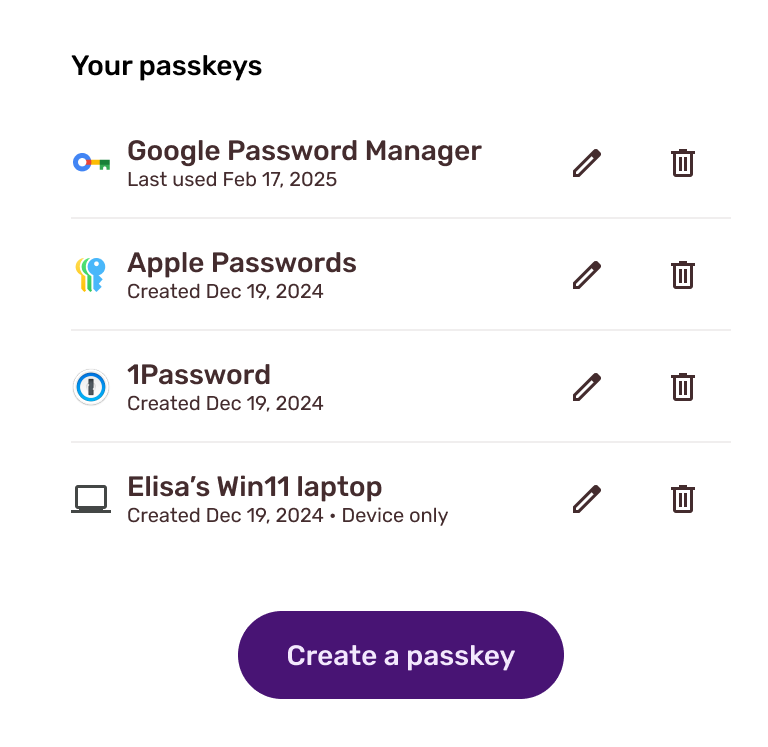 Example of a passkey management page showing good practices.
## Additional considerations
✅ [Signal the updated user details (username, display
name)](https://developer.chrome.com/docs/identity/webauthn-signal-api#signal-updated-username-and-display-name)
when the user updates it.
✅ [Create a passkey instead of a new password when a user "Forgot
password"](https://www.passkeycentral.org/design-guidelines/optional-patterns/create-passkey-after-account-recovery-due-to-forgotten-password).
## Resources
- [Passwordless login with passkeys](https://developers.google.com/identity/passkeys/)
- [Create a passkey for passwordless logins](https://web.dev/articles/passkey-registration)
- [Sign in with a passkey through form autofill](https://web.dev/articles/passkey-form-autofill)
- [Introduction to server-side passkey implementation](https://developers.google.com/identity/passkeys/developer-guides/server-introduction)