The Fetch Priority API indicates the relative priority of resources to the browser. It can enable optimal loading and improve Core Web Vitals.
 Addy Osmani [X](https://twitter.com/addyosmani) [GitHub](https://github.com/addyosmani) [Bluesky](https://bsky.app/profile/addyosmani.bsky.social)  Leena Sohoni [X](https://twitter.com/leena_sohoni)  Patrick Meenan [X](https://twitter.com/patmeenan)  Barry Pollard [X](https://twitter.com/tunetheweb) [GitHub](https://github.com/tunetheweb) [Mastodon](https://mastodon.social/@tunetheweb) [Bluesky](https://bsky.app/profile/tunetheweb.com) [Homepage](https://www.tunetheweb.com)
> [!NOTE]
> **Note:** This feature was originally called Priority Hints but was renamed to Fetch Priority after standardization. See [History](https://web.dev/articles/fetch-priority#history) for more details.
Browser Support
- ' d='M96 183a64 64 0 0 1-23-23L17 64a128 128 0 0 0 111 192l55-96a64 64 0 0 1-87 23Z'/%3E%3Cpath fill='url(%23b)' d='M192 128a64 64 0 0 1-9 32l-55 96A128 128 0 0 0 239 64H128a64 64 0 0 1 64 64Z'/%3E%3Ccircle cx='128' cy='128' r='52' fill='%231a73e8'/%3E%3Cpath fill='url(%23c)' d='M96 73a64 64 0 0 1 32-9h111a128 128 0 0 0-222 0l56 96a64 64 0 0 1 23-87Z'/%3E%3C/svg%3E)
- ' xlink:href='%23A'%3E%3Cstop offset='.76' stop-opacity='0'/%3E%3Cstop offset='.95' stop-opacity='.5'/%3E%3Cstop offset='1'/%3E%3C/radialGradient%3E%3CradialGradient id='F' cx='2523' cy='4680' r='20243' gradientTransform='matrix(-.03715 .99931 -2.12836 -.07913 13579 3530)' xlink:href='%23A'%3E%3Cstop offset='0' stop-color='%2335c1f1'/%3E%3Cstop offset='.11' stop-color='%2334c1ed'/%3E%3Cstop offset='.23' stop-color='%232fc2df'/%3E%3Cstop offset='.31' stop-color='%232bc3d2'/%3E%3Cstop offset='.67' stop-color='%2336c752'/%3E%3C/radialGradient%3E%3CradialGradient id='G' cx='24247' cy='7758' r='9734' gradientTransform='matrix(.28109 .95968 -.78353 .22949 24510 -16292)' xlink:href='%23A'%3E%3Cstop offset='0' stop-color='%2366eb6e'/%3E%3Cstop offset='1' stop-color='%2366eb6e' stop-opacity='0'/%3E%3C/radialGradient%3E%3Cpath id='H' d='M24105 20053a9345 9345 0 01-1053 472 10202 10202 0 01-3590 646c-4732 0-8855-3255-8855-7432 0-1175 680-2193 1643-2729-4280 180-5380 4640-5380 7253 0 7387 6810 8137 8276 8137 791 0 1984-230 2704-456l130-44a12834 12834 0 006660-5282c220-350-168-757-535-565z'/%3E%3Cpath id='I' d='M11571 25141a7913 7913 0 01-2273-2137 8145 8145 0 01-1514-4740 8093 8093 0 013093-6395 8082 8082 0 011373-859c312-148 846-414 1554-404a3236 3236 0 012569 1297 3184 3184 0 01636 1866c0-21 2446-7960-8005-7960-4390 0-8004 4166-8004 7820 0 2319 538 4170 1212 5604a12833 12833 0 007684 6757 12795 12795 0 003908 610c1414 0 2774-233 4045-656a7575 7575 0 01-6278-803z'/%3E%3Cpath id='J' d='M16231 15886c-80 105-330 250-330 566 0 260 170 512 472 723 1438 1003 4149 868 4156 868a5954 5954 0 003027-839 6147 6147 0 001133-850 6180 6180 0 001910-4437c26-2242-796-3732-1133-4392-2120-4141-6694-6525-11668-6525-7011 0-12703 5635-12798 12620 47-3654 3679-6605 7996-6605 350 0 2346 34 4200 1007 1634 858 2490 1894 3086 2921 618 1067 728 2415 728 2952s-271 1333-780 1990z'/%3E%3Cuse fill='url(%23B)' xlink:href='%23H'/%3E%3Cuse fill='url(%23D)' opacity='.35' xlink:href='%23H'/%3E%3Cuse fill='url(%23C)' xlink:href='%23I'/%3E%3Cuse fill='url(%23E)' opacity='.4' xlink:href='%23I'/%3E%3Cuse fill='url(%23F)' xlink:href='%23J'/%3E%3Cuse fill='url(%23G)' xlink:href='%23J'/%3E%3C/svg%3E)
- ' gradientUnits='userSpaceOnUse'%3E%3Cstop offset='.2' stop-color='%239059ff' stop-opacity='0'/%3E%3Cstop offset='.3' stop-color='%238c4ff3' stop-opacity='.1'/%3E%3Cstop offset='.8' stop-color='%237716a8' stop-opacity='.5'/%3E%3Cstop offset='1' stop-color='%236e008b' stop-opacity='.6'/%3E%3C/radialGradient%3E%3CradialGradient id='ff-g' cx='239.1' cy='34.6' r='171.6' gradientUnits='userSpaceOnUse'%3E%3Cstop offset='0' stop-color='%23ffe226'/%3E%3Cstop offset='.1' stop-color='%23ffdb27'/%3E%3Cstop offset='.3' stop-color='%23ffc82a'/%3E%3Cstop offset='.5' stop-color='%23ffa930'/%3E%3Cstop offset='.7' stop-color='%23ff7e37'/%3E%3Cstop offset='.8' stop-color='%23ff7139'/%3E%3C/radialGradient%3E%3CradialGradient id='ff-h' cx='374' cy='-74.3' r='732.2' gradientUnits='userSpaceOnUse'%3E%3Cstop offset='.1' stop-color='%23fff44f'/%3E%3Cstop offset='.5' stop-color='%23ff980e'/%3E%3Cstop offset='.6' stop-color='%23ff5634'/%3E%3Cstop offset='.7' stop-color='%23ff3647'/%3E%3Cstop offset='.9' stop-color='%23e31587'/%3E%3C/radialGradient%3E%3CradialGradient id='ff-i' cx='304.6' cy='7.1' r='536.4' gradientTransform='rotate(84 303 4)' gradientUnits='userSpaceOnUse'%3E%3Cstop offset='0' stop-color='%23fff44f'/%3E%3Cstop offset='.1' stop-color='%23ffe847'/%3E%3Cstop offset='.2' stop-color='%23ffc830'/%3E%3Cstop offset='.3' stop-color='%23ff980e'/%3E%3Cstop offset='.4' stop-color='%23ff8b16'/%3E%3Cstop offset='.5' stop-color='%23ff672a'/%3E%3Cstop offset='.6' stop-color='%23ff3647'/%3E%3Cstop offset='.7' stop-color='%23e31587'/%3E%3C/radialGradient%3E%3CradialGradient id='ff-j' cx='235' cy='98.1' r='457.1' gradientUnits='userSpaceOnUse'%3E%3Cstop offset='.1' stop-color='%23fff44f'/%3E%3Cstop offset='.5' stop-color='%23ff980e'/%3E%3Cstop offset='.6' stop-color='%23ff5634'/%3E%3Cstop offset='.7' stop-color='%23ff3647'/%3E%3Cstop offset='.9' stop-color='%23e31587'/%3E%3C/radialGradient%3E%3CradialGradient id='ff-k' cx='355.7' cy='124.9' r='500.3' gradientUnits='userSpaceOnUse'%3E%3Cstop offset='.1' stop-color='%23fff44f'/%3E%3Cstop offset='.2' stop-color='%23ffe141'/%3E%3Cstop offset='.5' stop-color='%23ffaf1e'/%3E%3Cstop offset='.6' stop-color='%23ff980e'/%3E%3C/radialGradient%3E%3ClinearGradient id='ff-a' x1='446.9' y1='76.8' x2='47.9' y2='461.8' gradientUnits='userSpaceOnUse'%3E%3Cstop offset='.1' stop-color='%23fff44f'/%3E%3Cstop offset='.1' stop-color='%23ffe847'/%3E%3Cstop offset='.2' stop-color='%23ffc830'/%3E%3Cstop offset='.4' stop-color='%23ff980e'/%3E%3Cstop offset='.4' stop-color='%23ff8b16'/%3E%3Cstop offset='.5' stop-color='%23ff672a'/%3E%3Cstop offset='.5' stop-color='%23ff3647'/%3E%3Cstop offset='.7' stop-color='%23e31587'/%3E%3C/linearGradient%3E%3ClinearGradient id='ff-l' x1='442.1' y1='74.8' x2='102.6' y2='414.3' gradientUnits='userSpaceOnUse'%3E%3Cstop offset='.2' stop-color='%23fff44f' stop-opacity='.8'/%3E%3Cstop offset='.3' stop-color='%23fff44f' stop-opacity='.6'/%3E%3Cstop offset='.5' stop-color='%23fff44f' stop-opacity='.2'/%3E%3Cstop offset='.6' stop-color='%23fff44f' stop-opacity='0'/%3E%3C/linearGradient%3E%3C/defs%3E%3Cpath d='M479 166c-11-25-32-52-49-60a249 249 0 0 1 25 73c-27-68-73-95-111-155a255 255 0 0 1-8-14 44 44 0 0 1-4-9 1 1 0 0 0 0-1 1 1 0 0 0-1 0c-60 35-81 101-83 134a120 120 0 0 0-66 25 71 71 0 0 0-6-5 111 111 0 0 1-1-58c-25 11-44 29-58 44-9-12-9-52-8-60l-8 4a175 175 0 0 0-24 21 210 210 0 0 0-22 26 203 203 0 0 0-32 73l-1 2-2 15a229 229 0 0 0-4 34v1a240 240 0 0 0 477 40l1-9c5-41 0-84-15-121zM202 355l3 1-3-1zm55-145zm198-31z' fill='url(%23ff-a)'/%3E%3Cpath d='M479 166c-11-25-32-52-49-60 14 26 22 53 25 72v1a207 207 0 0 1-206 279c-113-3-212-87-231-197-3-17 0-26 2-40-2 11-3 14-4 34v1a240 240 0 0 0 477 40l1-9c5-41 0-84-15-121z' fill='url(%23ff-b)'/%3E%3Cpath d='M479 166c-11-25-32-52-49-60 14 26 22 53 25 72v1a207 207 0 0 1-206 279c-113-3-212-87-231-197-3-17 0-26 2-40-2 11-3 14-4 34v1a240 240 0 0 0 477 40l1-9c5-41 0-84-15-121z' fill='url(%23ff-c)'/%3E%3Cpath d='m362 195 1 1a130 130 0 0 0-22-29C266 92 322 5 331 0c-60 35-81 101-83 134l9-1c45 0 84 25 105 62z' fill='url(%23ff-d)'/%3E%3Cpath d='M257 210c-1 6-22 26-29 26-68 0-80 41-80 41 3 35 28 64 57 79l4 2 7 3a107 107 0 0 0 31 6c120 6 143-143 57-186 22-4 45 5 58 14-21-37-60-62-105-62l-9 1a120 120 0 0 0-66 25l17 16c16 16 58 33 58 35z' fill='url(%23ff-e)'/%3E%3Cpath d='M257 210c-1 6-22 26-29 26-68 0-80 41-80 41 3 35 28 64 57 79l4 2 7 3a107 107 0 0 0 31 6c120 6 143-143 57-186 22-4 45 5 58 14-21-37-60-62-105-62l-9 1a120 120 0 0 0-66 25l17 16c16 16 58 33 58 35z' fill='url(%23ff-f)'/%3E%3Cpath d='m171 151 5 3a111 111 0 0 1-1-58c-25 11-44 29-58 44 1 0 36 0 54 11z' fill='url(%23ff-g)'/%3E%3Cpath d='M18 261a242 242 0 0 0 231 197 207 207 0 0 0 206-279c8 56-20 110-64 146-86 71-169 43-186 31l-3-1c-50-24-71-70-67-110-42 0-57-35-57-35s38-28 89-4c46 22 90 4 90 4 0-2-42-19-58-35l-17-16a71 71 0 0 0-6-5l-5-3c-18-11-52-11-54-11-9-12-9-51-8-60l-8 4a175 175 0 0 0-24 21 210 210 0 0 0-22 26 203 203 0 0 0-32 73c0 1-9 38-5 57z' fill='url(%23ff-h)'/%3E%3Cpath d='M341 167a130 130 0 0 1 22 29 46 46 0 0 1 4 3c55 50 26 121 24 126 44-36 72-90 64-146-27-68-73-95-111-155a255 255 0 0 1-8-14 44 44 0 0 1-4-9 1 1 0 0 0 0-1 1 1 0 0 0-1 0c-9 5-65 92 10 167z' fill='url(%23ff-i)'/%3E%3Cpath d='M367 199a46 46 0 0 0-4-3l-1-1c-13-9-36-18-58-15 86 44 63 193-57 187a107 107 0 0 1-31-6 131 131 0 0 1-11-5c17 12 99 39 186-31 2-5 31-76-24-126z' fill='url(%23ff-j)'/%3E%3Cpath d='M148 277s12-41 80-41c7 0 28-20 29-26s-44 18-90-4c-51-24-89 4-89 4s15 35 57 35c-4 40 16 85 67 110l3 1c-29-15-54-44-57-79z' fill='url(%23ff-k)'/%3E%3Cpath d='M479 166c-11-25-32-52-49-60a249 249 0 0 1 25 73c-27-68-73-95-111-155a255 255 0 0 1-8-14 44 44 0 0 1-4-9 1 1 0 0 0 0-1 1 1 0 0 0-1 0c-60 35-81 101-83 134l9-1c45 0 84 25 105 62-13-9-36-18-58-14 86 43 63 192-57 186a107 107 0 0 1-31-6 131 131 0 0 1-11-5l-3-1 3 1c-29-15-54-44-57-79 0 0 12-41 80-41 7 0 28-20 29-26 0-2-42-19-58-35l-17-16a71 71 0 0 0-6-5 111 111 0 0 1-1-58c-25 11-44 29-58 44-9-12-9-52-8-60l-8 4a175 175 0 0 0-24 21 210 210 0 0 0-22 26 203 203 0 0 0-32 73l-1 2-2 15a279 279 0 0 0-4 34v1a240 240 0 0 0 477 40l1-9c5-41 0-84-15-121zm-24 13z' fill='url(%23ff-l)'/%3E%3C/svg%3E)
- ' xlink:href='%23s-b'%3E%3Cstop offset='0' stop-color='%2324a5f3' stop-opacity='0' /%3E%3Cstop offset='1' stop-color='%231e8ceb' /%3E%3C/radialGradient%3E%3CradialGradient id='s-j' cx='109.3' cy='13.8' r='93.1' gradientTransform='matrix(-.02 1.1 -1.04 -.02 137 -115)' xlink:href='%23s-b'%3E%3Cstop offset='0' stop-opacity='0' /%3E%3Cstop offset='1' stop-color='%235488d6' stop-opacity='0' /%3E%3Cstop offset='1' stop-color='%235d96eb' /%3E%3C/radialGradient%3E%3C/defs%3E%3Crect width='220' height='220' x='22' y='-107' fill='url(%23s-a)' ry='49' transform='matrix(.57 0 0 .57 187 256)' /%3E%3Cg transform='translate(194 190)'%3E%3Ccircle cx='67.8' cy='67.7' fill='url(%23s-c)' paint-order='stroke fill markers' r='54' /%3E%3Ccircle cx='-69.9' cy='69.3' fill='url(%23s-i)' transform='translate(138 -2)' r='54' /%3E%3C/g%3E%3Cellipse cx='120' cy='14.2' fill='url(%23s-j)' rx='93.1' ry='93.7' transform='matrix(.58 0 0 .58 192 250)' /%3E%3Cg transform='matrix(.58 0 0 .57 197 182)'%3E%3Cpath fill='%23cac7c8' d='M46 192h1l72-48-7-9-66 57Z' /%3E%3Cpath fill='%23fbfffc' d='M46 191v1l66-57-7-9-59 65Z' /%3E%3Cpath fill='url(%23s-d)' d='m119 144-7-9 66-57-59 66Z' /%3E%3Cpath fill='%23fb645c' d='m105 126 7 9 66-57-1-1-72 49Z' /%3E%3C/g%3E%3Cpath stroke='%23fff' stroke-linecap='round' stroke-miterlimit='1' stroke-width='1.3' d='m287 278 3-2m-12-17 8-2m-8-3h4m-4-13 8 2m-8 3h4m-1-13 7 3m-4-11 7 4m-2-11 6 6m0-12 6 7m1-11 4 6m4-10 3 7m5-9 2 7m15-7-1 7m10-5-3 7m11-4-4 7m11-2-5 6m16 7-7 4m10 4-7 3m10 6-8 1m8 16-8-2m5 10-7-3m4 11-7-4m2 11-6-5m0 11-5-6m-2 11-4-7m-4 11-3-8m-6 10-1-8m-16 8 2-8m-10 5 3-7m-11 4 4-7m-11 2 5-6m-8 3 3-3m4 8 2-3m5 8 2-4m6 7 1-4m8 5v-4m8 4v-4m9 3-1-4m9 1-2-4m9 0-2-4m9-2-3-3m8-4-3-2m8-5-4-2m7-6-4-1m5-8h-4m4-8h-4m3-9-4 1m1-9-4 2m-1-9-3 2m-2-9-3 3m-4-8-2 3m-5-8-2 4m-6-6-1 3m-8-5v4m-8-4v4m-9-2 1 3m-9 0 2 3m-9 1 2 3m-9 2 3 3m-8 4 3 2m-8 5 4 2m-7 6 4 1m-4 25 4-1m-2 5 7-3m-6 7 4-2m-2 6 7-4m-13-21h8m41-41v-8m0 99v-8m49-42h-8' transform='translate(-65 8)' /%3E%3C/svg%3E)
[Source](https://developer.mozilla.org/docs/Web/API/HTMLImageElement/fetchPriority)
When a browser parses a web page and begins to discover and download resources such as images, scripts, or CSS, it assigns them a fetch `priority` so it can download them in an optimal order. A resource's priority usually depends on what it is and where it is in the document. For example, in-viewport images might have a `High` priority, and the priority for early loaded, render-blocking CSS using ``s in the `` might be `Very High`. Browsers are pretty good at assigning priorities that work well but may not be optimal in all cases.
This page discusses the Fetch Priority API and the `fetchpriority` HTML attribute, which lets you hint at the relative priority of a resource (`high` or `low`). Fetch Priority can help optimize the Core Web Vitals.
> [!NOTE]
> Prefer video to reading? Check out this [DevTools Tips video on fetchpriority](https://youtu.be/3rAf_Yx7R_g) for a summary of what's on this page.
> [Video](https://www.youtube.com/watch?v=3rAf_Yx7R_g)
## Summary
**A few key areas where Fetch Priority can help:**
- Boosting the priority of the LCP image by specifying `fetchpriority="high"` on the image element, causing LCP to happen sooner.
- Increasing the priority of `async` scripts, using better semantics than the current most common hack (inserting a `` for the `async` script).
- Decreasing the priority of late-body scripts to allow for better sequencing with images.
 Fetch Priority improving Largest Contentful Paint from 2.6 s to 1.9 s in a test of Google Flights.
Historically, developers have had limited influence over resource priority using [preload](https://developer.chrome.com/docs/lighthouse/performance/uses-rel-preload) and [preconnect](https://developer.chrome.com/docs/lighthouse/performance/uses-rel-preconnect). Preload lets you tell the browser about critical resources you want to load early before the browser would naturally discover them. This is especially useful for resources that are harder to discover, such as fonts included in stylesheets, background images, or resources loaded from a script. Preconnect helps warm up connections to cross-origin servers and can help improve metrics like [Time to first byte](https://web.dev/articles/ttfb). It's useful when you know an origin but not necessarily the exact URL of a resource that will be needed.
Fetch Priority complements these [Resource Hints](https://www.w3.org/TR/resource-hints/). It's a markup-based signal available through the `fetchpriority` attribute that developers can use to indicate the relative priority of a particular resource. You can also use these hints through JavaScript and the [Fetch API](https://web.dev/articles/introduction-to-fetch) with the `priority` property to influence the priority of resource fetches made for data. Fetch Priority can also complement preload. Take a Largest Contentful Paint image, which, when preloaded, will still get a low priority. If it is pushed back by other early low-priority resources, using Fetch Priority can help how soon the image gets loaded.
## Resource priority
The resource download sequence depends on the browser's assigned priority for
every resource on the page. The factors that can affect priority computation
logic include the following:
- The type of resource, such as CSS, fonts, scripts, images, and third-party resources.
- The location or order the document references resources in.
- Whether the [`async` or `defer`](https://web.dev/articles/efficiently-load-third-party-javascript#use_async_or_defer) attributes are used on scripts.
The following table shows how Chrome prioritizes and sequences most resources:
> [!NOTE]
> **Example of how to read this table:**
>
> - Early CSS (like CSS in the ``) is `highest` by default and blocks layout.
> - Late CSS (like CSS in the middle of the ``), doesn't block the initial layout. It's not all loaded while the browser is in this layout-blocking phase, and instead is only loaded one at a time with other resources until the browser leaves the layout-blocking phase, so the browser can focus on more important resources.
> - Non-matching CSS (like `media="print"` stylesheets when the page is loading on a screen, not being printed) are loaded with the `lowest` priority.
> There are more explanations in the table footnotes.
| | Load in layout-blocking phase || Load one-at-a-time in layout-blocking phase |||
|---|---|---|---|---|---|
| **Blink Priority** | **VeryHigh** | **High** | **Medium** | **Low** | **VeryLow** |
| **DevTools Priority** | **Highest** | **High** | **Medium** | **Low** | **Lowest** |
| | Main resource | | | | |
| | CSS (early\*\*) | | CSS (late\*\*) | | CSS (media mismatch\*\*\*) |
| | | Script (early\*\* or not from preload scanner) | Script (late\*\*) | Script (async) | |
| | Font | Font (rel=preload) | | | |
| | | Import | | | |
| | | Image (in viewport) | Image (first 5 images \> 10,000px2) | Image | |
| | | | | Media (video/audio) | |
| | | | | | Prefetch |
| | | XSL | | | |
| | XHR (sync) | XHR/fetch\* (async) | | | |
> [!NOTE]
> **Notes:**
> **\*** Preloads using `"as"` or [fetch](https://developer.mozilla.org/docs/Web/API/Fetch_API) with a specific `"destination"` use the priority of the destination they're requesting. For example, preload `as="style"` uses Highest priority. With no explicit destination, fetch is prioritized like an async XHR.
> **\*\*** "Early" is defined as being requested before any non-preloaded images have been requested, and "late" is after non-preloaded images have been requested.
> **\*\*\*** CSS where the media type doesn't match isn't fetched by the preload scanner and is only processed when the main parser reaches it, which usually means it's fetched very late.
>
> Images start at "Low" priority by default. At layout time, images within the viewport are boosted to "High". As of Chrome 117, the first 5 large images are set to "Medium" to speed this up, and two of them can be fetched in parallel during the initial "tight mode". By tagging important images in markup using `fetchpriority="high"`, they can start at "High" immediately and load much faster.
The browser downloads resources with the same computed priority in the order they're discovered. You can check the priority assigned to different resources when loading a page under the Chrome Dev Tools **Network** tab. (Make sure you include the **priority** column by right-clicking the table headings and ticking that).
 Priority for resource `type = "font"` on BBC news detail page  Priority for resource `type = "script"` on BBC news detail page.
When priorities change, you can see both the initial and final priority in the **Big request rows** setting or in a tooltip.
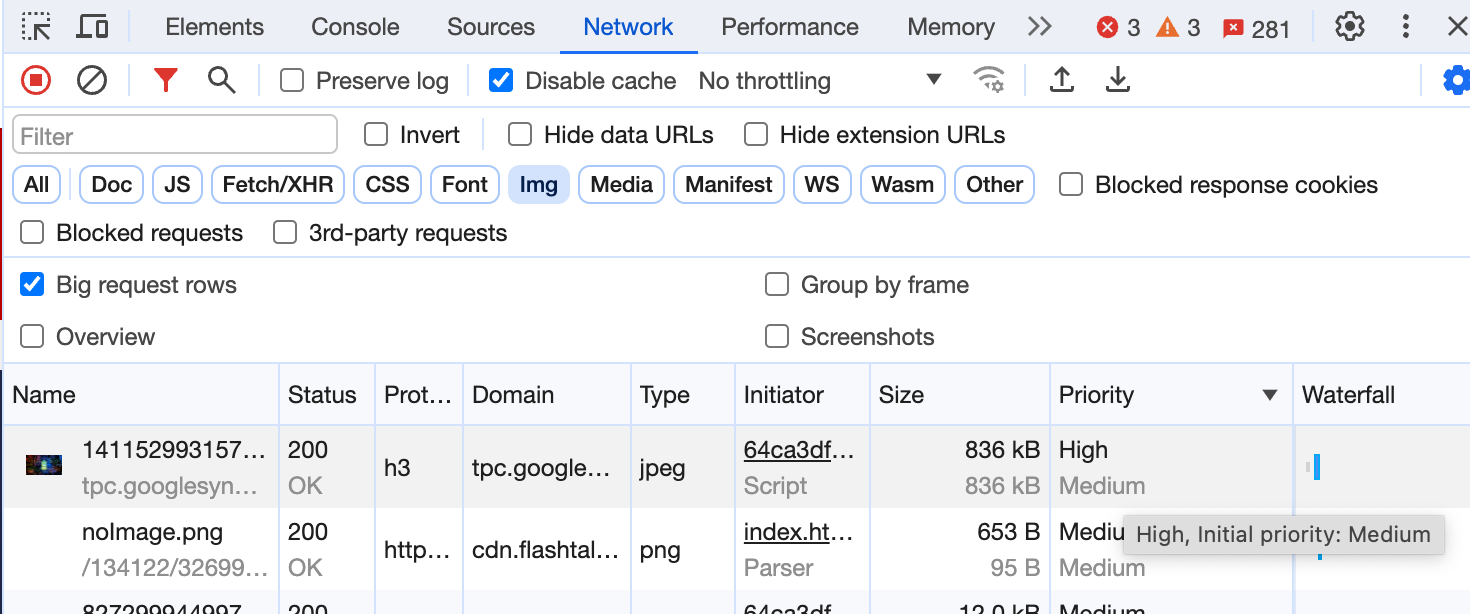 Priority changes in DevTools.
## When might you need Fetch Priority?
Now that you understand the browser's prioritization logic, you can tweak your page's download order to optimize its performance and [Core Web Vitals](https://web.dev/articles/vitals). Here are some examples of things you can change to influence the priority of resource downloads:
- Place resource tags like `
### Effects of browser priority and `fetchpriority`
You can apply the `fetchpriority` attribute to different resources as shown in the following table to increase or reduce their computed priority. `fetchpriority="auto"` (◉) in each row marks the default priority for that type of resource. (also available [as a Google Doc](https://docs.google.com/document/d/1bCDuq9H1ih9iNjgzyAL0gpwNFiEP4TZS-YLRp_RuMlc/edit)).
> [!NOTE]
> **Example of how to read this table:**
>
> - Early CSS (like CSS in the ``) is `highest` by default (◉). Even if you use `fetchpriority=high` (⬆), it won't increase any further because it's as it's as high as it can go. If you lower it with `fetchpriority=low` (⬇) it only lowers to `high`, and not any lower. In both cases, it can load during the layout-blocking phase.
> There are more explanations in the table footnotes.
| | Load in layout-blocking phase || Load one at a time in layout-blocking phase |||
|---|---|---|---|---|---|
| **Blink Priority** | **VeryHigh** | **High** | **Medium** | **Low** | **VeryLow** |
| **DevTools Priority** | **Highest** | **High** | **Medium** | **Low** | **Lowest** |
| Main Resource | ◉ | | | | |
| CSS (early\*\*) | ⬆◉ | ⬇ | | | |
| CSS (late\*\*) | | ⬆ | ◉ | ⬇ | |
| CSS (media mismatch\*\*\*) | | ⬆\*\*\* | | | ◉⬇ |
| Script (early\*\* or not from preload scanner) | | ⬆◉ | | ⬇ | |
| Script (late\*\*) | | ⬆ | ◉ | ⬇ | |
| Script (async/defer) | | ⬆ | | ◉⬇ | |
| Font | ◉ | | | | |
| Font (rel=preload) | | ⬆◉ | | ⬇ | |
| Import | | ◉ | | | |
| Image (in viewport - after layout) | | ⬆◉ | | ⬇ | |
| Image (first 5 images \> 10,000px2) | | ⬆ | ◉ | ⬇ | |
| Image | | ⬆ | | ◉⬇ | |
| Media (video/audio) | | | | ◉ | |
| XHR (sync) - deprecated | ◉ | | | | |
| XHR/fetch\* (async) | | ⬆◉ | | ⬇ | |
| Prefetch | | | | | ◉ |
| XSL | | ◉ | | | |
> [!NOTE]
> **Notes:**
> **\*** Preload using `"as"` or [fetch](https://developer.mozilla.org/docs/Web/API/Fetch_API) using a specific `"destination"` use the priority of the destination they are requesting. For example, preload `as="style"` will use Highest priority. With no explicit destintation, fetch will be prioritized like an async XHR.
> **\*\*** "Early" is defined as being requested before any non-preloaded images have been requested ("late" is after).
> **\*\*\*** CSS where the media type doesn't match is not fetched by the preload scanner and is only processed when the main parser reaches it, which usually means it will be fetched very late, even with `fetchpriority="high"`.
>
> Images by default start at "Low" priority and then at layout time are boosted to "High" if within the viewport. As of Chrome 117, the first 5 large images are set to "Medium" to speed this up and two of these can be fetched in parallel during the initial "tight mode". By tagging important images in markup using `fetchpriority="high"`, they can start at "High" immediately and load much faster.
`fetchpriority` sets *relative priority* , meaning it raises or lowers the default priority by an appropriate amount, rather instead of explicitly setting the priority to `High` or `Low`. This often results in `High` or `Low` priority, but not always. For example, critical CSS with `fetchpriority="high"` retains the "Very High"/"Highest" priority, and using `fetchpriority="low"` on these elements retains the "High" priority. Neither of these cases involve explicitly setting priority to `High` or `Low`.
### Use cases
Use the `fetchpriority` attribute when you want to give the browser an extra hint about what priority to fetch a resource with.
#### Increase the priority of the LCP image
You can specify `fetchpriority="high"` to boost the priority of the LCP or other critical images.
The following comparison shows the Google Flights page with an LCP background image loaded with and without Fetch Priority. With the priority set to high, the [LCP improved from 2.6s to 1.9s](https://www.webpagetest.org/video/compare.php?tests=211006_AiDcG3_40871b05d6040112a05be4524565cf5d,211006_BiDcHR_bebed947f1b6607f2d97e8a899fdc36b&thumbSize=200&ival=100&end=visual).
An experiment conducted using Cloudflare workers to rewrite the Google Flights page using Fetch Priority.
#### Lower the priority of above-the-fold images
Use `fetchpriority="low"` to lower the priority of above-the-fold images that aren't immediately important, for example offscreen images in an image carousel.
While images 2-4 will be outside of the viewport, they may be considered "close enough" to boost them to `high` and also load even if a `load=lazy` attribute is added. Therefore `fetchpriority="low"` is the correct solution for this.
In an earlier experiment with the [Oodle](https://github.com/google/oodle-demo) app, we used this to lower the priority of images that don't appear on load. It decreased page load time by 2 seconds.
 Using high priority for only the first carousel image lets the page load faster.
#### Lower the priority of preloaded resources
To stop preloaded resources from competing with other critical resources, you can reduce their priority. Use this technique with images, scripts, and CSS.
#### Reprioritize scripts
Scripts your page needs to be interactive should be load quickly, but shouldn't block other, more critical, render-blocking resources. You can mark these as `async` with high priority.
You can't mark a script as `async` if it relies on specific DOM states. However, if they run later on the page, you can load them with lower priority:
This will still block the parser when it reaches this script, but will allow content before this to be prioritised.
An alternative, if the completed DOM is needed, is to use the `defer` attribute (which runs, in order, after [DOMContentLoaded](https://developer.mozilla.org/docs/Web/API/Document/DOMContentLoaded_event)), or even `async` at the bottom of the page.
#### Lower the priority for non-critical data fetches
The browser executes `fetch` with a high priority. If you have multiple fetches that might fire simultaneously, you can use the high default priority for the more important data fetches and lower the priority of less critical data.
// Important validation data (high by default)
let authenticate = await fetch('/user');
// Less important content data (suggested low)
let suggestedContent = await fetch('/content/suggested', {priority: 'low'});
## Fetch Priority implementation notes
Fetch Priority can improve performance in specific use cases but there are some things to be aware of when using Fetch Priority:
- The `fetchpriority` attribute is a hint, not a directive. The browser tries to respect the developer's preference, but it can also apply its resource priority preferences for resource priority to resolve conflicts.
- Don't confuse Fetch Priority with preloading:
- Preload is a mandatory fetch, not a hint.
- Preload lets the browser discover a resource early, but it still fetches the resource with the default priority. Conversely, Fetch Priority doesn't help with discoverability, but it does let you increase or decrease the fetch priority.
- It's often easier to observe and measure the effects of a preload than the effects of a priority change.
Fetch Priority can complement preloads by increasing the granularity of prioritization. If you've already specified a preload as one of the first items in the `` for an LCP image, then a `high` Fetch Priority might not improve LCP significantly. However, if the preload happens after other resources load, a `high` Fetch Priority can improve LCP more. If a critical image is a CSS background image, preload it with `fetchpriority = "high"`.
- Load time improvements from prioritization are more relevant in environments where more resources compete for the available network bandwidth. This is common for HTTP/1.x connections where parallel downloads aren't possible, or on low bandwidth HTTP/2 or HTTP/3 connections. In these cases, prioritization can help resolve bottlenecks.
- CDNs don't [implement HTTP/2 prioritization](https://github.com/andydavies/http2-prioritization-issues#cdns--cloud-hosting-services) uniformly, and similarly for HTTP/3. Even if the browser communicates the priority from Fetch Priority, the CDN might not reprioritize resources in the specified order. This makes testing Fetch Priority difficult. The priorities are applied both internally within the browser and with protocols that support prioritization (HTTP/2 and HTTP/3). It's still worth using Fetch Priority just for the internal browser prioritization independent of CDN or origin support, because priorities often change when the browser requests resources. For example, low-priority resources like images are often held back from being requested while the browser processes critical `` items.
- You might not be able to introduce Fetch Priority as a best practice in your initial design. Later in your development cycle, you can the priorities being assigned to different resources on the page, and if they don't match your expectations, you can introduce Fetch Priority for further optimization.
Developers should use preload for its [intended purpose](https://www.smashingmagazine.com/2016/02/preload-what-is-it-good-for/#loading-of-late-discovered-resources)---to preload resources not detected by the parser (fonts, imports, background LCP images). The placement of the `preload` hint will affect when the resource is preloaded.
Fetch priority is about how the resource should be fetched when it is fetched.
### Tips for using preloads
Keep the following in mind when using preloads:
- Including a preload in HTTP headers puts it before everything else in the load order.
- Generally, preloads load in the order the parser gets to them for anything with `Medium` priority or higher. Be careful if you're including preloads at the beginning of your HTML.
- Font preloads probably work best toward the end of the head or beginning of the body.
- Import preloads (dynamic `import()` or `modulepreload`) should run after the script tag that needs the import, so make sure the script gets loaded or parsed first so it can be evaluated while its dependencies are loading.
- Image preloads have a `Low` or `Medium` priority by default. Order them relative to async scripts and other low or lowest priority tags.
## History
Fetch Priority was first experimented with in Chrome as an origin trial in 2018, and then again in 2021 using the `importance` attribute. At that time it was called [Priority Hints](https://github.com/WICG/priority-hints). The interface has since changed to `fetchpriority` for HTML and `priority` for JavaScript's Fetch API as part of the web standards process. To reduce confusion, we now call this API Fetch Priority.
## Conclusion
Developers are likely to be interested in Fetch Priority with the fixes in preload behavior and the recent focus on Core Web Vitals and LCP. They now have additional knobs available to achieve their preferred loading sequence.


 The following comparison shows the Google Flights page with an LCP background image loaded with and without Fetch Priority. With the priority set to high, the [LCP improved from 2.6s to 1.9s](https://www.webpagetest.org/video/compare.php?tests=211006_AiDcG3_40871b05d6040112a05be4524565cf5d,211006_BiDcHR_bebed947f1b6607f2d97e8a899fdc36b&thumbSize=200&ival=100&end=visual).
An experiment conducted using Cloudflare workers to rewrite the Google Flights page using Fetch Priority.
#### Lower the priority of above-the-fold images
Use `fetchpriority="low"` to lower the priority of above-the-fold images that aren't immediately important, for example offscreen images in an image carousel.