 Marcin Wichary [X](https://twitter.com/mwichary) [Homepage](http://www.aresluna.org/)
## Introduction
Let the novices keep their keyboards for adventure games, their precious multi-touchy-feely fingertips for fruit cutting, and their fancy newfangled motion sensors for pretending they can dance like Michael Jackson. (Newsflash: They can't.) But you're different. You're better. You're a pro. For you, the games begin and end with a gamepad in your hands.
But wait. Aren't you out of luck if you want to support a gamepad in your web app? Not anymore. The brand new [Gamepad API](http://dvcs.w3.org/hg/gamepad/raw-file/default/gamepad.html) comes to the rescue, allowing you to use JavaScript to read the state of any gamepad controller attached to your computer. It's so fresh off the presses, that it only landed in Chrome 21 last week -- and it's also on the verge of being supported in Firefox (currently available in a [special build](http://people.mozilla.com/%7Etmielczarek/gamepad/)).
That turned out to be pretty great timing, because we get a chance to use it recently in the [Hurdles 2012 Google doodle](http://www.google.com/doodles/hurdles-2012). This article will briefly explain how we added Gamepad API to the doodle, and what we learned during the process.
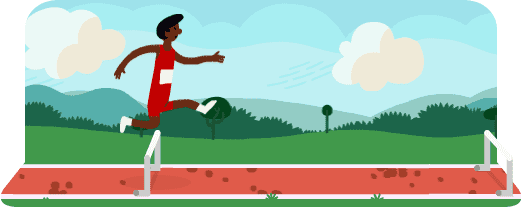 Hurdles 2012 Google doodle
## Gamepad tester
Ephemeral as they are, interactive doodles tend to be pretty complex under the hood. So that it's easier to demonstrate what we're talking about, we took the gamepad code from the doodle, and put together a simple gamepad tester. You can use it to see whether your USB gamepad works correctly -- and also look under the hood to examine how it's done.
## What browsers support it today?
Browser Support
- ' d='M96 183a64 64 0 0 1-23-23L17 64a128 128 0 0 0 111 192l55-96a64 64 0 0 1-87 23Z'/%3E%3Cpath fill='url(%23b)' d='M192 128a64 64 0 0 1-9 32l-55 96A128 128 0 0 0 239 64H128a64 64 0 0 1 64 64Z'/%3E%3Ccircle cx='128' cy='128' r='52' fill='%231a73e8'/%3E%3Cpath fill='url(%23c)' d='M96 73a64 64 0 0 1 32-9h111a128 128 0 0 0-222 0l56 96a64 64 0 0 1 23-87Z'/%3E%3C/svg%3E)
- ' xlink:href='%23A'%3E%3Cstop offset='.76' stop-opacity='0'/%3E%3Cstop offset='.95' stop-opacity='.5'/%3E%3Cstop offset='1'/%3E%3C/radialGradient%3E%3CradialGradient id='F' cx='2523' cy='4680' r='20243' gradientTransform='matrix(-.03715 .99931 -2.12836 -.07913 13579 3530)' xlink:href='%23A'%3E%3Cstop offset='0' stop-color='%2335c1f1'/%3E%3Cstop offset='.11' stop-color='%2334c1ed'/%3E%3Cstop offset='.23' stop-color='%232fc2df'/%3E%3Cstop offset='.31' stop-color='%232bc3d2'/%3E%3Cstop offset='.67' stop-color='%2336c752'/%3E%3C/radialGradient%3E%3CradialGradient id='G' cx='24247' cy='7758' r='9734' gradientTransform='matrix(.28109 .95968 -.78353 .22949 24510 -16292)' xlink:href='%23A'%3E%3Cstop offset='0' stop-color='%2366eb6e'/%3E%3Cstop offset='1' stop-color='%2366eb6e' stop-opacity='0'/%3E%3C/radialGradient%3E%3Cpath id='H' d='M24105 20053a9345 9345 0 01-1053 472 10202 10202 0 01-3590 646c-4732 0-8855-3255-8855-7432 0-1175 680-2193 1643-2729-4280 180-5380 4640-5380 7253 0 7387 6810 8137 8276 8137 791 0 1984-230 2704-456l130-44a12834 12834 0 006660-5282c220-350-168-757-535-565z'/%3E%3Cpath id='I' d='M11571 25141a7913 7913 0 01-2273-2137 8145 8145 0 01-1514-4740 8093 8093 0 013093-6395 8082 8082 0 011373-859c312-148 846-414 1554-404a3236 3236 0 012569 1297 3184 3184 0 01636 1866c0-21 2446-7960-8005-7960-4390 0-8004 4166-8004 7820 0 2319 538 4170 1212 5604a12833 12833 0 007684 6757 12795 12795 0 003908 610c1414 0 2774-233 4045-656a7575 7575 0 01-6278-803z'/%3E%3Cpath id='J' d='M16231 15886c-80 105-330 250-330 566 0 260 170 512 472 723 1438 1003 4149 868 4156 868a5954 5954 0 003027-839 6147 6147 0 001133-850 6180 6180 0 001910-4437c26-2242-796-3732-1133-4392-2120-4141-6694-6525-11668-6525-7011 0-12703 5635-12798 12620 47-3654 3679-6605 7996-6605 350 0 2346 34 4200 1007 1634 858 2490 1894 3086 2921 618 1067 728 2415 728 2952s-271 1333-780 1990z'/%3E%3Cuse fill='url(%23B)' xlink:href='%23H'/%3E%3Cuse fill='url(%23D)' opacity='.35' xlink:href='%23H'/%3E%3Cuse fill='url(%23C)' xlink:href='%23I'/%3E%3Cuse fill='url(%23E)' opacity='.4' xlink:href='%23I'/%3E%3Cuse fill='url(%23F)' xlink:href='%23J'/%3E%3Cuse fill='url(%23G)' xlink:href='%23J'/%3E%3C/svg%3E)
- ' gradientUnits='userSpaceOnUse'%3E%3Cstop offset='.2' stop-color='%239059ff' stop-opacity='0'/%3E%3Cstop offset='.3' stop-color='%238c4ff3' stop-opacity='.1'/%3E%3Cstop offset='.8' stop-color='%237716a8' stop-opacity='.5'/%3E%3Cstop offset='1' stop-color='%236e008b' stop-opacity='.6'/%3E%3C/radialGradient%3E%3CradialGradient id='ff-g' cx='239.1' cy='34.6' r='171.6' gradientUnits='userSpaceOnUse'%3E%3Cstop offset='0' stop-color='%23ffe226'/%3E%3Cstop offset='.1' stop-color='%23ffdb27'/%3E%3Cstop offset='.3' stop-color='%23ffc82a'/%3E%3Cstop offset='.5' stop-color='%23ffa930'/%3E%3Cstop offset='.7' stop-color='%23ff7e37'/%3E%3Cstop offset='.8' stop-color='%23ff7139'/%3E%3C/radialGradient%3E%3CradialGradient id='ff-h' cx='374' cy='-74.3' r='732.2' gradientUnits='userSpaceOnUse'%3E%3Cstop offset='.1' stop-color='%23fff44f'/%3E%3Cstop offset='.5' stop-color='%23ff980e'/%3E%3Cstop offset='.6' stop-color='%23ff5634'/%3E%3Cstop offset='.7' stop-color='%23ff3647'/%3E%3Cstop offset='.9' stop-color='%23e31587'/%3E%3C/radialGradient%3E%3CradialGradient id='ff-i' cx='304.6' cy='7.1' r='536.4' gradientTransform='rotate(84 303 4)' gradientUnits='userSpaceOnUse'%3E%3Cstop offset='0' stop-color='%23fff44f'/%3E%3Cstop offset='.1' stop-color='%23ffe847'/%3E%3Cstop offset='.2' stop-color='%23ffc830'/%3E%3Cstop offset='.3' stop-color='%23ff980e'/%3E%3Cstop offset='.4' stop-color='%23ff8b16'/%3E%3Cstop offset='.5' stop-color='%23ff672a'/%3E%3Cstop offset='.6' stop-color='%23ff3647'/%3E%3Cstop offset='.7' stop-color='%23e31587'/%3E%3C/radialGradient%3E%3CradialGradient id='ff-j' cx='235' cy='98.1' r='457.1' gradientUnits='userSpaceOnUse'%3E%3Cstop offset='.1' stop-color='%23fff44f'/%3E%3Cstop offset='.5' stop-color='%23ff980e'/%3E%3Cstop offset='.6' stop-color='%23ff5634'/%3E%3Cstop offset='.7' stop-color='%23ff3647'/%3E%3Cstop offset='.9' stop-color='%23e31587'/%3E%3C/radialGradient%3E%3CradialGradient id='ff-k' cx='355.7' cy='124.9' r='500.3' gradientUnits='userSpaceOnUse'%3E%3Cstop offset='.1' stop-color='%23fff44f'/%3E%3Cstop offset='.2' stop-color='%23ffe141'/%3E%3Cstop offset='.5' stop-color='%23ffaf1e'/%3E%3Cstop offset='.6' stop-color='%23ff980e'/%3E%3C/radialGradient%3E%3ClinearGradient id='ff-a' x1='446.9' y1='76.8' x2='47.9' y2='461.8' gradientUnits='userSpaceOnUse'%3E%3Cstop offset='.1' stop-color='%23fff44f'/%3E%3Cstop offset='.1' stop-color='%23ffe847'/%3E%3Cstop offset='.2' stop-color='%23ffc830'/%3E%3Cstop offset='.4' stop-color='%23ff980e'/%3E%3Cstop offset='.4' stop-color='%23ff8b16'/%3E%3Cstop offset='.5' stop-color='%23ff672a'/%3E%3Cstop offset='.5' stop-color='%23ff3647'/%3E%3Cstop offset='.7' stop-color='%23e31587'/%3E%3C/linearGradient%3E%3ClinearGradient id='ff-l' x1='442.1' y1='74.8' x2='102.6' y2='414.3' gradientUnits='userSpaceOnUse'%3E%3Cstop offset='.2' stop-color='%23fff44f' stop-opacity='.8'/%3E%3Cstop offset='.3' stop-color='%23fff44f' stop-opacity='.6'/%3E%3Cstop offset='.5' stop-color='%23fff44f' stop-opacity='.2'/%3E%3Cstop offset='.6' stop-color='%23fff44f' stop-opacity='0'/%3E%3C/linearGradient%3E%3C/defs%3E%3Cpath d='M479 166c-11-25-32-52-49-60a249 249 0 0 1 25 73c-27-68-73-95-111-155a255 255 0 0 1-8-14 44 44 0 0 1-4-9 1 1 0 0 0 0-1 1 1 0 0 0-1 0c-60 35-81 101-83 134a120 120 0 0 0-66 25 71 71 0 0 0-6-5 111 111 0 0 1-1-58c-25 11-44 29-58 44-9-12-9-52-8-60l-8 4a175 175 0 0 0-24 21 210 210 0 0 0-22 26 203 203 0 0 0-32 73l-1 2-2 15a229 229 0 0 0-4 34v1a240 240 0 0 0 477 40l1-9c5-41 0-84-15-121zM202 355l3 1-3-1zm55-145zm198-31z' fill='url(%23ff-a)'/%3E%3Cpath d='M479 166c-11-25-32-52-49-60 14 26 22 53 25 72v1a207 207 0 0 1-206 279c-113-3-212-87-231-197-3-17 0-26 2-40-2 11-3 14-4 34v1a240 240 0 0 0 477 40l1-9c5-41 0-84-15-121z' fill='url(%23ff-b)'/%3E%3Cpath d='M479 166c-11-25-32-52-49-60 14 26 22 53 25 72v1a207 207 0 0 1-206 279c-113-3-212-87-231-197-3-17 0-26 2-40-2 11-3 14-4 34v1a240 240 0 0 0 477 40l1-9c5-41 0-84-15-121z' fill='url(%23ff-c)'/%3E%3Cpath d='m362 195 1 1a130 130 0 0 0-22-29C266 92 322 5 331 0c-60 35-81 101-83 134l9-1c45 0 84 25 105 62z' fill='url(%23ff-d)'/%3E%3Cpath d='M257 210c-1 6-22 26-29 26-68 0-80 41-80 41 3 35 28 64 57 79l4 2 7 3a107 107 0 0 0 31 6c120 6 143-143 57-186 22-4 45 5 58 14-21-37-60-62-105-62l-9 1a120 120 0 0 0-66 25l17 16c16 16 58 33 58 35z' fill='url(%23ff-e)'/%3E%3Cpath d='M257 210c-1 6-22 26-29 26-68 0-80 41-80 41 3 35 28 64 57 79l4 2 7 3a107 107 0 0 0 31 6c120 6 143-143 57-186 22-4 45 5 58 14-21-37-60-62-105-62l-9 1a120 120 0 0 0-66 25l17 16c16 16 58 33 58 35z' fill='url(%23ff-f)'/%3E%3Cpath d='m171 151 5 3a111 111 0 0 1-1-58c-25 11-44 29-58 44 1 0 36 0 54 11z' fill='url(%23ff-g)'/%3E%3Cpath d='M18 261a242 242 0 0 0 231 197 207 207 0 0 0 206-279c8 56-20 110-64 146-86 71-169 43-186 31l-3-1c-50-24-71-70-67-110-42 0-57-35-57-35s38-28 89-4c46 22 90 4 90 4 0-2-42-19-58-35l-17-16a71 71 0 0 0-6-5l-5-3c-18-11-52-11-54-11-9-12-9-51-8-60l-8 4a175 175 0 0 0-24 21 210 210 0 0 0-22 26 203 203 0 0 0-32 73c0 1-9 38-5 57z' fill='url(%23ff-h)'/%3E%3Cpath d='M341 167a130 130 0 0 1 22 29 46 46 0 0 1 4 3c55 50 26 121 24 126 44-36 72-90 64-146-27-68-73-95-111-155a255 255 0 0 1-8-14 44 44 0 0 1-4-9 1 1 0 0 0 0-1 1 1 0 0 0-1 0c-9 5-65 92 10 167z' fill='url(%23ff-i)'/%3E%3Cpath d='M367 199a46 46 0 0 0-4-3l-1-1c-13-9-36-18-58-15 86 44 63 193-57 187a107 107 0 0 1-31-6 131 131 0 0 1-11-5c17 12 99 39 186-31 2-5 31-76-24-126z' fill='url(%23ff-j)'/%3E%3Cpath d='M148 277s12-41 80-41c7 0 28-20 29-26s-44 18-90-4c-51-24-89 4-89 4s15 35 57 35c-4 40 16 85 67 110l3 1c-29-15-54-44-57-79z' fill='url(%23ff-k)'/%3E%3Cpath d='M479 166c-11-25-32-52-49-60a249 249 0 0 1 25 73c-27-68-73-95-111-155a255 255 0 0 1-8-14 44 44 0 0 1-4-9 1 1 0 0 0 0-1 1 1 0 0 0-1 0c-60 35-81 101-83 134l9-1c45 0 84 25 105 62-13-9-36-18-58-14 86 43 63 192-57 186a107 107 0 0 1-31-6 131 131 0 0 1-11-5l-3-1 3 1c-29-15-54-44-57-79 0 0 12-41 80-41 7 0 28-20 29-26 0-2-42-19-58-35l-17-16a71 71 0 0 0-6-5 111 111 0 0 1-1-58c-25 11-44 29-58 44-9-12-9-52-8-60l-8 4a175 175 0 0 0-24 21 210 210 0 0 0-22 26 203 203 0 0 0-32 73l-1 2-2 15a279 279 0 0 0-4 34v1a240 240 0 0 0 477 40l1-9c5-41 0-84-15-121zm-24 13z' fill='url(%23ff-l)'/%3E%3C/svg%3E)
- ' xlink:href='%23s-b'%3E%3Cstop offset='0' stop-color='%2324a5f3' stop-opacity='0' /%3E%3Cstop offset='1' stop-color='%231e8ceb' /%3E%3C/radialGradient%3E%3CradialGradient id='s-j' cx='109.3' cy='13.8' r='93.1' gradientTransform='matrix(-.02 1.1 -1.04 -.02 137 -115)' xlink:href='%23s-b'%3E%3Cstop offset='0' stop-opacity='0' /%3E%3Cstop offset='1' stop-color='%235488d6' stop-opacity='0' /%3E%3Cstop offset='1' stop-color='%235d96eb' /%3E%3C/radialGradient%3E%3C/defs%3E%3Crect width='220' height='220' x='22' y='-107' fill='url(%23s-a)' ry='49' transform='matrix(.57 0 0 .57 187 256)' /%3E%3Cg transform='translate(194 190)'%3E%3Ccircle cx='67.8' cy='67.7' fill='url(%23s-c)' paint-order='stroke fill markers' r='54' /%3E%3Ccircle cx='-69.9' cy='69.3' fill='url(%23s-i)' transform='translate(138 -2)' r='54' /%3E%3C/g%3E%3Cellipse cx='120' cy='14.2' fill='url(%23s-j)' rx='93.1' ry='93.7' transform='matrix(.58 0 0 .58 192 250)' /%3E%3Cg transform='matrix(.58 0 0 .57 197 182)'%3E%3Cpath fill='%23cac7c8' d='M46 192h1l72-48-7-9-66 57Z' /%3E%3Cpath fill='%23fbfffc' d='M46 191v1l66-57-7-9-59 65Z' /%3E%3Cpath fill='url(%23s-d)' d='m119 144-7-9 66-57-59 66Z' /%3E%3Cpath fill='%23fb645c' d='m105 126 7 9 66-57-1-1-72 49Z' /%3E%3C/g%3E%3Cpath stroke='%23fff' stroke-linecap='round' stroke-miterlimit='1' stroke-width='1.3' d='m287 278 3-2m-12-17 8-2m-8-3h4m-4-13 8 2m-8 3h4m-1-13 7 3m-4-11 7 4m-2-11 6 6m0-12 6 7m1-11 4 6m4-10 3 7m5-9 2 7m15-7-1 7m10-5-3 7m11-4-4 7m11-2-5 6m16 7-7 4m10 4-7 3m10 6-8 1m8 16-8-2m5 10-7-3m4 11-7-4m2 11-6-5m0 11-5-6m-2 11-4-7m-4 11-3-8m-6 10-1-8m-16 8 2-8m-10 5 3-7m-11 4 4-7m-11 2 5-6m-8 3 3-3m4 8 2-3m5 8 2-4m6 7 1-4m8 5v-4m8 4v-4m9 3-1-4m9 1-2-4m9 0-2-4m9-2-3-3m8-4-3-2m8-5-4-2m7-6-4-1m5-8h-4m4-8h-4m3-9-4 1m1-9-4 2m-1-9-3 2m-2-9-3 3m-4-8-2 3m-5-8-2 4m-6-6-1 3m-8-5v4m-8-4v4m-9-2 1 3m-9 0 2 3m-9 1 2 3m-9 2 3 3m-8 4 3 2m-8 5 4 2m-7 6 4 1m-4 25 4-1m-2 5 7-3m-6 7 4-2m-2 6 7-4m-13-21h8m41-41v-8m0 99v-8m49-42h-8' transform='translate(-65 8)' /%3E%3C/svg%3E)
[Source](https://developer.mozilla.org/docs/Web/API/Gamepad)
## What gamepads can be used?
Generally, any modern gamepad that is supported by your system natively should work. We tested various gamepads from off-brand USB controllers on a PC, through PlayStation 2 gamepads connected via a dongle to a Mac, all the way to Bluetooth controllers paired with a Chrome OS notebook.
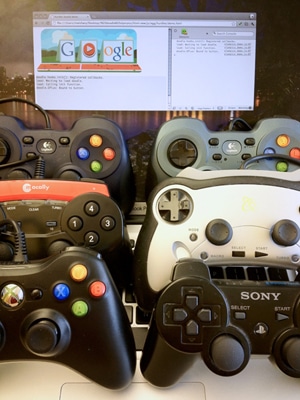 Gamepads
This is a photo of some controllers we used for testing our doodle -- "Yes, mom, that really is what I do at work." If your controller doesn't work, or if the controls are mapped incorrectly, please [file a bug against Chrome](https://code.google.com/p/chromium/issues/entry?template=Defect+report+from+user&cc=scottmg@chromium.org&labels=Type-Feature,Pri-2,Area-Internals,Feature-Gamepad) or [Firefox](https://bugzilla.mozilla.org/) . (Please test in the absolutely newest version of each browser to make sure it's not already fixed.)
> [!NOTE]
> **Note:** Some gamepads have a switch at the back telling them to use a different mode of operation. Toggling that might make them work better.
> [!NOTE]
> **Note:** Some gamepads have a compatibility mode switch up front that makes four-axis d-pad and the left analogue stick switch places (logically).
## Feature detecting the Gamepad API\<
In Chrome:
var gamepadSupportAvailable = !!navigator.webkitGetGamepads || !!navigator.webkitGamepads;
It does not seem possible to detect this in Firefox just yet -- everything is event-based, and all the event handlers need to be attached to window, which prevents a typical technique of detecting event handlers from working.
But we're sure that is temporary. The ever-so-awesome [Modernizr](http://modernizr.com/) already tells you about the Gamepad API, so we recommend this for all your current and future detecting needs:
var gamepadSupportAvailable = Modernizr.gamepads;
## Finding out about connected gamepads
Even if you connect the gamepad, it won't manifest itself in any way unless the user presses any of its buttons first. This is to prevent fingerprinting, although proves to be a bit of a challenge for user experience: you can't ask the user to press the button or provide gamepad-specific instructions because you have no idea whether they connected their controller.
Once you clear that hurdle (sorry...), however, more await.
### Polling
Chrome's implementation of the API exposes a function -- `navigator.webkitGetGamepads()` -- you can use to get a list of all the gamepads currently plugged into to the system, alongside with their current state (buttons + sticks). The first connected gamepad will be returned as the first entry in the array, and so on.
(This function call just recently replaced an array you could access directly -- `navigator.webkitGamepads[]`. As of early August 2012, accessing this array is still necessary in Chrome 21, while the function call works in Chrome 22 and newer. Moving forward, the function call is the recommended way to use the API, and will slowly trickle to all the installed Chrome browsers.)
The so-far-implemented part of the spec requires you to continuously check the state of connected gamepads (and compare it to the previous one if necessary), instead of firing events when things change. We relied on [requestAnimationFrame()](http://www.html5rocks.com/tutorials/speed/animations/) to set up polling in the most efficient and battery-friendly way. For our doodle, even though we already have a `requestAnimationFrame()` loop to support animations, we created a second completely separate one -- it was simpler to code and shouldn't affect performance in any way.
Here is the code from the tester:
/**
* Starts a polling loop to check for gamepad state.
*/
startPolling: function() {
// Don't accidentally start a second loop, man.
if (!gamepadSupport.ticking) {
gamepadSupport.ticking = true;
gamepadSupport.tick();
}
},
/**
* Stops a polling loop by setting a flag which will prevent the next
* requestAnimationFrame() from being scheduled.
*/
stopPolling: function() {
gamepadSupport.ticking = false;
},
/**
* A function called with each requestAnimationFrame(). Polls the gamepad
* status and schedules another poll.
*/
tick: function() {
gamepadSupport.pollStatus();
gamepadSupport.scheduleNextTick();
},
scheduleNextTick: function() {
// Only schedule the next frame if we haven't decided to stop via
// stopPolling() before.
if (gamepadSupport.ticking) {
if (window.requestAnimationFrame) {
window.requestAnimationFrame(gamepadSupport.tick);
} else if (window.mozRequestAnimationFrame) {
window.mozRequestAnimationFrame(gamepadSupport.tick);
} else if (window.webkitRequestAnimationFrame) {
window.webkitRequestAnimationFrame(gamepadSupport.tick);
}
// Note lack of setTimeout since all the browsers that support
// Gamepad API are already supporting requestAnimationFrame().
}
},
/**
* Checks for the gamepad status. Monitors the necessary data and notices
* the differences from previous state (buttons for Chrome/Firefox,
* new connects/disconnects for Chrome). If differences are noticed, asks
* to update the display accordingly. Should run as close to 60 frames per
* second as possible.
*/
pollStatus: function() {
// (Code goes here.)
},
If you only care about one gamepad, getting its data might be as simple as:
var gamepad = navigator.webkitGetGamepads && navigator.webkitGetGamepads()[0];
If you want to be a bit more clever, or support more than one player simultaneously, you will need to add a few more lines of code to react to more complex scenarious (two or more gamepads connected, some of them getting disconnected mid-way, etc.). You can look at the [source code](https://github.com/html5rocks/www.html5rocks.com/blob/master/content/tutorials/doodles/gamepad/static/gamepad-tester/gamepad.js#L187) of our tester, function `pollGamepads()`, for one approach on how to solve this.
### Events
Firefox uses an alternative, better way described in the Gamepad API spec. Instead of asking you to poll, it exposes two events -- `MozGamepadConnected` and `MozGamepadDisconnected` -- which are fired whenever a gamepad gets plugged in (or, more precisely, plugged in and "announced" by pressing any of its buttons) or unplugged. The gamepad object that will continue to reflect its future state is passed as the `.gamepad` parameter of the event object.
From the tester source code:
/**
* React to the gamepad being connected. Today, this will only be executed
* on Firefox.
*/
onGamepadConnect: function(event) {
// Add the new gamepad on the list of gamepads to look after.
gamepadSupport.gamepads.push(event.gamepad);
// Start the polling loop to monitor button changes.
gamepadSupport.startPolling();
// Ask the tester to update the screen to show more gamepads.
tester.updateGamepads(gamepadSupport.gamepads);
},
### Summary
In the end, our initialization function in the tester, supporting both approaches, looks like this:
/**
* Initialize support for Gamepad API.
*/
init: function() {
// As of writing, it seems impossible to detect Gamepad API support
// in Firefox, hence we need to hardcode it in the third clause.
// (The preceding two clauses are for Chrome.)
var gamepadSupportAvailable = !!navigator.webkitGetGamepads ||
!!navigator.webkitGamepads ||
(navigator.userAgent.indexOf('Firefox/') != -1);
if (!gamepadSupportAvailable) {
// It doesn't seem Gamepad API is available -- show a message telling
// the visitor about it.
tester.showNotSupported();
} else {
// Firefox supports the connect/disconnect event, so we attach event
// handlers to those.
window.addEventListener('MozGamepadConnected',
gamepadSupport.onGamepadConnect, false);
window.addEventListener('MozGamepadDisconnected',
gamepadSupport.onGamepadDisconnect, false);
// Since Chrome only supports polling, we initiate polling loop straight
// away. For Firefox, we will only do it if we get a connect event.
if (!!navigator.webkitGamepads || !!navigator.webkitGetGamepads) {
gamepadSupport.startPolling();
}
}
},
## Gamepad info
Every gamepad connected to the system will be represented by an object looking something like this:
id: "PLAYSTATION(R)3 Controller (STANDARD GAMEPAD Vendor: 054c Product: 0268)"
index: 1
timestamp: 18395424738498
buttons: Array[8]
0: 0
1: 0
2: 1
3: 0
4: 0
5: 0
6: 0.03291
7: 0
axes: Array[4]
0: -0.01176
1: 0.01961
2: -0.00392
3: -0.01176
### Basic info
The top few fields are simple metadata:
- `id`: a textual description of the gamepad
- `index`: an integer useful to tell different gamepads attached to one computer apart
- `timestamp`: the timestamp of the last update of the button/axes state (currently only supported in Chrome)
### Buttons and sticks
Today's gamepads are not exactly what your grandpa might have used to save the princess in the wrong castle -- they typically have at least sixteen separate buttons (some discrete, some analogue), in addition to two analogue sticks. Gamepad API will tell you about all the buttons and analogue sticks that are reported by the operating system.
Once you get the current state in the gamepad object, you can access the buttons via `.buttons[]` and sticks via `.axes[]` arrays. Here's a visual summary of what they correspond to:
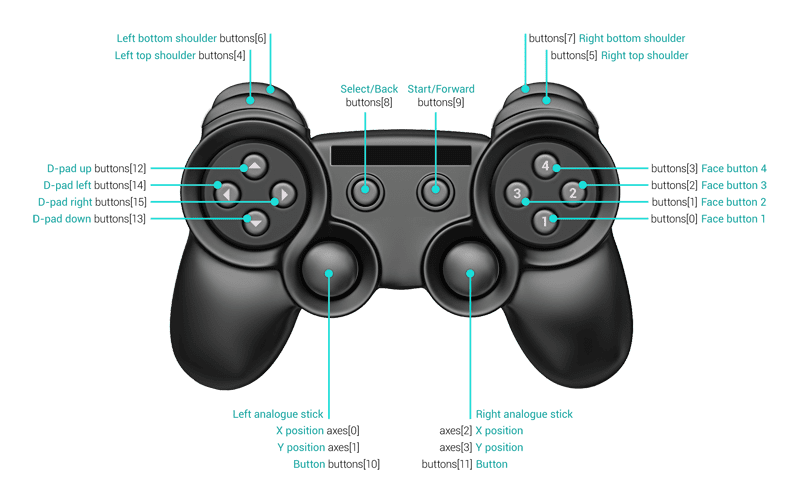 Gamepad Diagram
The spec asks the browser to map first sixteen buttons and four axes to:
gamepad.BUTTONS = {
FACE_1: 0, // Face (main) buttons
FACE_2: 1,
FACE_3: 2,
FACE_4: 3,
LEFT_SHOULDER: 4, // Top shoulder buttons
RIGHT_SHOULDER: 5,
LEFT_SHOULDER_BOTTOM: 6, // Bottom shoulder buttons
RIGHT_SHOULDER_BOTTOM: 7,
SELECT: 8,
START: 9,
LEFT_ANALOGUE_STICK: 10, // Analogue sticks (if depressible)
RIGHT_ANALOGUE_STICK: 11,
PAD_TOP: 12, // Directional (discrete) pad
PAD_BOTTOM: 13,
PAD_LEFT: 14,
PAD_RIGHT: 15
};
gamepad.AXES = {
LEFT_ANALOGUE_HOR: 0,
LEFT_ANALOGUE_VERT: 1,
RIGHT_ANALOGUE_HOR: 2,
RIGHT_ANALOGUE_VERT: 3
};
The extra buttons and axes will be appended to the ones above. Please note that neither sixteen buttons nor four axes are guaranteed, though -- be ready for some of them to simply be undefined.
The buttons can take values from 0.0 (not pressed) to 1.0 (pressed completely). The axes go from -1.0 (completely left or up) through 0.0 (center) to 1.0 (completely right or down).
### Analogue or discrete?
Ostensibly, every button could be an analogue one -- this is somewhat common for shoulder buttons, for example. Therefore, it is best to set a threshold rather than just compare it bluntly to 1.00 (what if an analogue button happens to be slightly dirty? It might never reach 1.00). In our doodle we do it this way:
gamepad.ANALOGUE_BUTTON_THRESHOLD = .5;
gamepad.buttonPressed_ = function(pad, buttonId) {
return pad.buttons[buttonId] &&
(pad.buttons[buttonId] > gamepad.ANALOGUE_BUTTON_THRESHOLD);
};
You can do the same to turn analogue sticks into digital joysticks. Sure, there is always the digital pad (d-pad), but your gamepad might not have one. Here's our code to handle that:
gamepad.AXIS_THRESHOLD = .75;
gamepad.stickMoved_ = function(pad, axisId, negativeDirection) {
if (typeof pad.axes[axisId] == 'undefined') {
return false;
} else if (negativeDirection) {
return pad.axes[axisId] < -gamepad.AXIS_THRESHOLD;
} else {
return pad.axes[axisId] > gamepad.AXIS_THRESHOLD;
}
};
## Button presses and stick movements
### Events
In some cases, like a flight simulator game, continuously checking and reacting to stick positions or button presses makes more sense... but for things like Hurdles 2012 doodle? You might wonder: Why do I need to check for buttons every single frame? Why can't I get events like I do for keyboard or mouse up/down?
Good news is, you can. Bad news is -- in the future. It's in the spec, but not implemented in any browser yet.
### Polling
In the meantime, your way out is comparing the current and previous state, and calling functions if you see any difference. For example:
if (buttonPressed(pad, 0) != buttonPressed(oldPad, 0)) {
buttonEvent(0, buttonPressed(pad, 0) ? 'down' : 'up');
}
> [!NOTE]
> **Note:** Compare timestamps of the current and previously polled gamepad data (the timestamp field). If they're defined (Firefox doesn't support it yet) and identical, it means the state didn't change from the last time you looked at it, and no further work is necessary. From the tester source code:
for (var i in gamepadSupport.gamepads) {
var gamepad = gamepadSupport.gamepads[i];
// Don't do anything if the current timestamp is the same as previous
// one, which means that the state of the gamepad hasn't changed.
// This is only supported by Chrome right now, so the first check
// makes sure we're not doing anything if the timestamps are empty
// or undefined.
if (gamepadSupport.prevTimestamps[i] &&
(gamepad.timestamp == gamepadSupport.prevTimestamps[i])) {
continue;
}
gamepadSupport.prevTimestamps[i] = gamepad.timestamp;
gamepadSupport.updateDisplay(i);
}
### The keyboard-first approach in the Hurdles 2012 doodle
Since without a gamepad, our today's doodle's preferred input method is the keyboard, we decided for the gamepad to emulate it rather closely. This meant three decisions:
1. The doodle only needs three buttons -- two for running, and one for jumping -- but the gamepad is likely to have many more. We therefore mapped all the sixteen known buttons and two known sticks onto those three logical functions in a way we thought made most sense, so that people could run by: alternating A/B buttons, alternating shoulder buttons, pressing left/right on the d-pad, or swinging either stick violently left and right (some of those will, of course, be more efficient than the others). For example:
newState[gamepad.STATES.LEFT] =
gamepad.buttonPressed_(pad, gamepad.BUTTONS.PAD_LEFT) ||
gamepad.stickMoved_(pad, gamepad.AXES.LEFT_ANALOGUE_HOR, true) ||
gamepad.stickMoved_(pad, gamepad.AXES.RIGHT_ANALOGUE_HOR, true),
newState[gamepad.STATES.PRIMARY_BUTTON] =
gamepad.buttonPressed_(pad, gamepad.BUTTONS.FACE_1) ||
gamepad.buttonPressed_(pad, gamepad.BUTTONS.LEFT_SHOULDER) ||
gamepad.buttonPressed_(pad, gamepad.BUTTONS.LEFT_SHOULDER_BOTTOM) ||
gamepad.buttonPressed_(pad, gamepad.BUTTONS.SELECT) ||
gamepad.buttonPressed_(pad, gamepad.BUTTONS.START) ||
gamepad.buttonPressed_(pad, gamepad.BUTTONS.LEFT_ANALOGUE_STICK),
2. We treated each analogue input as a discrete one, using the threshold functions described previously.
3. We went as far as bolting the gamepad input onto the doodle, instead of baking it in -- our polling loop actually synthesizes necessary keydown and keyup events (with a proper keyCode) and sends them back to DOM:
// Create and dispatch a corresponding key event.
var event = document.createEvent('Event');
var eventName = down ? 'keydown' : 'keyup';
event.initEvent(eventName, true, true);
event.keyCode = gamepad.stateToKeyCodeMap_[state];
gamepad.containerElement_.dispatchEvent(event);
And that's all there is to it!
## Tips and tricks
- Remember that the gamepad won't be visible in your browser at all before a button is pressed.
- If you are testing the gamepad in different browsers simultaneously, note that only one of them can sense the controller. If you're not receiving any events, make sure to close the other pages that might be using it. Plus, from our experience, sometimes a browser can "hold onto" the gamepad even if you close the tab or quit the browser itself. Restarting the system is sometimes the only way to fix things.
- As always, use [Chrome Canary](https://tools.google.com/dlpage/chromesxs/) and the equivalents for other browsers to make sure you're experiencing the best support -- and then act appropriately if you see older versions behaving differently.
## The future
We hope this helps to shed some light on this new API -- still a bit precarious, but already a lot of fun.
In addition to the missing pieces of the API (e.g. events) and broader browser support, we're also hoping to eventually see things like rumble control, access to built-in gyroscopes, etc. And, more support for different types of gamepads -- please [file a bug against Chrome](https://code.google.com/p/chromium/issues/entry?template=Defect+report+from+user&cc=scottmg@chromium.org&labels=Type-Feature,Pri-2,Area-Internals,Feature-Gamepad) and/or [file a bug against Firefox](https://bugzilla.mozilla.org/) if you see find one that works incorrectly or not at all.
But before that, go and play with our [Hurdles 2012 doodle](http://www.google.com/doodles/hurdles-2012) and see how much more fun it is on the gamepad. Oh, did you just say you could do better than 10.7 seconds? Bring it.
## Further reading
- [W3C Gamepad API specification](http://dvcs.w3.org/hg/gamepad/raw-file/default/gamepad.html)
- [MDN Gamepad API Docs](https://developer.mozilla.org/API/Gamepad/Using_Gamepad_API)