 Demián Renzulli [X](https://twitter.com/drenzulli) [GitHub](https://github.com/demianrenzulli)
> [!IMPORTANT]
> **Important:** This guide describes an advanced performance technique that can improve performance, but may lead to bugs if not implemented properly. **Most sites should be able to achieve our recommended performance targets
> without implementing this technique.**
CSS files are [render-blocking resources](https://developer.chrome.com/docs/lighthouse/performance/render-blocking-resources):
they must be loaded and processed before the browser renders the page. Web pages
that contain unnecessarily large style sheets take longer to render.
Learn how to defer non-critical CSS to optimize the
[Critical Rendering Path](https://web.dev/articles/critical-rendering-path) and improve
[First Contentful Paint (FCP)](https://web.dev/articles/fcp).
## Suboptimal CSS loading
The following example contains an accordion with three hidden paragraphs of
text, each of which is styled with a different class:
This page requests a CSS file with eight classes, but not all of them are
necessary to render the "visible" content.
The goal of this guide is to optimize this page so only the *critical* styles
are loaded synchronously, while the rest (including the paragraph styles),
are loaded in a non-blocking way.
## Measure
Run [Lighthouse in DevTools](https://web.dev/articles/discover-performance-opportunities-with-lighthouse#run_lighthouse_from_chrome_devtools)
to review impactful metrics.
1. [Open the demo](https://codepen.io/web-dot-dev/live/KwVyQLe) in Chrome.
2. [Open Chrome DevTools](https://developer.chrome.com/docs/devtools/open).
3. Select the [**Performance panel**](https://developer.chrome.com/docs/devtools/performance/overview#open_the_performance_panel).
4. From inside the panel, reload the page.
The report shows the **First Contentful Paint** metric with a value of "1s", and
the opportunity **Eliminate render-blocking resources** , pointing to the
**style.css** file:
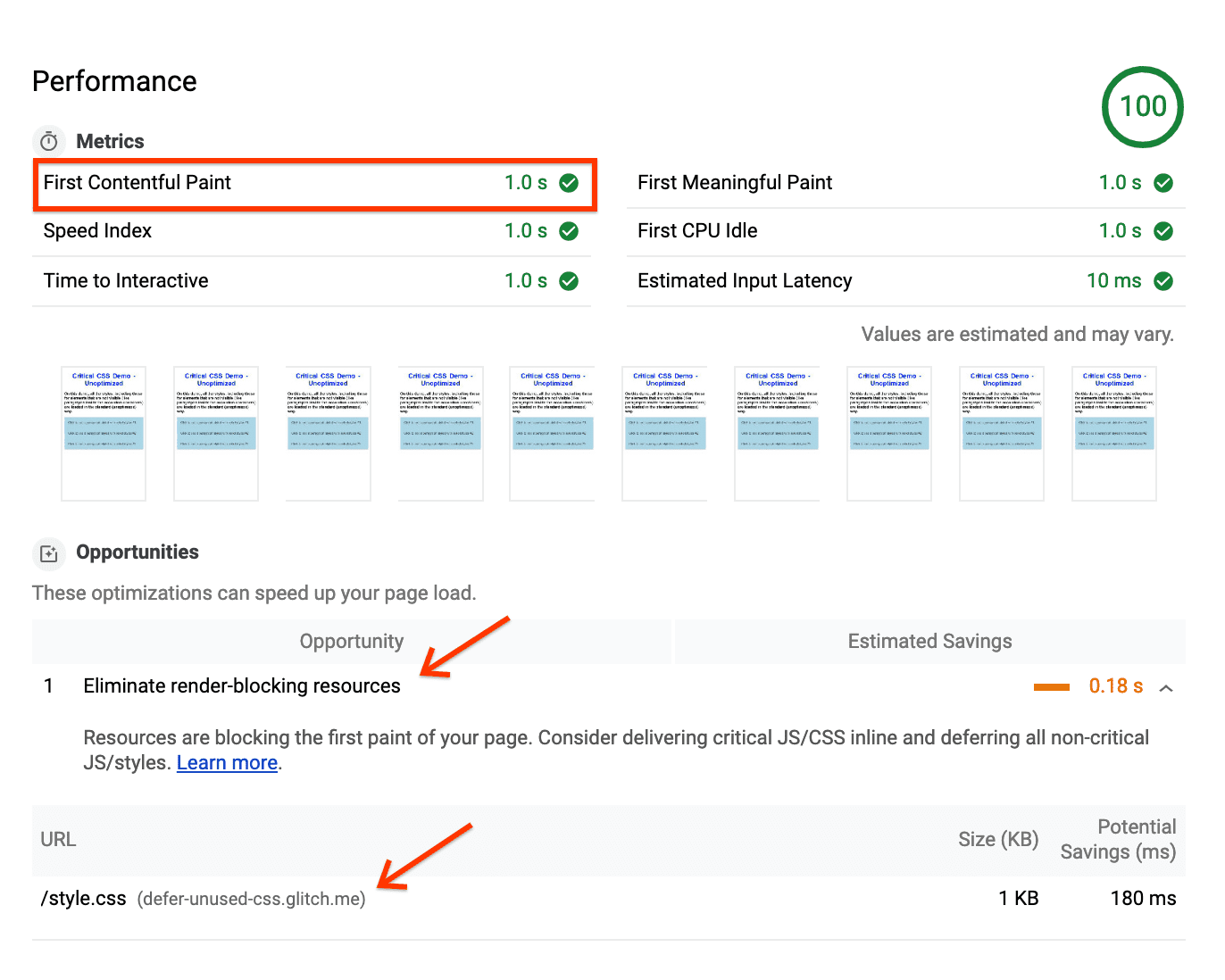 The Lighthouse report suggests simplifying your style sheet to make your page load faster.
> [!NOTE]
> **Note:** This demo uses a very small style sheet. In production scenarios, it's common to need much larger CSS files. If Lighthouse detects that a page has at least 2048 bytes of CSS rules that weren't used while rendering the *above the fold* content, it also shows a **Remove Unused CSS** suggestion.
In the resulting trace, the **FCP** marker is placed immediately
after the CSS finishes loading:
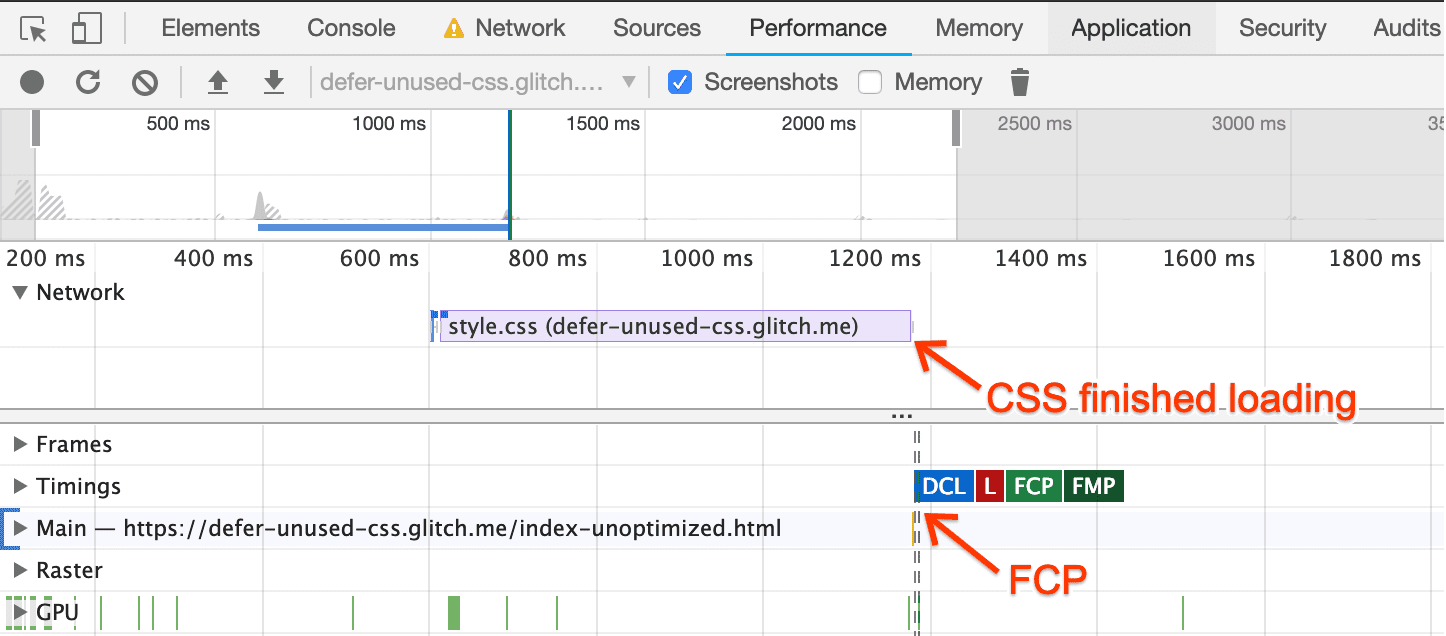 On the unoptimized demo page, FCP can't happen until the CSS finishes loading.
This means the browser needs to wait for all CSS to load and get processed
before painting a single pixel on the screen.
## Optimize
To optimize this page, use the
[Coverage Tool](https://developer.chrome.com/docs/devtools/css/reference#coverage)
to determine which classes are considered *critical*.
1. Open the DevTools [Command Menu](https://developer.chrome.com/docs/devtools/command-menu) by pressing `Control+Shift+P` or `Command+Shift+P` (Mac).
2. Type "Coverage" and select **Show Coverage**.
3. Click **Reload** to reload the page and start capturing the coverage.
 The coverage report shows how much of your CSS is actually used in the initial page load.
Double-click the report to see details:
- Classes marked in green are critical. The browser needs them to render the visible content, including the title, subtitle, and accordion buttons.
- Classes marked in red are non-critical, only affecting content that's not immediately visible, like the hidden paragraphs.
With this information, optimize your CSS so the browser can start processing
critical styles immediately after the page loads and defer non-critical CSS
for later:
1. Extract the class definitions marked with green in the coverage report, and
put those classes in a `
2. Load the rest of the classes asynchronously by applying the following
pattern:
This isn't the standard way of loading CSS. Here's how it works:
- `link rel="preload" as="style"` requests the style sheet asynchronously. Learn more about `preload` in the [Preload critical assets guide](https://web.dev/articles/preload-critical-assets).
- The `onload` attribute in the `link` lets the browser process the CSS when the style sheet finishes loading.
- "nulling" the `onload` handler after it's used helps some browsers avoid re-calling the handler when they switch the `rel` attribute.
- The reference to the style sheet inside the `noscript` element provides a fallback for browsers that don't execute JavaScript.
### In production
In production, we recommend using CSS-deferring functions, such as
[`loadCSS`](https://github.com/filamentgroup/loadCSS/blob/master/README.md),
that encapsulate this behavior and work well across browsers. These functions
support a [Content Security Policy](https://web.dev/articles/csp), which might not
allow inline `onload` JavaScript.
You can also place the CSS link at the bottom of the page, so content may
render without waiting for the stylesheet to load in the browser.
However, the browser still prioritizes the stylesheet, so it
can still block critical content in the browser.
The resulting page looks exactly like the previous version, even when most
styles load asynchronously.
## Monitor
Use DevTools to run another **Performance** trace on the optimized page.
The **FCP** marker appears before the page requests the CSS, which means the
browser doesn't need to wait for the CSS to load before rendering the page:
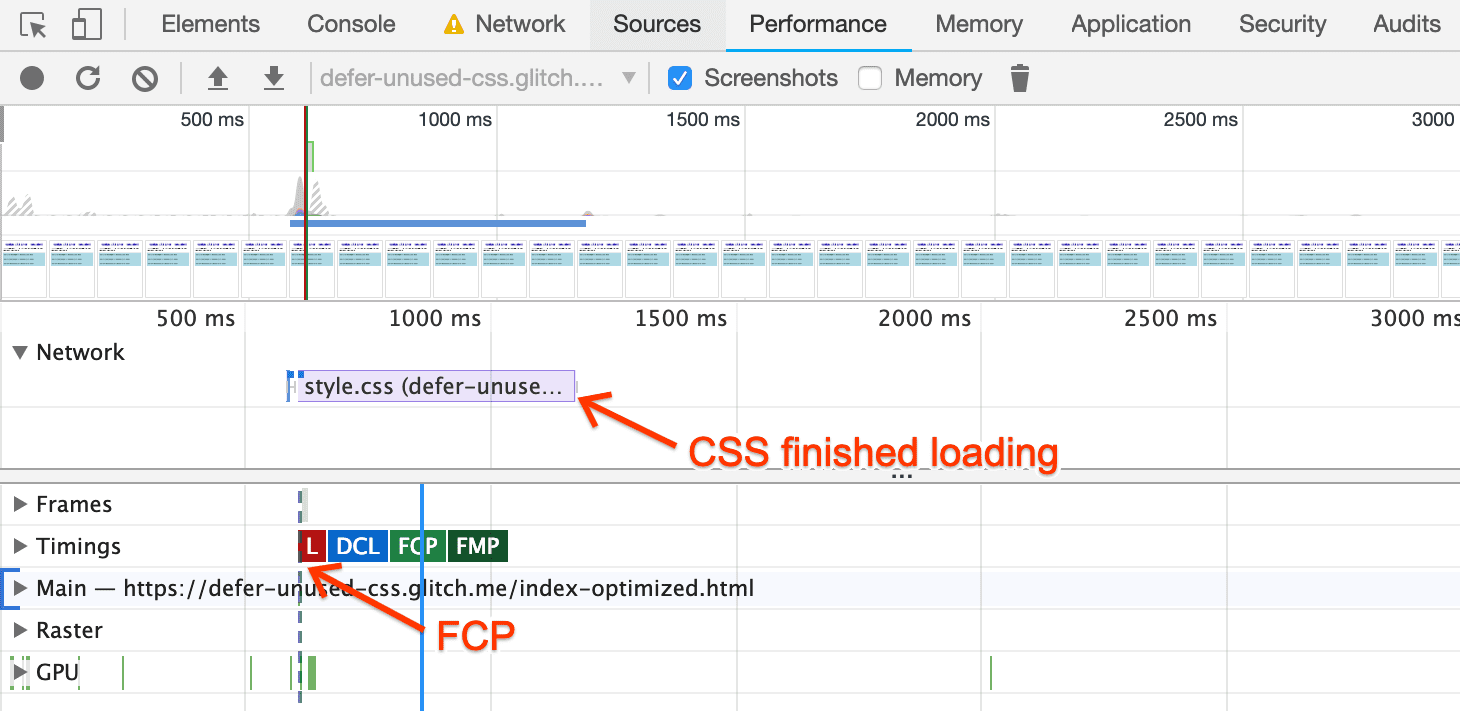 On the optimized page, FCP can start before the style sheet loads.
As a final step, run Lighthouse on the optimized page.
In the report, you'll see that the FCP page has been reduced by **0.2s** (a 20%
improvement!):
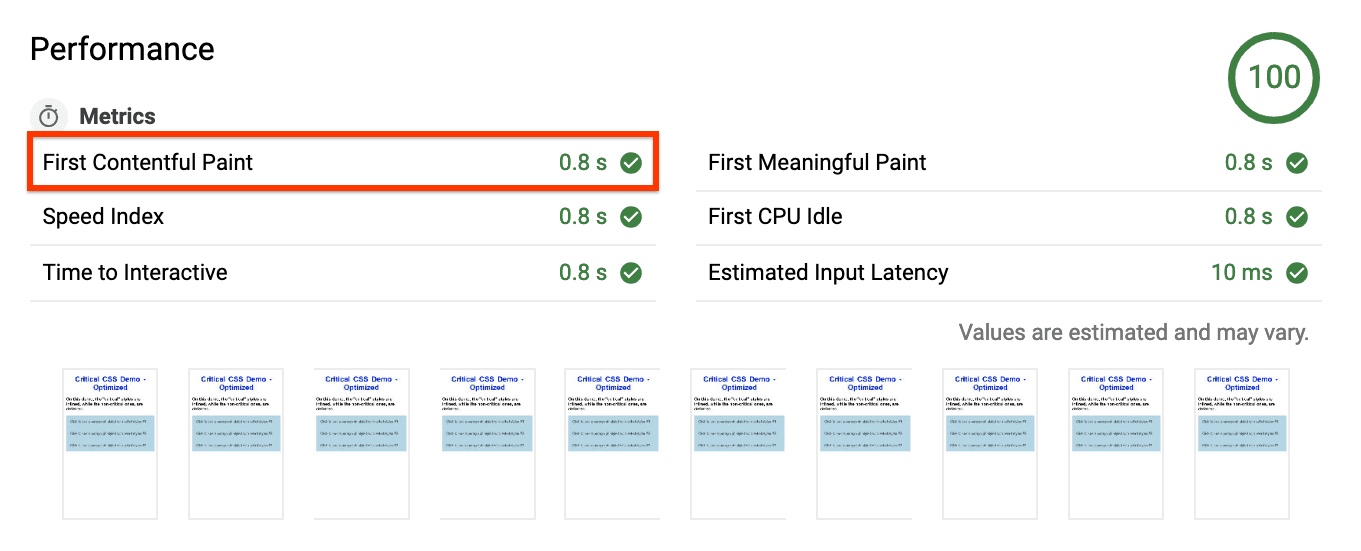 Lighthouse report, showing an FCP value of '0.8s'.
The **Eliminate render-blocking resources** suggestion no longer appears under
**Opportunities** , and is instead in the **Passed Audits** section:
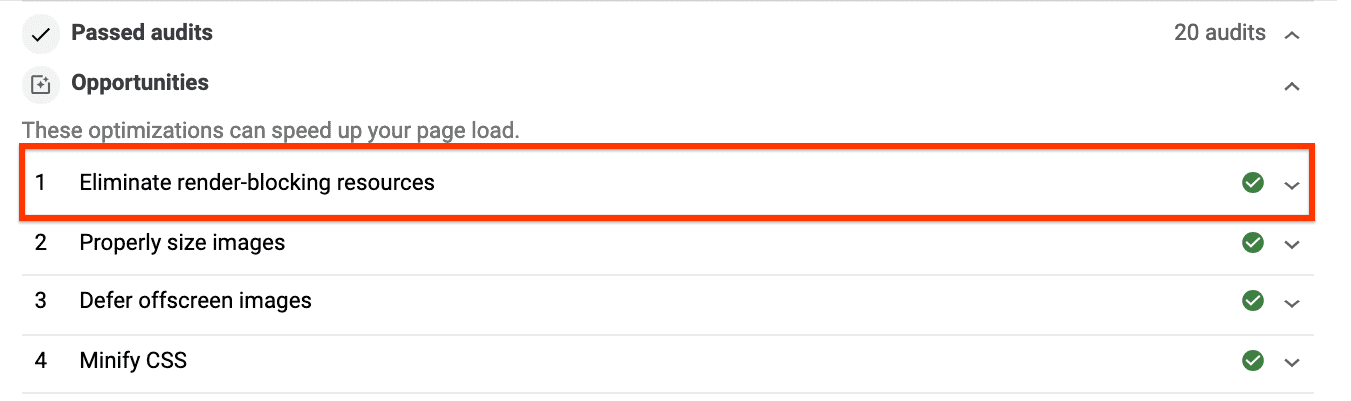 The page now passes the blocking resources audit.
## Next steps and references
For more complex production environments, the
[extract critical CSS guide](https://web.dev/articles/extract-critical-css) covers some of the
most popular tools to extract critical CSS and includes
[a codelab](https://web.dev/articles/codelab-extract-and-inline-critical-css) to see how they
work in practice.