 Houssein Djirdeh [X](https://twitter.com/hdjirdeh) [GitHub](https://github.com/housseindjirdeh) [Homepage](https://houssein.me/)
PRPL is an acronym that describes a pattern used to make web pages load and
become interactive, faster:
- **Preload** the late-discovered resources.
- **Render** the initial route as soon as possible.
- **Pre-cache** remaining assets.
- **Lazy load** other routes and non-critical assets.
In this guide, learn how each of these techniques fit together but still can be
used independently to achieve performance results.
## Audit your page with Lighthouse
Run Lighthouse to identify opportunities for improvement aligned with the PRPL
techniques:
1. Press \`Control+Shift+J\` (or \`Command+Option+J\` on Mac) to open DevTools.
2. Click the **Lighthouse** tab.
3. Select the **Performance** and **Progressive Web App** checkboxes.
4. Click **Run Audits** to generate a report.
For more information, see [Discover performance opportunities with Lighthouse](https://web.dev/articles/discover-performance-opportunities-with-lighthouse).
## Preload critical resources
Lighthouse shows the following failed audit if a certain resource is parsed and
fetched late:

[**Preload**](https://developer.mozilla.org/docs/Web/HTML/Preloading_content)
is a declarative fetch request that tells the browser to request a resource that is otherwise not discoverable by the browser's [preload scanner](https://web.dev/articles/preload-scanner), such as an image referenced by the [`background-image` property](https://developer.mozilla.org/docs/Web/CSS/background-image). Preload late-discovered resources by adding a `` tag with `rel="preload"` to the head of your HTML document:
Adding a `` directive will initiate a request for that resource and store it in the cache. The browser is then able to retrieve it when needed.
For more information about preloading critical resources, refer to the
[Preload critical assets](https://web.dev/articles/preload-critical-assets) guide.
> [!NOTE]
> does not generally change the request's priority. To increase the priority of a resource use the [Fetch Priority API](https://web.dev/articles/fetch-priority).
## Render the initial route as soon as possible
Lighthouse provides a warning if there are resources that delay [**First Paint**](https://web.dev/articles/user-centric-performance-metrics#important_metrics_to_measure),
the moment when your site renders pixels to the screen:

To improve First Paint, Lighthouse recommends inlining critical JavaScript and
deferring the rest using
[`async`](https://web.dev/articles/critical-rendering-path/adding-interactivity-with-javascript),
as well as inlining critical CSS used above-the-fold. This improves performance
by eliminating round-trips to the server to fetch render-blocking assets.
However, inline code is harder to maintain from a development perspective and
cannot be cached separately by the browser.
Another approach to improve First Paint is to **server-side render** the initial
HTML of your page. This displays content immediately to the user while scripts
are still being fetched, parsed, and executed. However, this can increase the
payload of the HTML file significantly, which can harm [**Time to Interactive**](https://web.dev/articles/tti),
or the time it takes for your application to become interactive and can respond
to user input.
There is no single correct solution to reduce the First Paint in your
application, and you should only consider inlining styles and server-side
rendering if the benefits outweigh the tradeoffs for your application. You can
learn more about both of these concepts with the following resources.
- [Optimize CSS Delivery](https://developers.google.com/speed/docs/insights/OptimizeCSSDelivery)
- [What is Server-Side Rendering?](https://www.youtube.com/watch?v=GQzn7XRdzxY)
## Pre-cache assets
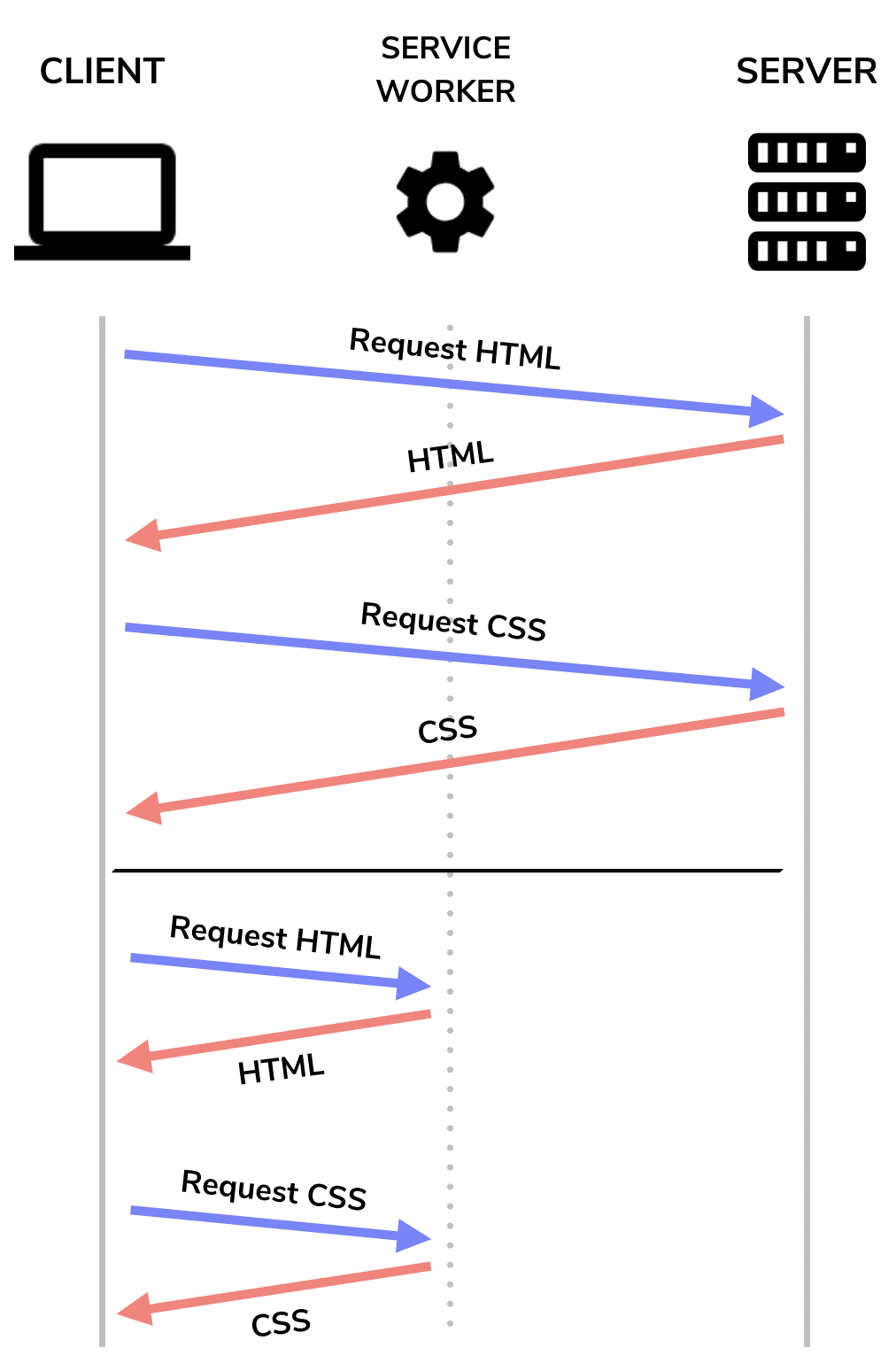
By acting as a proxy, **service workers** can fetch assets directly from the cache
rather than the server on repeat visits. This not only allows users to use your
application when they are offline, but also results in faster page load times on
repeat visits.
Use a third-party library to simplify the process of generating a service worker
unless you have more complex caching requirements than what a library can
provide. For example,
[Workbox](https://web.dev/case-studies/aem-with-workbox) provides a
collection of tools that allow you to create and maintain a service worker to
cache assets. For more information on service workers and offline reliability,
refer to the [service worker guide](https://web.dev/articles/service-workers-cache-storage) in the reliability learning path.
## Lazy load
Lighthouse displays a failed audit if you send too much data over the network.

This includes all asset types, but large JavaScript payloads are especially
costly due to the time it takes the browser to parse and compile them.
Lighthouse also provides a warning for this when appropriate.

To send a smaller JavaScript payload that contains only the code needed when a
user initially loads your application, split the entire bundle and [lazy load](https://web.dev/articles/reduce-javascript-payloads-with-code-splitting) chunks on demand.
Once you've managed to split your bundle, preload the chunks that are more
important (see the [Preload critical assets](https://web.dev/articles/preload-critical-assets) guide).
Preloading ensures more important resources are fetched and downloaded sooner
by the browser.
Aside from splitting and loading different JavaScript chunks on demand,
Lighthouse also provides an audit for lazy loading non-critical images.

If you load many images on your web page, defer all that are below the fold, or
outside the device viewport, when a page is loaded (see [Use lazysizes to lazyload images](https://web.dev/use-lazysizes-to-lazyload-images)).
## Next steps
Now that you understand some of the basic concepts behind the PRPL pattern,
continue to the next guide in this section to learn more.
It's important to remember that not all of the techniques need to be
applied together. Any efforts made with any of the following will provide
noticeable performance improvements.
- **Preload** critical resources.
- **Render** the initial route as soon as possible.
- **Pre-cache** remaining assets.
- **Lazy load** other routes and non-critical assets.
You can read up more about [PRPL](https://www.patterns.dev/posts/prpl/) patterns.