 Thomas Steiner [GitHub](https://github.com/tomayac) [LinkedIn](https://www.linkedin.com/in/thomassteinerlinkedin) [Mastodon](https://toot.cafe/@tomayac) [Bluesky](https://bsky.app/profile/tomayac.com) [Homepage](https://blog.tomayac.com/)
Published: June 15, 2020
When you play Progressive Web App buzzword bingo, it's safe to bet on "PWAs are
just websites." [Microsoft's PWA documentation agrees](https://docs.microsoft.com/microsoft-edge/progressive-web-apps-chromium/#progressive-web-apps-on-windows:%7E:text=PWAs%20are%20just%20websites),
[we say it](https://web.dev/explore/progressive-web-apps#content:%7E:text=Progressive%20Web%20Apps,Websites),
and so have PWA nominators [Frances Berriman and Alex Russell](https://infrequently.org/2015/06/progressive-apps-escaping-tabs-without-losing-our-soul/#post-2263:%7E:text=they%E2%80%99re%20just%20websites).
Yes, PWAs are just websites, but they are also way more than that. If done
right, a PWA won't feel like a website, but like a *real* app.
But what does it mean to feel like a real app?
Take the Apple [Podcasts app](https://support.apple.com/HT201859) as an example.
It's available on macOS on desktop and on iOS (and iPadOS respectively) on mobile.
While Podcasts is a media application, the core ideas I illustrate with its
help apply to other categories of apps, too.
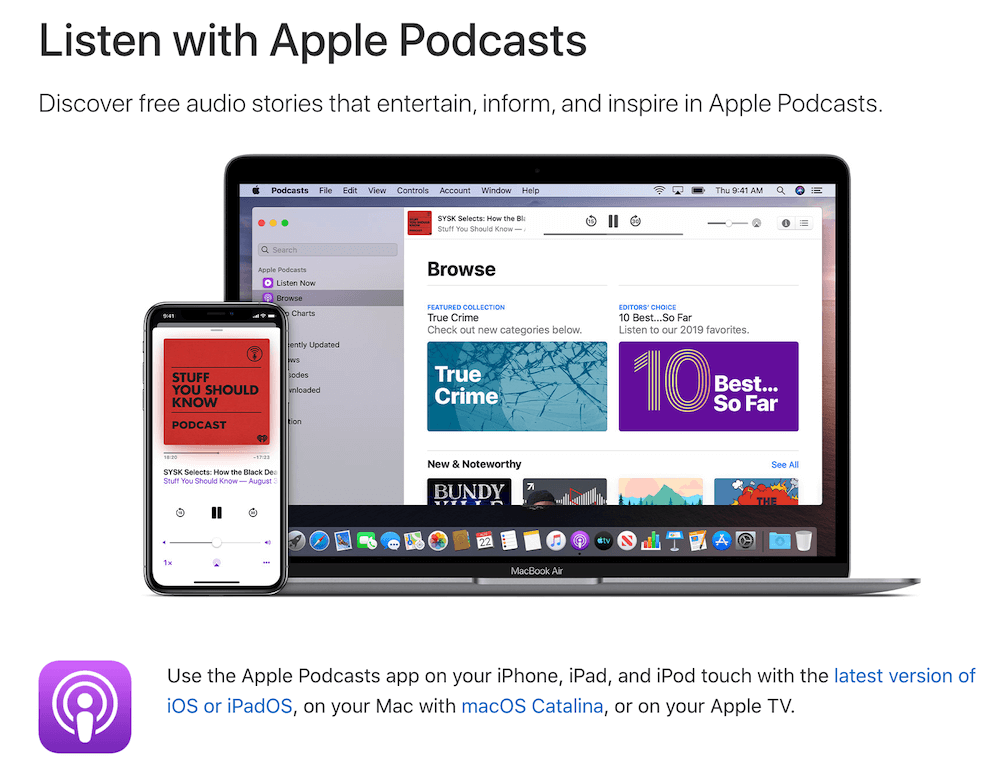 Apple Podcasts on iPhone and on macOS ([Source](https://support.apple.com/HT201859)).
> [!CAUTION]
> **Caution:** Each iOS, Android, and desktop app feature listed has a **Do this on the web** component that you can open for more details. However, not all browsers on the various operating systems support all the listed APIs or functionalities. Review the compatibility before implementing any technology in production.
## Capable of running offline
Think about the platform-specific applications you have on your mobile phone
or desktop. One thing stands out: you can always use it. In the Podcasts app,
even if I'm offline, there is always something to do or see. When there is no
network connection, the app still opens. The **Top Charts** section doesn't
show any content, but instead, it falls back to a
**Can't connect right now** message paired with a **Retry** button.
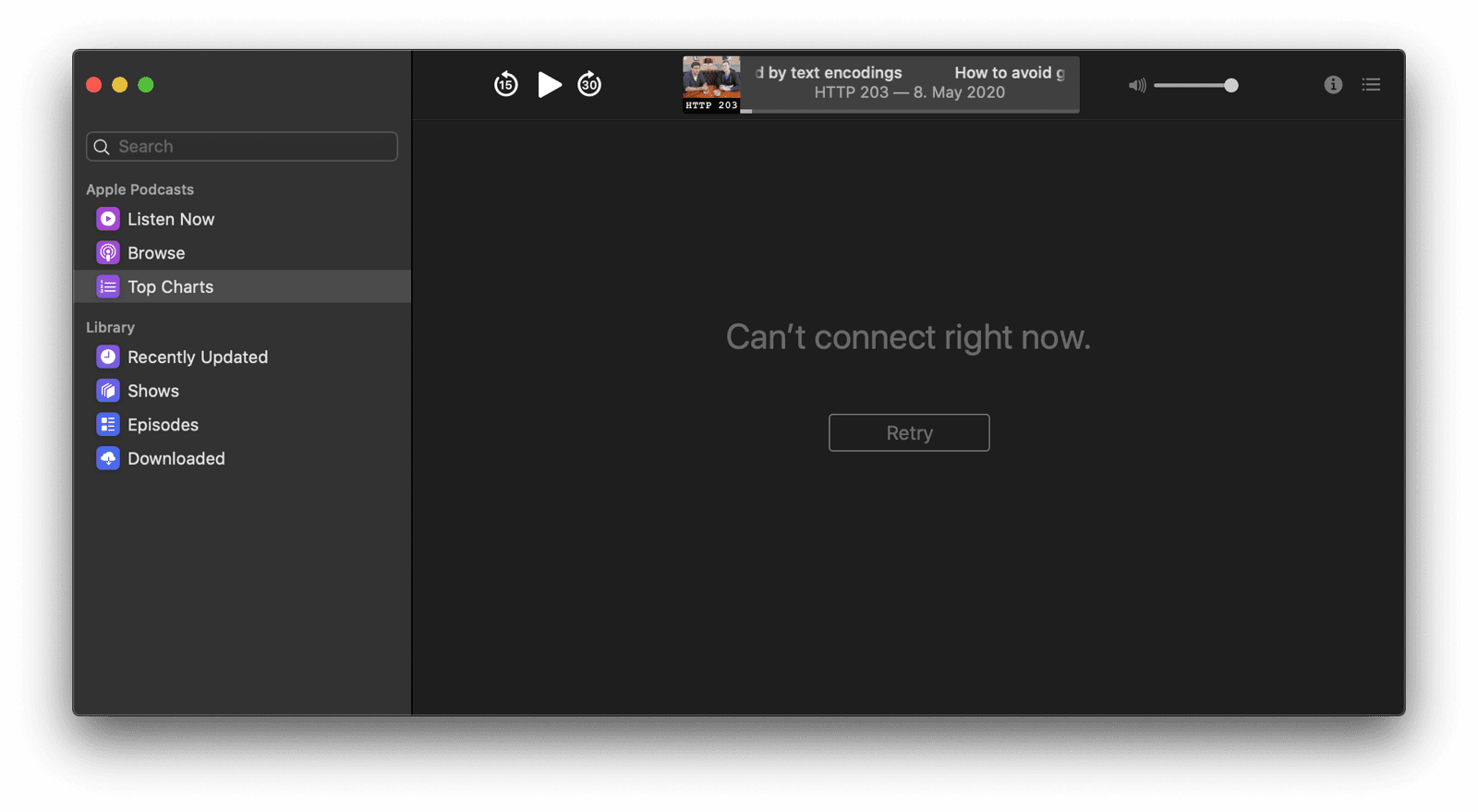 The Podcasts app shows a message that it "cannot connect right not," when no network connection is available. Do this on the web
The Podcasts app follows the so-called app shell model. All the static content that is needed to show the core app is cached locally,
including decorative images like the left-hand menu icons and the core player UI icons.
Dynamic content like the **Top Charts** data is only loaded on demand, with locally cached fallback content available should the loading fail.
Read the article [The App Shell Model](https://developers.google.com/web/fundamentals/architecture/app-shell)
to learn how to apply this architectural model to your web app.
## Offline content available and media playable
While offline, in the left-hand drawer, I can still navigate to the
**Downloaded** section and play downloaded podcast episodes, which are displayed
with all metadata, including artwork and descriptions.
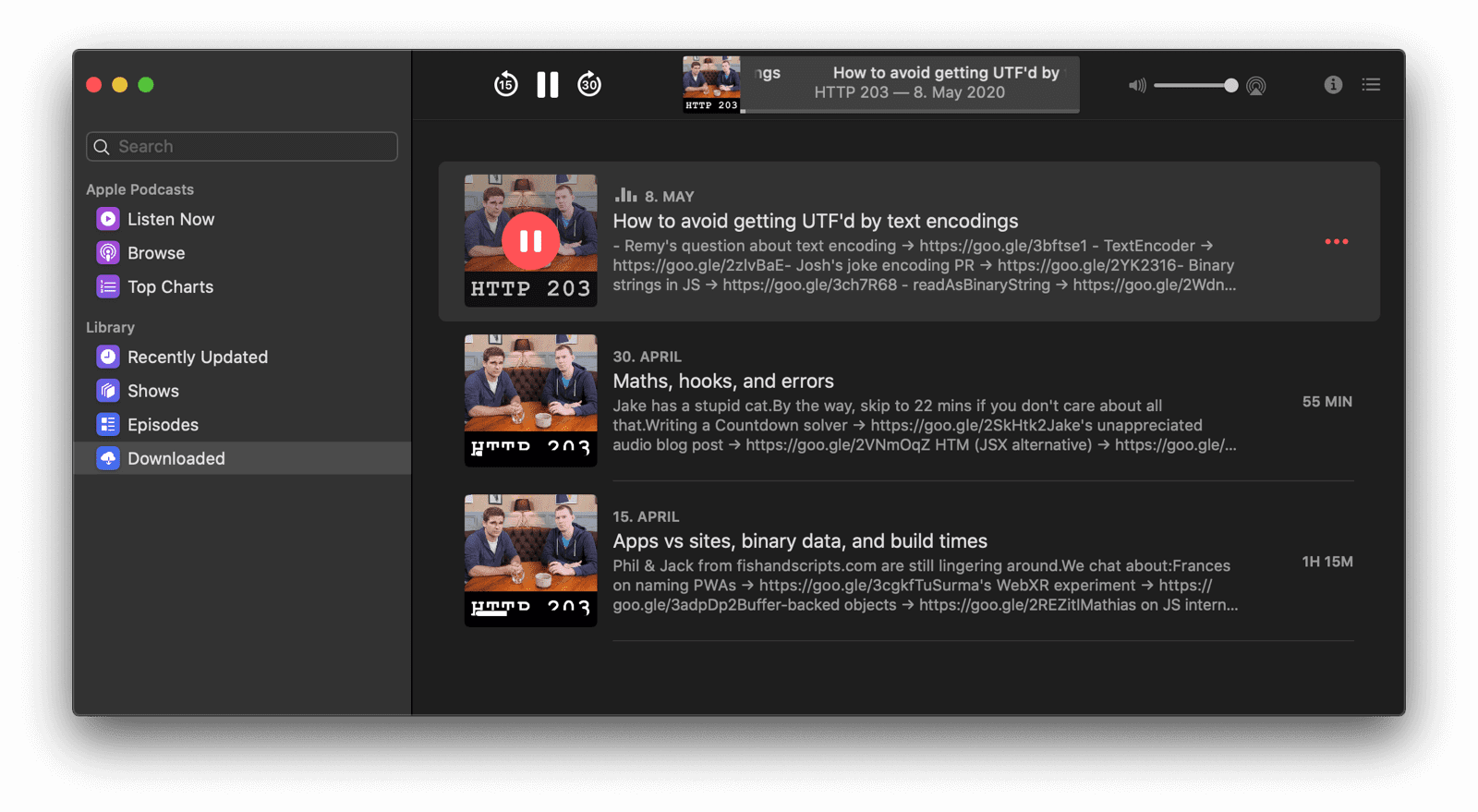 Downloaded podcast episodes can be played even without network. Do this on the web
Previously downloaded media content can be served from the cache, for example using the
[Serve cached audio and video](https://developer.chrome.com/docs/workbox/serving-cached-audio-and-video)
recipe from the [Workbox](https://developer.chrome.com/docs/workbox) library.
Other content can always be stored in the cache, or in IndexedDB. Read the article [Storage for the web](https://web.dev/articles/storage-for-the-web)
for all details and to know when to use what storage technology.
If you have data that should be persistently stored without the risk of being purged when the
available amount of memory gets low, you can use the
[Persistent Storage API](https://web.dev/articles/persistent-storage).
## Proactive background downloading
When I am back online, I can of course search for content with a query like `http 203`, and when I decide to subscribe to the search result, the [HTTP 203 podcast](https://web.dev/podcasts), the latest episode of the series is immediately downloaded, no questions asked.
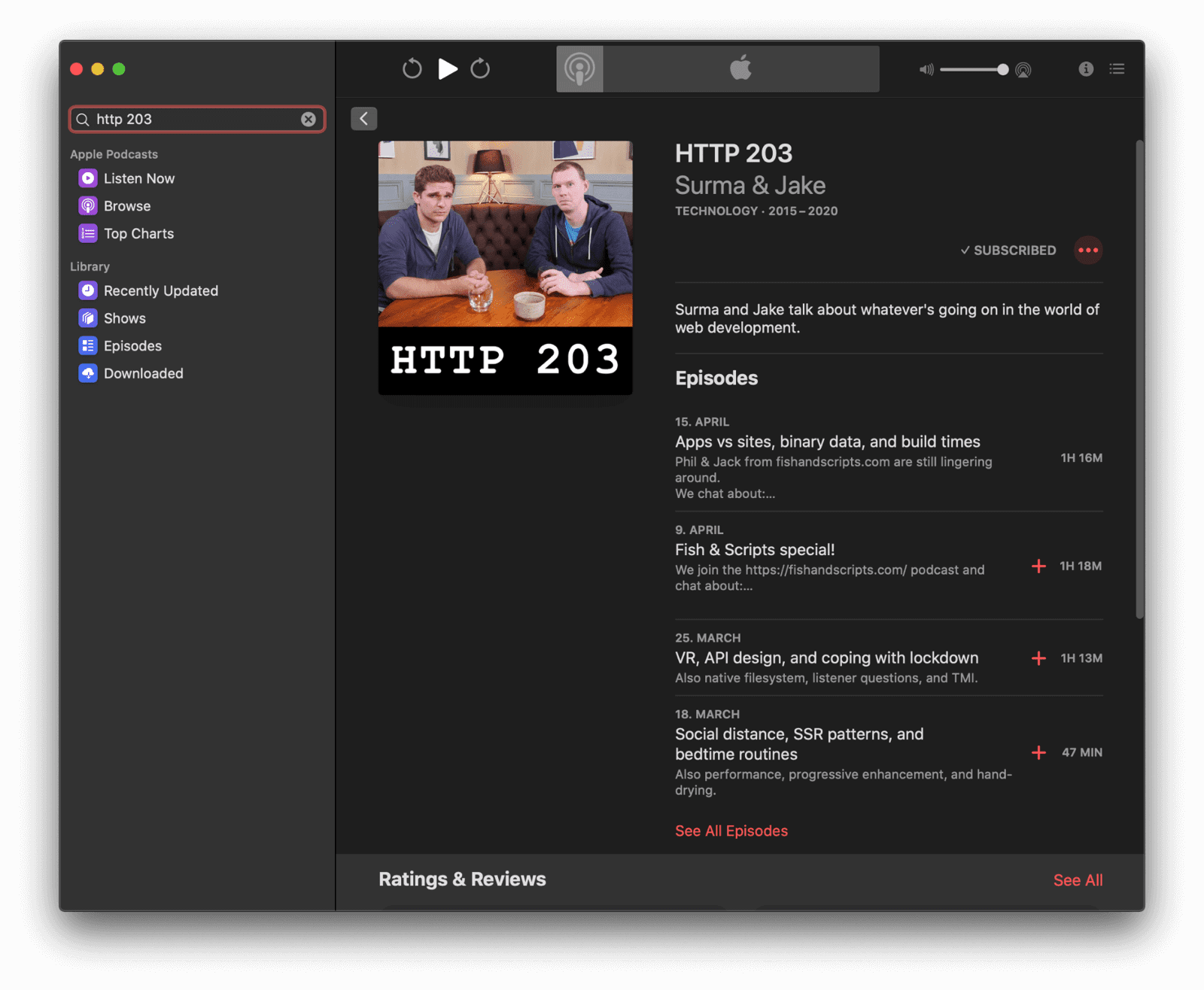 After subscribing to a podcast, the latest episode is immediately downloaded. Do this on the web
Downloading a podcast episode is an operation that potentially can take
longer. The [Background Fetch API](https://developers.google.com/web/updates/2018/12/background-fetch)
lets you delegate downloads to the browser, which takes care of them in
the background.
On Android, the browser in turn can even delegate these downloads
further on to the operating system, so the browser does not need to be
continuously running. Once the download has completed, your app's service
worker gets woken up and you can decide what to do with the response.
## Interact and share with other applications
The Podcasts app integrates naturally with other applications. For example,
when I right-click an episode that I like, I can share it to other apps on my
device, like the Messages app. It also naturally integrates with the system
clipboard. I can right-click any episode and copy a link to it.
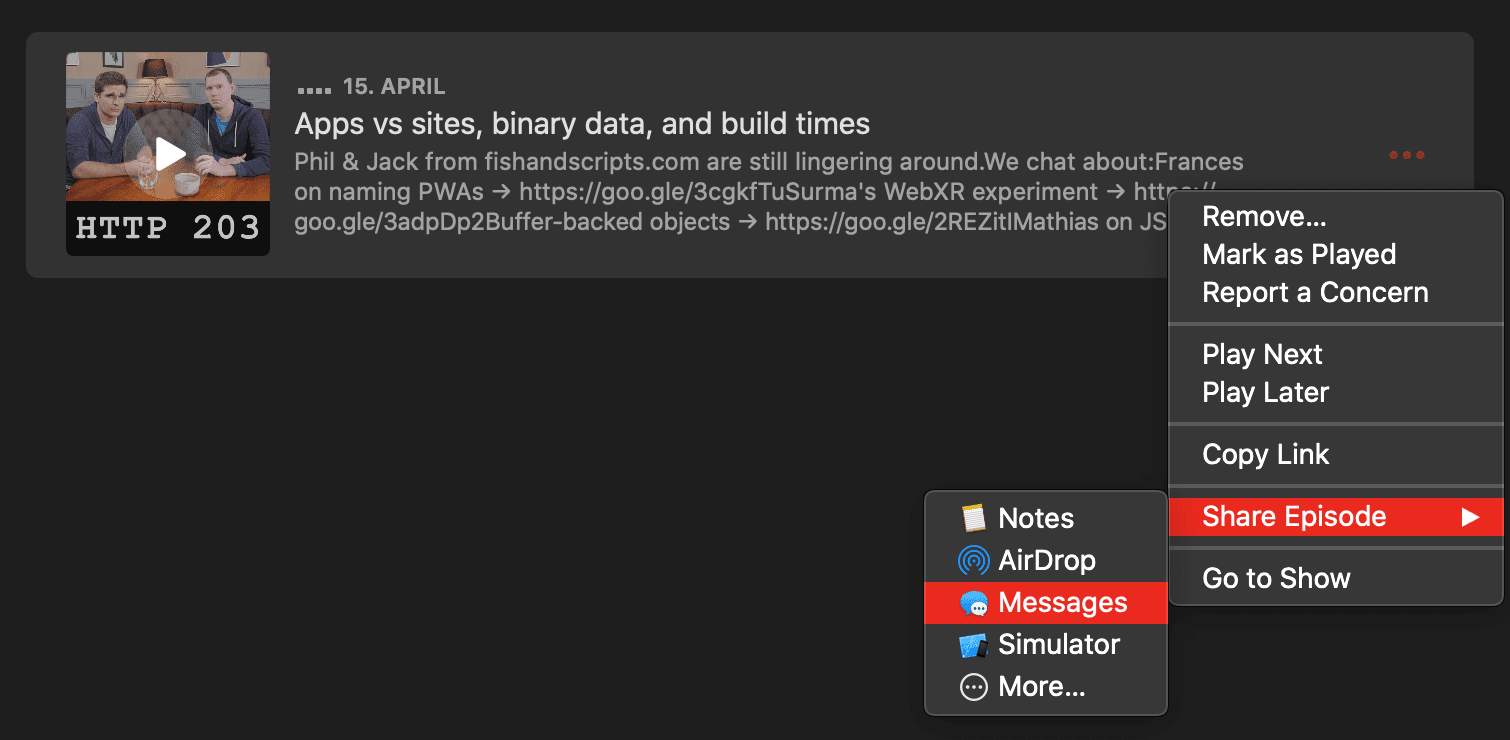 Sharing a podcast episode to the Messages app. Do this on the web
The [Web Share API](https://web.dev/articles/web-share) and the [Web Share Target API](https://web.dev/web-share-target)
allow your app to share and receive texts, files, and links to and from other applications on the device.
Although it's not yet possible for a web app to add menu items to the operating system's built-in right-click menu, there are lots of other ways to link to and from other apps on the device.
With the [Async Clipboard API](https://web.dev/image-support-for-async-clipboard), you can programmatically read and write
text and image data (PNG images) to the system clipboard.
On Android, you can use the [Contact Picker API](https://web.dev/contact-picker) to select entries from the device's contacts manager.
If you offer both a platform-specific app and a PWA, you can use the [Get Installed Related Apps API](https://web.dev/articles/get-installed-related-apps)
to check if the platform-specific app is installed, in which case you don't need to encourage the user to install the PWA or accept web push notifications.
## Background app refreshing
In the Podcasts app's settings, I can configure the app to download new episodes automatically. Like that, I don't even have to think about it, updated content will always just be there. Magic.
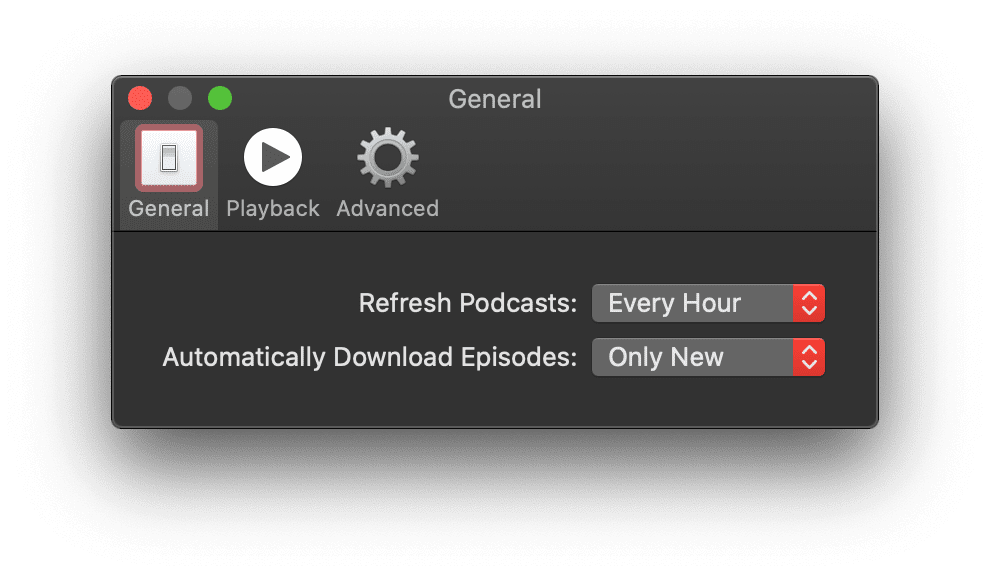 Podcasts is configured to refresh your feed for new podcast episode every hour. Do this on the web
The [Periodic Background Sync API](https://web.dev/periodic-background-sync)
allows your app to refresh its content regularly in the background without the need for it to be running.
This means new content is proactively available, so your users can start delving into it right away whenever they decide.
## State synchronized over the cloud
My subscriptions are synchronized across all of my devices. In a seamless world,
I don't have to worry about manually keeping my podcast subscriptions in sync.
Likewise, I don't have to be afraid that my mobile device's memory will be
consumed by episodes I've already listened to on my desktop. The play state is
kept in sync, and listened-to episodes are automatically deleted.
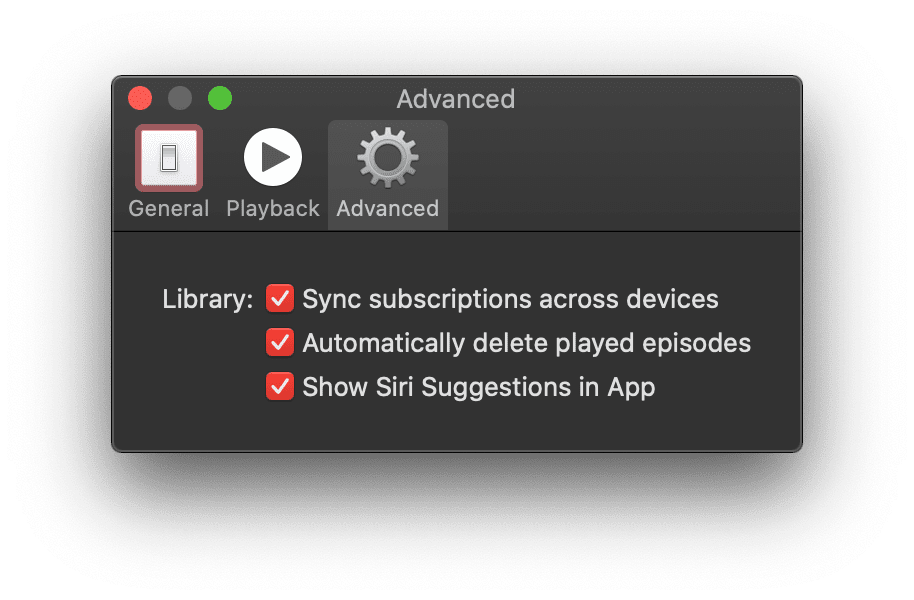 The Podcasts app's settings menu in the 'Advanced' section where the 'Sync subscriptions across devices' option is activated. State is synchronized over the cloud. Do this on the web
Syncing app state data is a task that you can delegate to the [Background Sync API](https://developers.google.com/web/updates/2015/12/background-sync). The sync operation itself does not have to happen immediately, just *eventually*, and maybe even when the user has closed the app again already.
## Hardware media key controls
When I am busy with another application, say, reading a news page in my browser,
I can still control the Podcasts app with the media keys on my laptop.
There is no need to switch to the app just to skip forward or backward.
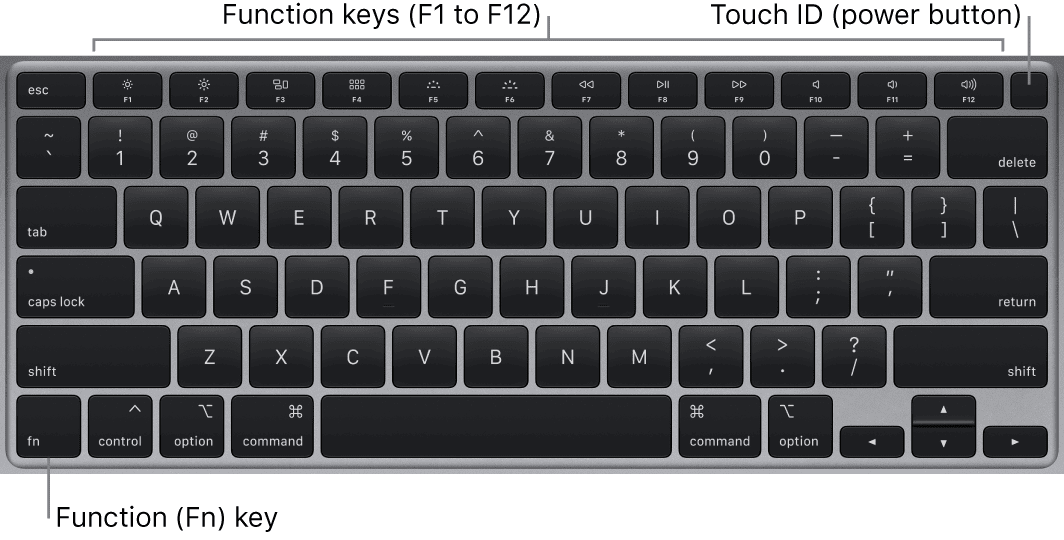 The [media keys](https://support.apple.com/guide/macbook-pro/magic-keyboard-apdd0116a6a2/mac) allow for controlling the Podcasts app. Do this on the web
Media keys are supported by the [Media Session API](https://web.dev/articles/media-session).
Like that, users can make use of the hardware media keys on their physical
keyboards, headphones, or even control the web app from the software media
keys on their smartwatches. Additionally, you could use a
[vibration pattern](https://developer.mozilla.org/docs/Web/API/Vibration_API)
when the user seeks over a significant part of the content, such as
passing the opening credits or a chapter boundary.
## Multitasking and app shortcut
Of course I can always multitask back to the Podcasts app from anywhere. The app
has a clearly distinguishable icon that I can also put on my desktop or
application dock so Podcasts can be launched immediately when I feel like it.
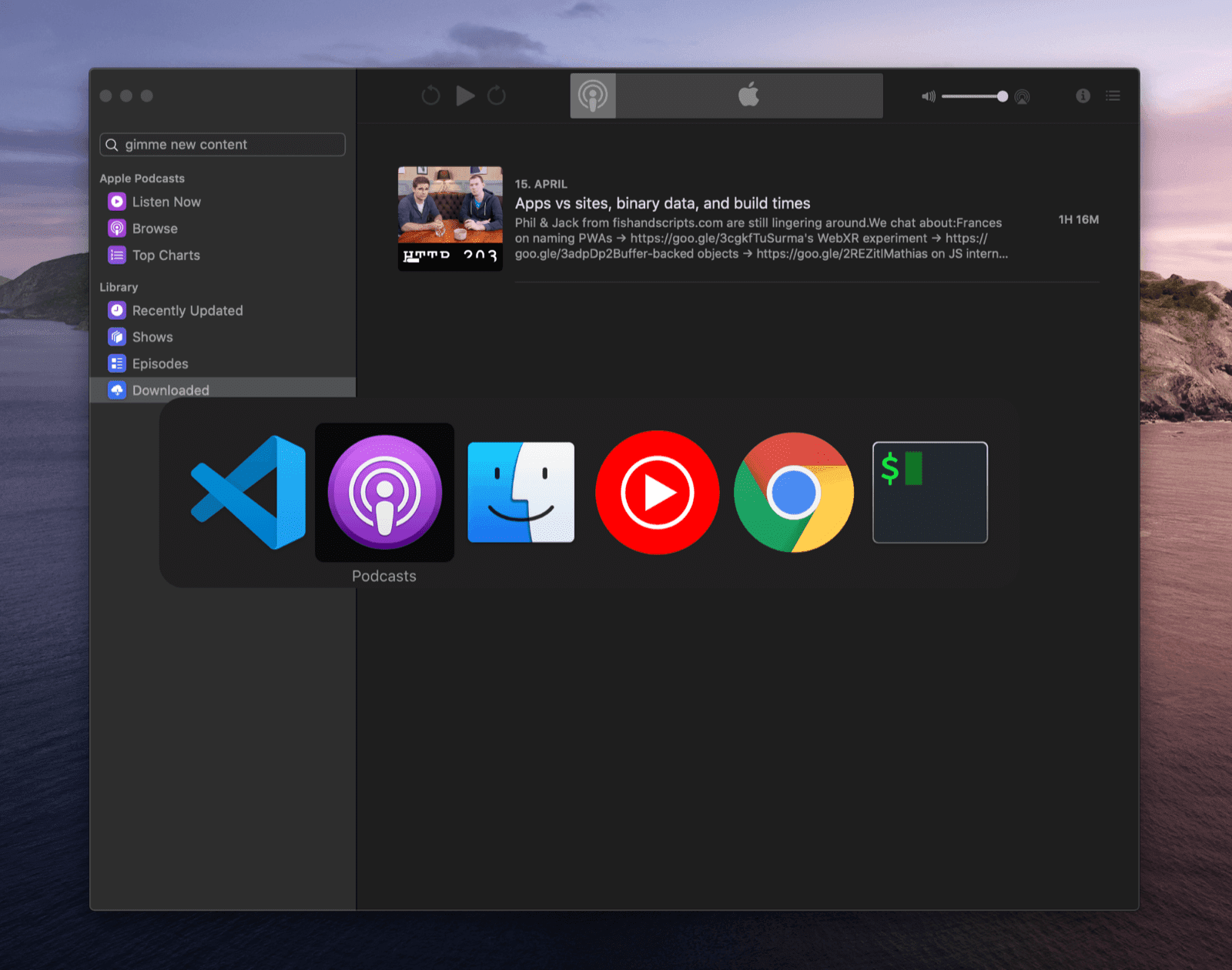 Multitasking back to the Podcasts app. Do this on the web
Progressive Web Apps on both desktop and mobile can be installed to the home screen, start menu, or application dock.
Installation can happen based on a proactive prompt, or fully controlled by the app developer.
The article [What does it take to be installable?](https://web.dev/articles/install-criteria) covers everything you need to know.
When multitasking, PWAs appear independent from the browser.
## Quick actions in context menu
The most common app actions, **Search** for new content and
**Check for New Episodes** , are available right from the context menu of the
app in the Dock. In the **Options** menu, I can also decide to open the app at
login time.
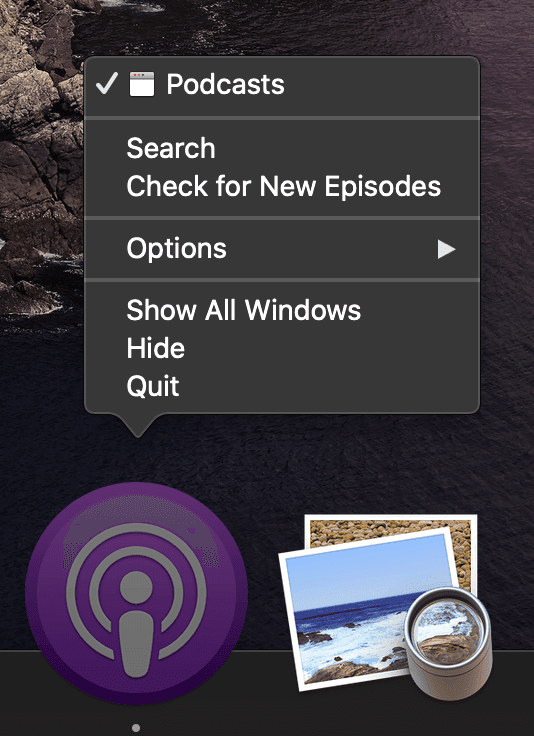 Quick actions are immediately available right from the app icon. Do this on the web
By specifying [app icon shortcuts](https://web.dev/articles/app-shortcuts)
in the PWA's web app manifest, you can register quick routes to common tasks that users can reach directly from the app icon.
On operating systems like macOS, users can also right-click the app icon and set the app to launch at login time.
There is ongoing work on a proposal for [run on login](https://github.com/MicrosoftEdge/MSEdgeExplainers/blob/main/RunOnLogin/Explainer.md).
## Act as default app
Other iOS applications and even websites or emails can integrate with the Podcasts app by leveraging the `podcasts://` URL scheme. If I follow a link like [`podcasts://podcasts.apple.com/podcast/the-css-podcast/id1042283903`](podcasts://podcasts.apple.com/podcast/the-css-podcast/id1042283903) while in the browser, I am brought right into the Podcasts app and can decide to subscribe or listen to the podcast.
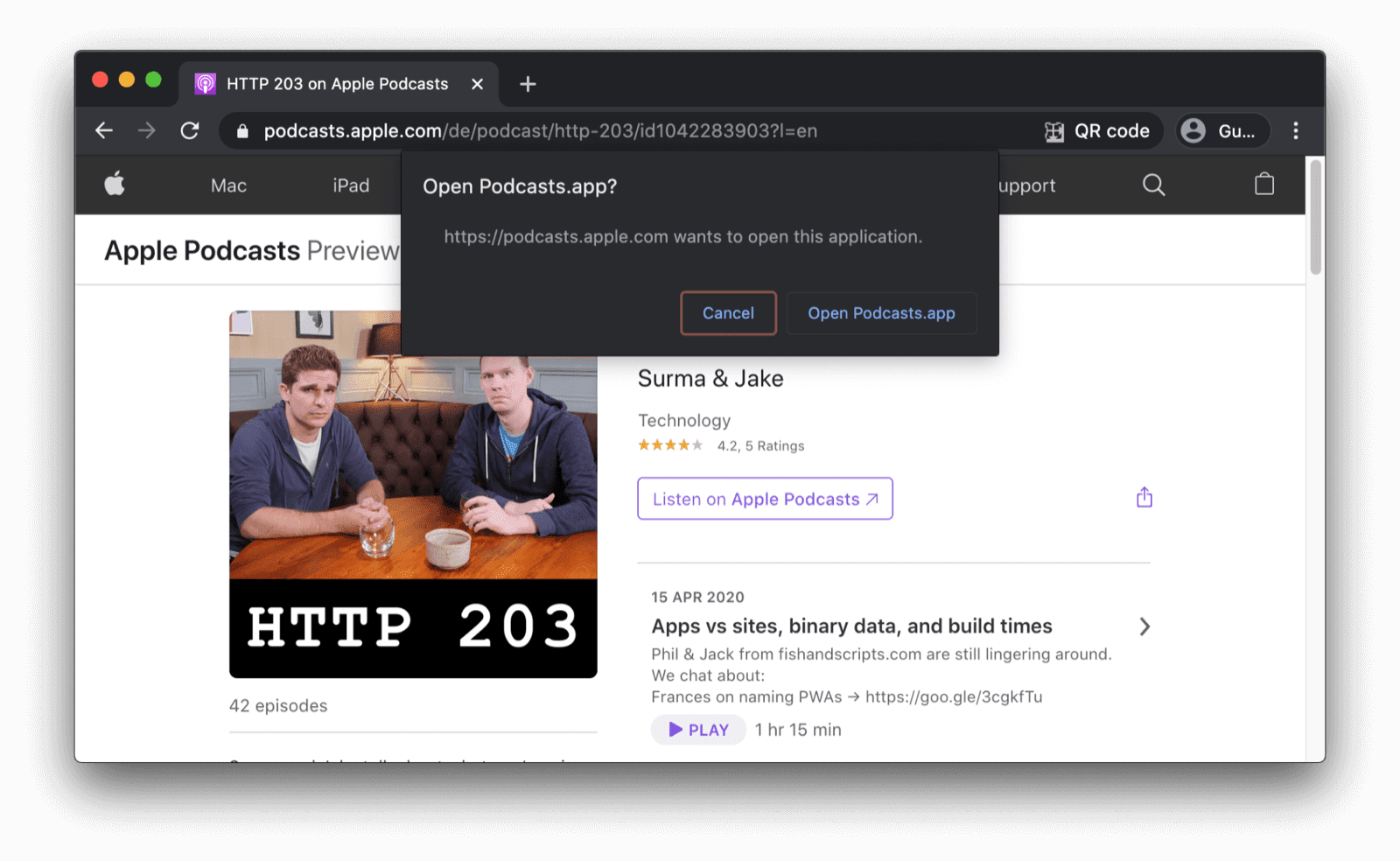 The Podcasts app can be opened right from the browser. Do this on the web
Handling fully custom URL schemes is not yet possible, but there's an
ongoing proposal for [URL Protocol Handling](https://github.com/MicrosoftEdge/MSEdgeExplainers/blob/main/URLProtocolHandler/explainer.md)
for PWAs. [`registerProtocolHandler()`](https://developer.mozilla.org/docs/Web/API/Navigator/registerProtocolHandler) with a
`web+` scheme prefix is the best alternative.
## Local file system integration
You may not immediately think of it, but the Podcasts app naturally integrates
with the local file system. When I download a podcast episode to my laptop, it's
stored in `~/Library/Group Containers/243LU875E5.groups.com.apple.podcasts/Library/Cache`.
Unlike, say `~/Documents`, this directory is not meant to be accessed directly
by regular users.
Other storage mechanisms than files are referenced in the [offline content](https://web.dev/articles/app-like-pwas#offline_content_available_and_media_playable) section.
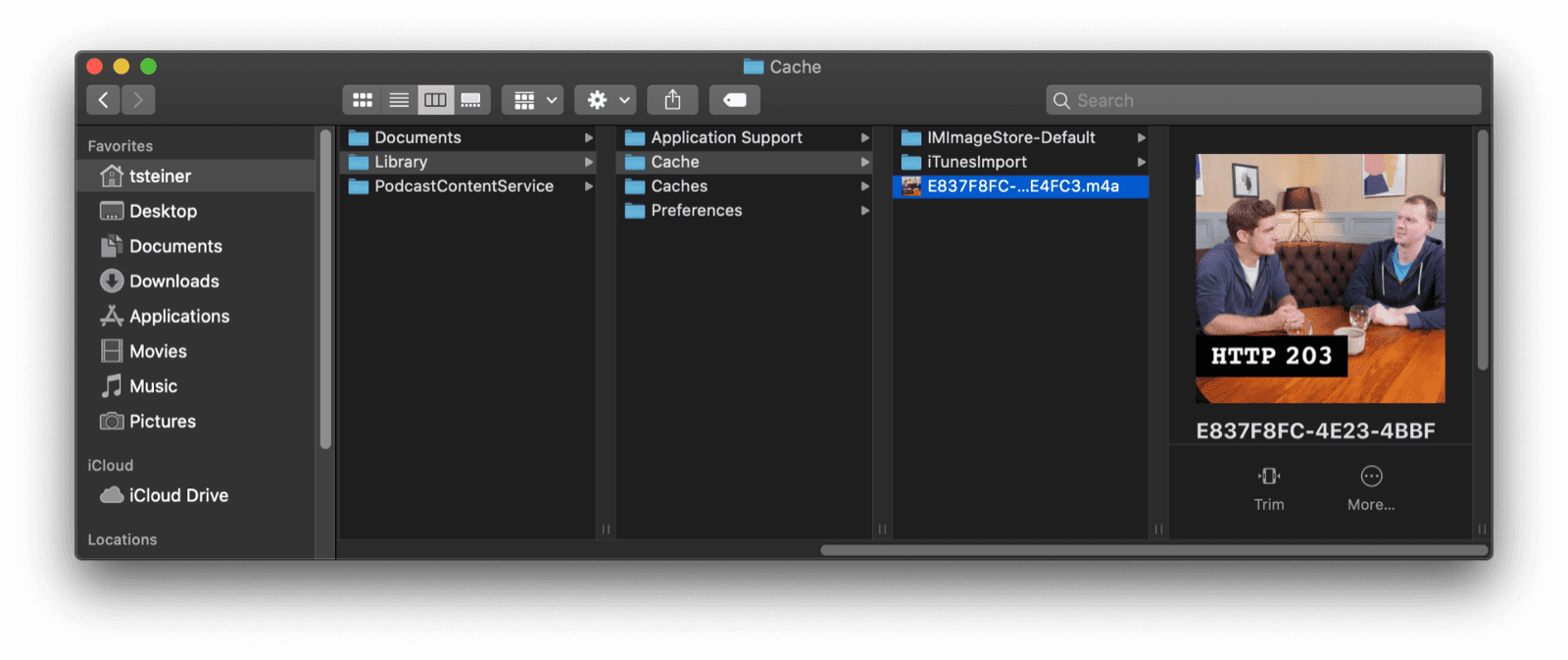 Podcast episodes are stored in a special system app folder. Do this on the web
The [File System Access API](https://web.dev/file-system-access) enables developers to get access to the local file system
of the device. You can use it directly or using the [browser-fs-access](https://github.com/GoogleChromeLabs/browser-fs-access)
support library that transparently provides a fallback for browsers that don't support the API.
For security reasons, system directories are not web-accessible.
## Platform look and feel
There is a more subtle feature that is self-evident for an iOS application, like
Podcasts. None of the text labels are selectable and all text blends in with
the system font of the machine. Also, my choice of system color theme
(such as dark mode) is respected.
 The Podcasts app supports light and dark mode.  The app uses the default system font. Do this on the web
By leveraging the [`user-select`](https://developer.mozilla.org/docs/Web/CSS/user-select)
CSS property with the value of [`none`](https://developer.mozilla.org/docs/Web/CSS/user-select#Syntax:~:text=none,-The),
you can protect UI elements from being accidentally selected.
Be sure, though, to not abuse this property for making *app contents* unselectable.
It should only be used for UI elements like button texts, etc.
The [`system-ui`](https://developer.mozilla.org/docs/Web/CSS/font-family#:~:text=system%2Dui,-Glyphs)
value for the [`font-family`](https://developer.mozilla.org/docs/Web/CSS/font-family) CSS property lets you
specify the default UI font of the system to be used for your app.
Finally, your app can obey to the user's color scheme preference by respecting their [`prefers-color-scheme`](https://web.dev/articles/prefers-color-scheme) choice, with an optional [dark mode toggle](https://github.com/GoogleChromeLabs/dark-mode-toggle)
to override it.
Another thing to decide on might be what the browser should do when reaching
the boundary of a scrolling area, for example, to implement custom *pull to refresh* .
This is possible with the [`overscroll-behavior`](https://developer.mozilla.org/docs/Web/CSS/overscroll-behavior) CSS property.
## Customized title bar
When you look at the Podcasts app window, you notice that it does not have a classic integrated title bar and toolbar, like, for example, the Safari browser window, but a customized experience that looks like a sidebar docked to the main player window.
 The Safari browser's integrated tile bar and toolbar.  Customized title bars of Safari and Podcasts. Do this on the web
[Title bar customization](https://developer.mozilla.org/docs/Web/API/Window_Controls_Overlay_API)
has limited availability. You can (and should) specify the
[`display`](https://web.dev/articles/add-manifest#display) and the
[`theme-color`](https://web.dev/articles/add-manifest#theme-color)
properties of the web app manifest. This determines the look and feel of
your application window and decides which default browser controls should
be shown---potentially none.
## Snappy animations
In-app animations are snappy and smooth in Podcasts. For example, when I open
the **Episode Notes** drawer on the right, it elegantly slides in. When I remove
one episode from my downloads, the remaining episodes float up and consume the
screen real estate that was freed by the deleted episode.
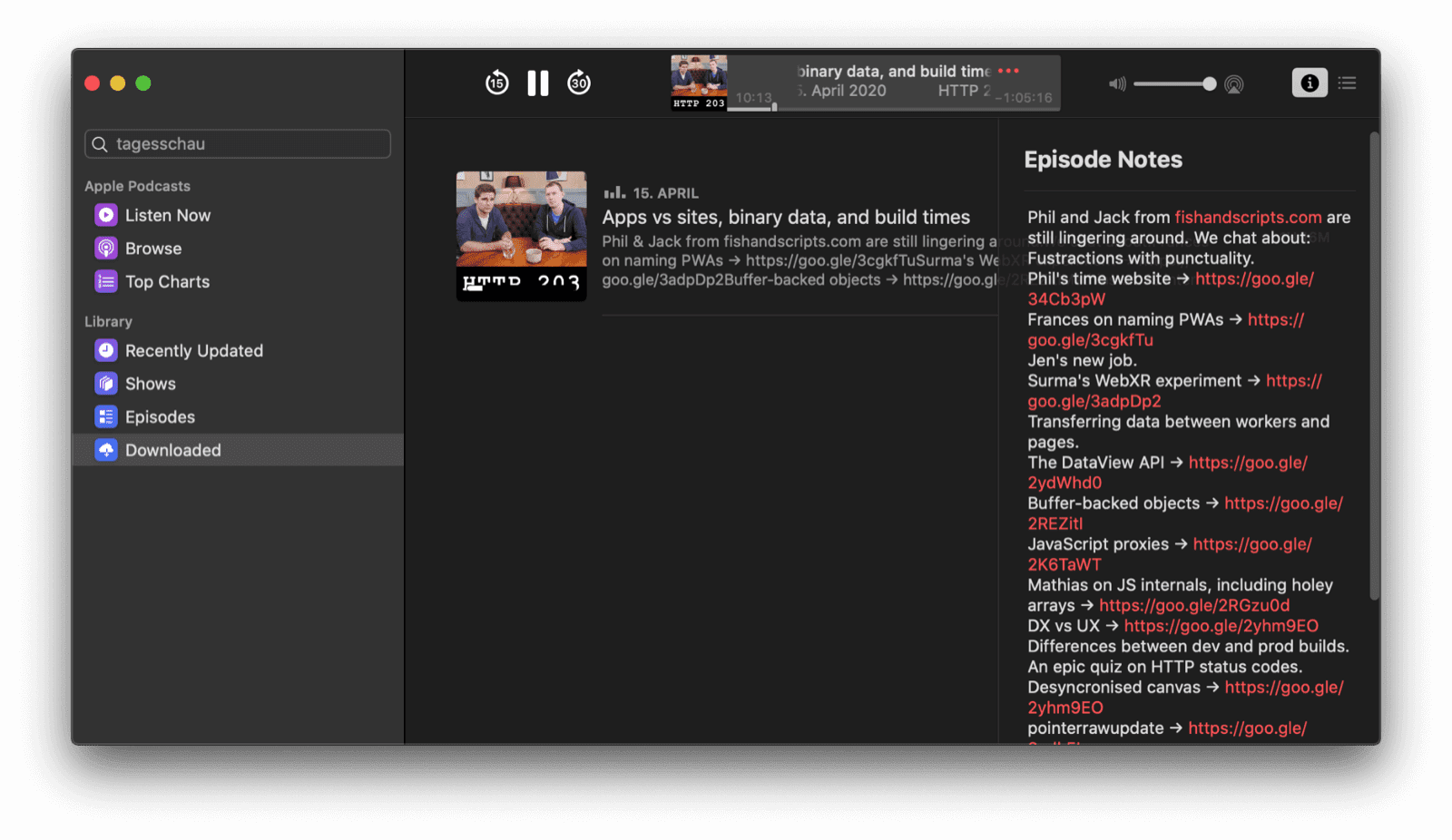 In-app animations like when opening a drawer are snappy. Do this on the web
Performant animations on the web are certainly possible if you take into account a number of best practices
outlined in the article [Animations and Performance](https://developers.google.com/web/fundamentals/design-and-ux/animations/animations-and-performance).
Scroll animations as commonly seen in paginated content or media carousels can be massively improved by using the [CSS Scroll Snap](https://developers.google.com/web/updates/2018/07/css-scroll-snap) feature.
For full control, you can use the [Web Animations API](https://developer.mozilla.org/docs/Web/API/Web_Animations_API).
## Content surfaced outside of app
The Podcasts app on iOS can surface content in other locations than the actual
application, for example, in the system's Widgets view or as a Siri Suggestion.
Proactive, usage-based calls-to-action that just require a tap to interact with
can greatly increase the re-engagement rate of an app like Podcasts.
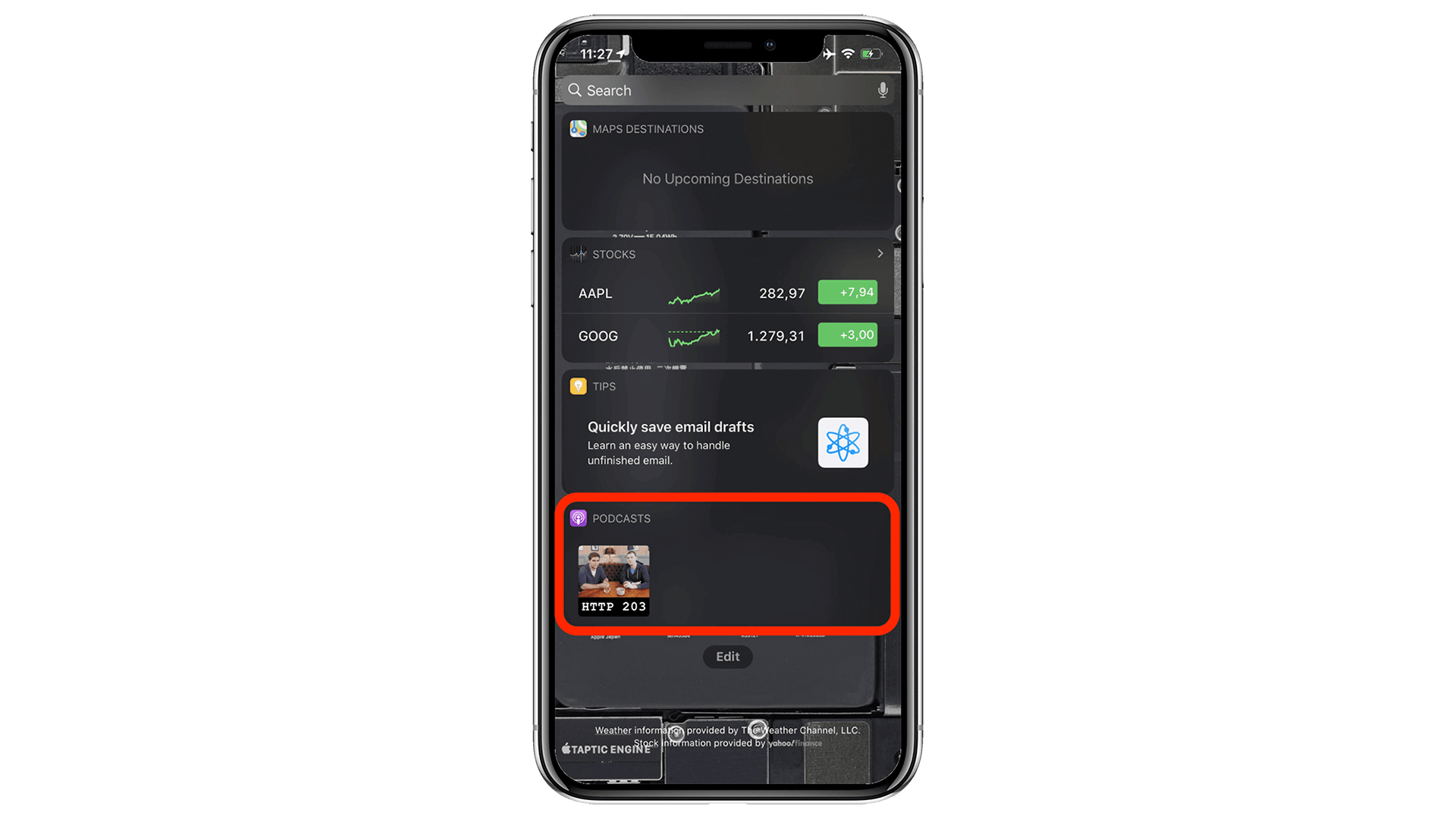 iOS Widget view shows the Podcasts app suggesting a new episode. Do this on the web
Use the [Content Index API](https://web.dev/articles/content-indexing-api)
in your application to tell the browser what content of the PWA is
available offline. This allows the browser to expose this content outside
of the main app. By marking up interesting content in your app as suitable
for [speakable](https://developers.google.com/search/docs/data-types/speakable)
audio playback and by using
[structured markup](https://developers.google.com/search/docs/guides/search-gallery),
you can help search engines and virtual assistants, like the Google
Assistant, present your offerings in an ideal light.
## Lock screen media control widget
When a podcast episode is playing, the Podcasts app shows a beautiful control widget on the lock screen that features metadata like the episode artwork, the episode title, and the podcast name.
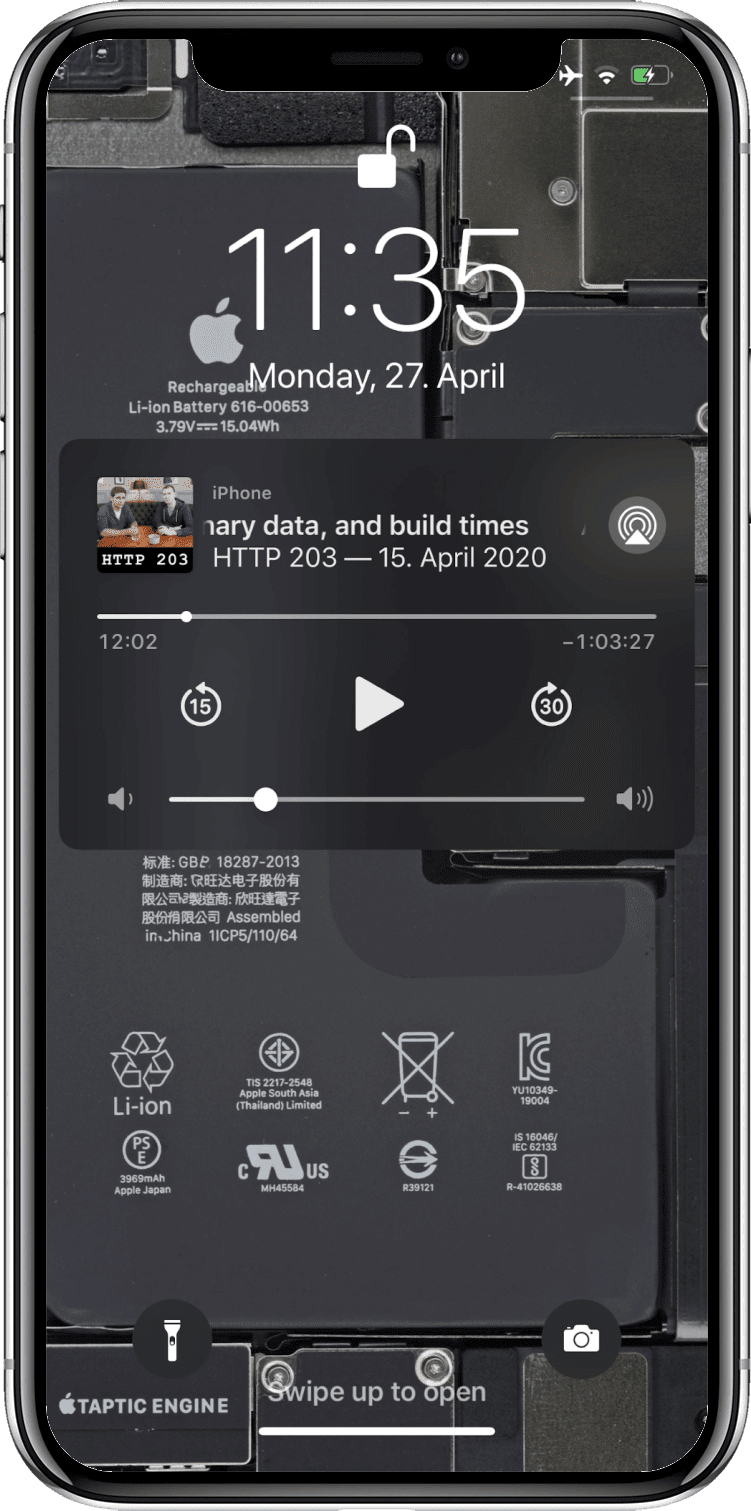 Media playing in the app can be controlled from the lock screen. Do this on the web
The [Media Session API](https://web.dev/articles/media-session) lets you specify metadata like artwork, track titles, etc.
that then gets displayed on the lock screen, smartwatches, or other media widgets in the browser.
## Push notifications
Push notifications have become a bit of an annoyance on the web
(albeit [notification prompts are a lot quieter](https://blog.chromium.org/2020/01/introducing-quieter-permission-ui-for.html) now).
But if used properly, they can add a lot of value.
For example, the iOS Podcasts app can optionally notify me of new episodes of podcasts I am subscribed to or recommend new ones, as well as alert me of new app features.
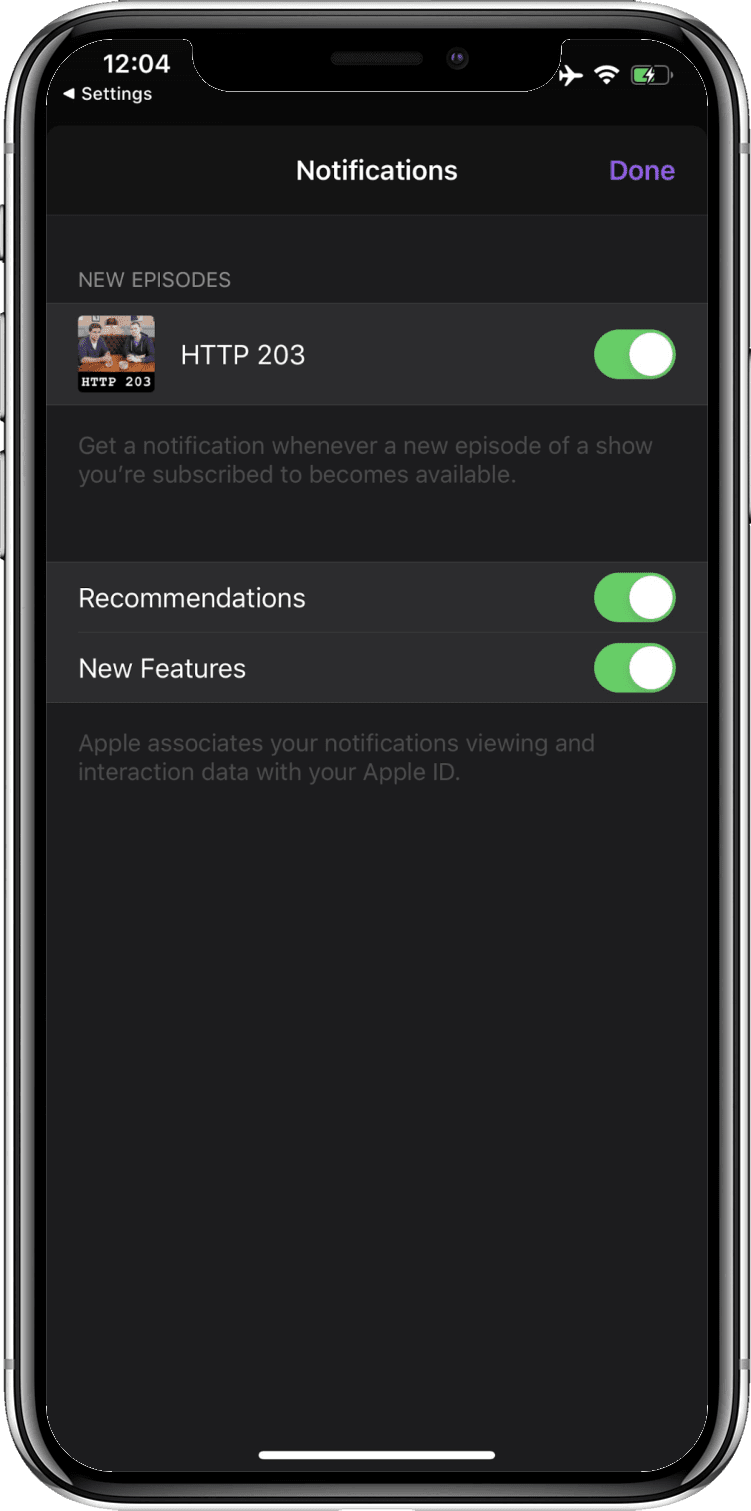 Apps can send push notifications to inform the user about new content. Do this on the web
The [Push API](https://developers.google.com/web/fundamentals/push-notifications)
allows your app to receive push notifications so you can notify your users about noteworthy events around your PWA.
For notifications that should fire at a known time in the future and that don't require a network connection,
you can use the [Notification Triggers API](https://web.dev/notification-triggers).
## App icon badging
Whenever there are new episodes available for one of the podcasts I am subscribed to, an app icon badge on the Podcasts home screen icon appears, again encouraging me to re-engage with the app in a way that is not intrusive.
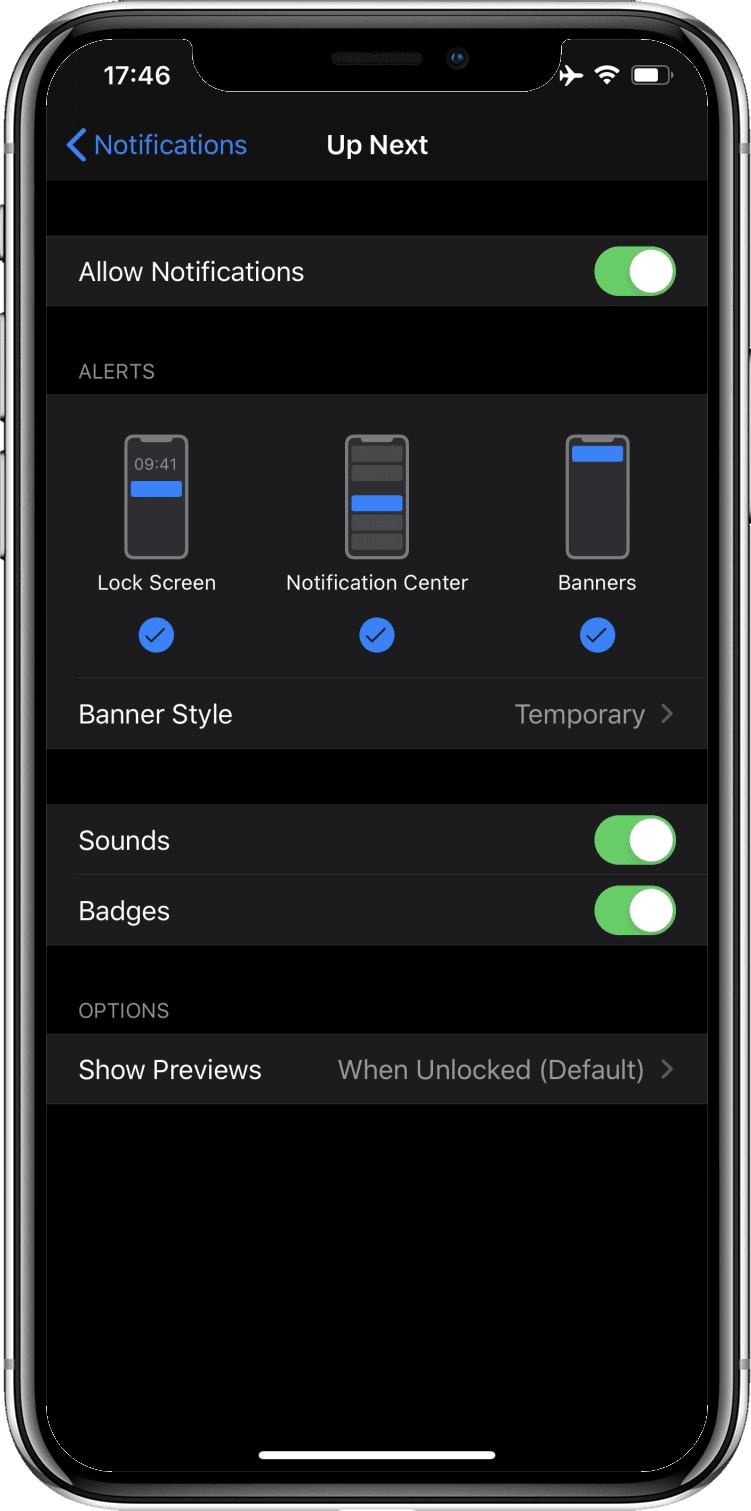 Badges are a subtle way for applications to inform users about new content. Do this on the web
You can set app icon badges with the [Badging API](https://web.dev/badging-api).
This is especially useful when your PWA has some notion of "unread" items or when you need a means
to unobtrusively draw the user's attention back to the app.
## Media playback takes precedence over energy saver settings
When podcast media is playing, the screen may turn off, but the system doesn't
enter standby mode. Apps can optionally keep the screen awake, too, for
example to display lyrics or captions.
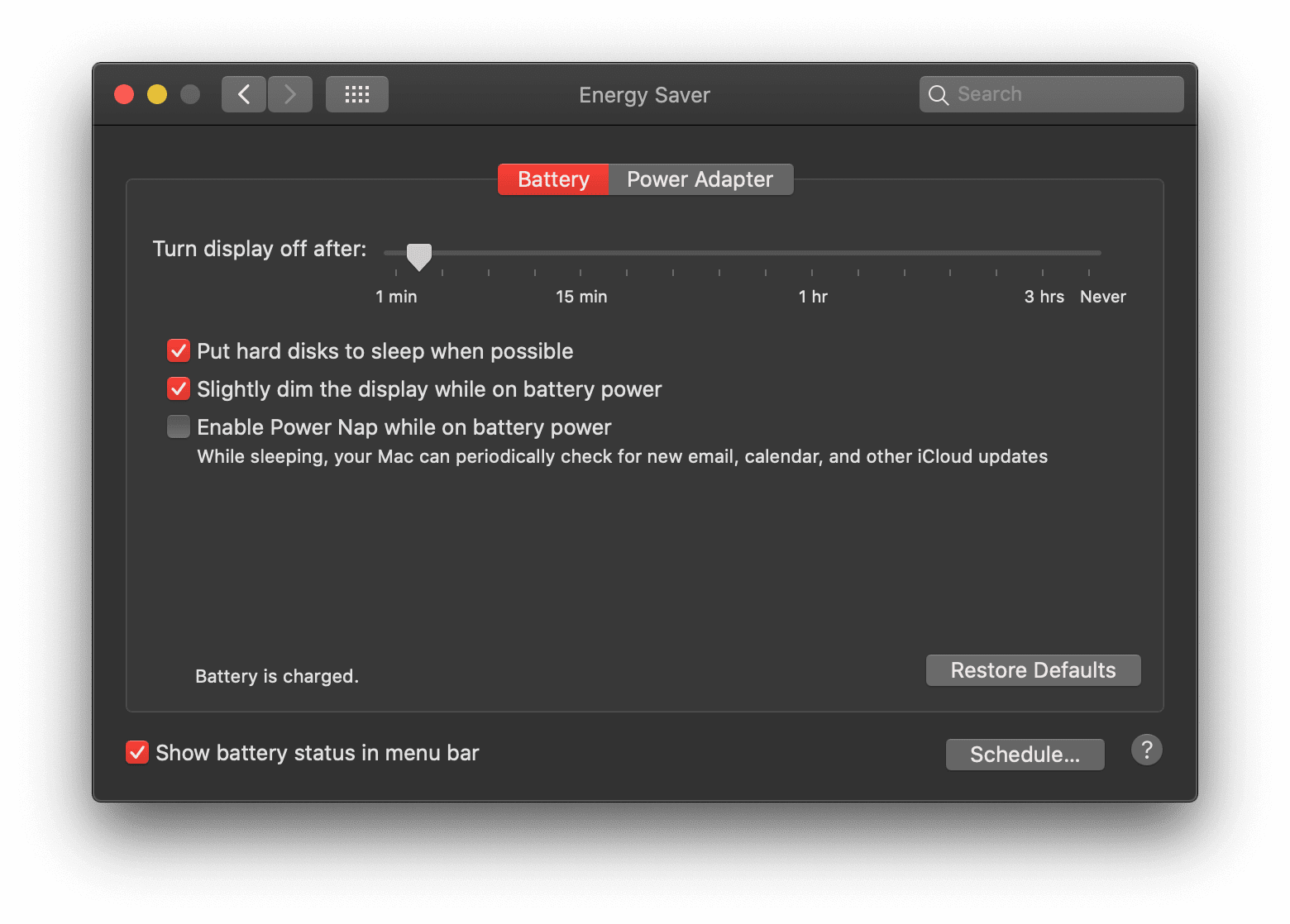 Apps can keep the screen awake. Do this on the web
Use the [Screen Wake Lock API](https://web.dev/wakelock) to prevent the
screen from turning off. Media playback on the web automatically prevents
the system from entering standby mode.
## App discovery through an app store
While the Podcasts app is part of the macOS desktop experience, on iOS it needs
to be installed from the App Store. A quick search for `podcast`, `podcasts`,
or `apple podcasts` immediately turns the app up in the App Store.
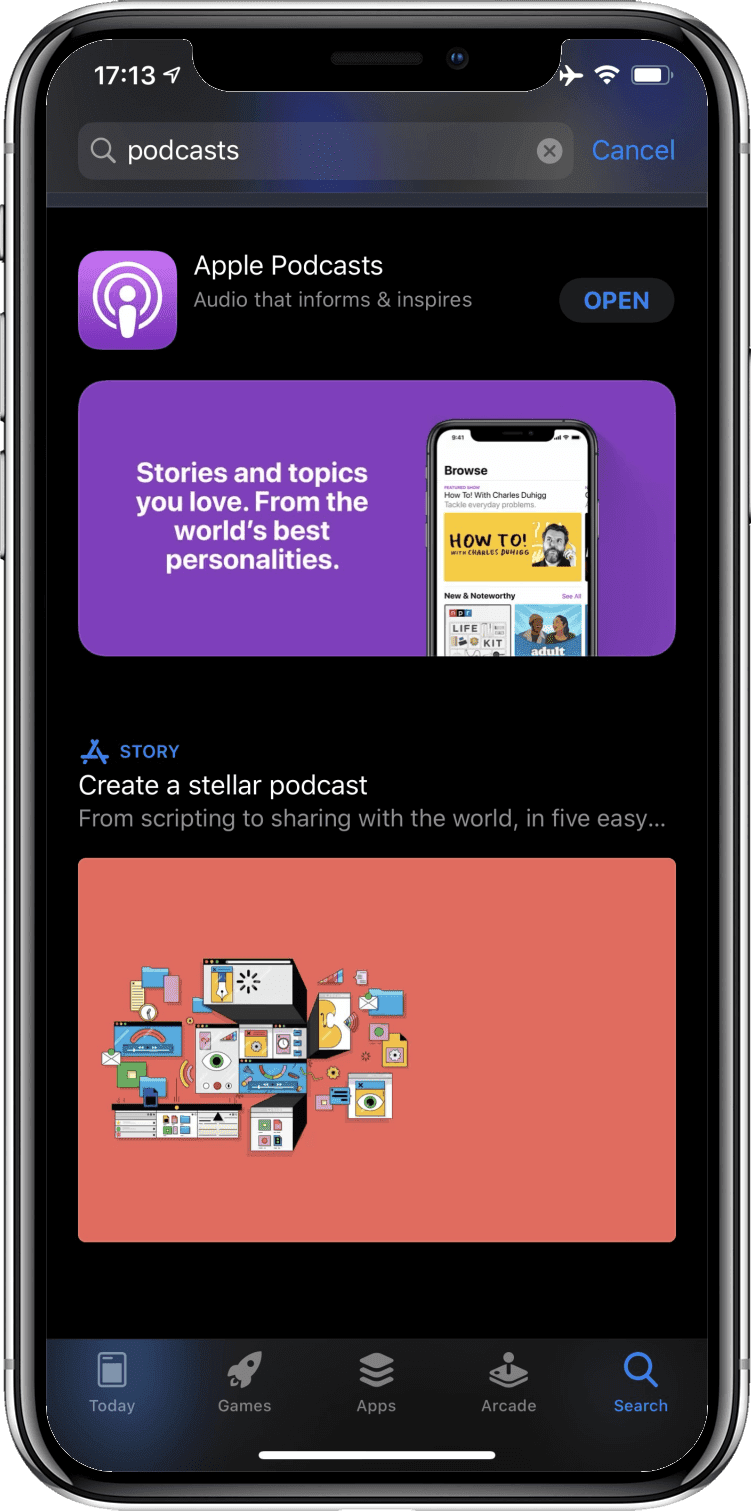 Users have learned to discover apps in app stores. Do this on the web
While Apple doesn't allow PWAs on the App Store, with Android, you can
submit your PWA wrapped in a
[Trusted Web Activity](https://web.dev/articles/using-a-pwa-in-your-android-app).
The [`bubblewrap`](https://github.com/GoogleChromeLabs/bubblewrap)
script makes this a painless operation. This script is also what internally
powers [PWABuilder](https://www.pwabuilder.com/)'s Android app
export feature, which you can use without touching the command line.
## Feature summary
This table shows a compact overview of all features and provides a list of
useful resources for realizing them on the web.
| Feature | Useful resources for doing this on the web |
|---|---|
| [Capable of running offline](https://web.dev/articles/app-like-pwas#capable_of_running_offline) | - [App shell model](https://developers.google.com/web/fundamentals/architecture/app-shell) |
| [Offline content available and media playable](https://web.dev/articles/app-like-pwas#offline_content_available_and_media_playable) | - [Serve cached audio and video](https://developer.chrome.com/docs/workbox/serving-cached-audio-and-video) - [Workbox library](https://developer.chrome.com/docs/workbox) - [Storage API](https://web.dev/articles/storage-for-the-web) - [Persistent Storage API](https://web.dev/articles/persistent-storage) |
| [Proactive background downloading](https://web.dev/articles/app-like-pwas#proactive_background_downloading) | - [Background Fetch API](https://developers.google.com/web/updates/2018/12/background-fetch) |
| [Sharing to and interacting with other applications](https://web.dev/articles/app-like-pwas#interact_and_share_with_other_applications) | - [Web Share API](https://web.dev/articles/web-share) - [Web Share Target API](https://web.dev/web-share-target) - [Async Clipboard API](https://web.dev/image-support-for-async-clipboard) - [Contact Picker API](https://web.dev/contact-picker) - [Get Installed Related Apps API](https://web.dev/articles/get-installed-related-apps) |
| [Background app refreshing](https://web.dev/articles/app-like-pwas#background_app_refreshing) | - [Periodic Background Sync API](https://web.dev/periodic-background-sync) |
| [State synchronized over the cloud](https://web.dev/articles/app-like-pwas#state_synchronized_over_the_cloud) | - [Background Sync API](https://developers.google.com/web/updates/2015/12/background-sync) |
| [Hardware media key controls](https://web.dev/articles/app-like-pwas#hardware_media_key_controls) | - [Media Session API](https://web.dev/articles/media-session) |
| [Multitasking and app shortcut](https://web.dev/articles/app-like-pwas#multitasking_and_app_shortcut) | - [Installability criteria](https://web.dev/articles/install-criteria) |
| [Quick actions in context menu](https://web.dev/articles/app-like-pwas#quick_actions_in_context_menu) | - [App icon shortcuts](https://web.dev/articles/app-shortcuts) - [Run on login](https://github.com/MicrosoftEdge/MSEdgeExplainers/tree/master/RunOnLogin) (early stage) |
| [Act as default app](https://web.dev/articles/app-like-pwas#act_as_default_app) | - [URL protocol handling](https://github.com/MicrosoftEdge/MSEdgeExplainers/blob/main/URLProtocolHandler/explainer.md) (early stage) - [`registerProtocolHandler()`](https://developer.mozilla.org/docs/Web/API/Navigator/registerProtocolHandler) |
| [Local file system integration](https://web.dev/articles/app-like-pwas#local_file_system_integration) | - [File System Access API](https://web.dev/file-system-access) - [browser-fs-access library](https://github.com/GoogleChromeLabs/browser-fs-access) |
| [Platform look and feel](https://web.dev/articles/app-like-pwas#platform_look_and_feel) | - [`user-select: none`](https://developer.mozilla.org/docs/Web/CSS/user-select#Syntax:~:text=none,-The) - [`font-family: system-ui`](https://developer.mozilla.org/docs/Web/CSS/font-family) - [`prefers-color-scheme`](https://web.dev/articles/prefers-color-scheme) - [Dark mode toggle](https://github.com/GoogleChromeLabs/dark-mode-toggle) |
| [Customized title bar](https://web.dev/articles/app-like-pwas#customized_title_bar) | - [Title bar customization](https://github.com/MicrosoftEdge/MSEdgeExplainers/blob/main/TitleBarCustomization/explainer.md) (early stage) - [Display mode](https://web.dev/articles/add-manifest#display) - [Theme color](https://web.dev/articles/add-manifest#theme-color) |
| [Snappy animations](https://web.dev/articles/app-like-pwas#snappy_animations) | - [Animations and performance tips](https://developers.google.com/web/fundamentals/design-and-ux/animations/animations-and-performance) - [CSS Scroll Snap](https://developers.google.com/web/updates/2018/07/css-scroll-snap) - [Web Animations API](https://developer.mozilla.org/docs/Web/API/Web_Animations_API) |
| [Content surfaced outside of app](https://web.dev/articles/app-like-pwas#content_surfaced_outside_of_app) | - [Content Index API](https://web.dev/content-indexing-api) - [Speakable content](https://developers.google.com/search/docs/data-types/speakable) - [Structured markup](https://developers.google.com/search/docs/guides/search-gallery) |
| [Lock screen media control widget](https://web.dev/articles/app-like-pwas#lock_screen_media_control_widget) | - [Media Session API](https://web.dev/articles/media-session) |
| [Push notifications](https://web.dev/articles/app-like-pwas#push_notifications) | - [Push API](https://developers.google.com/web/fundamentals/push-notifications) - [Notification Triggers API](https://web.dev/notification-triggers) |
| [App icon badging](https://web.dev/articles/app-like-pwas#app_icon_badging) | - [Badging API](https://web.dev/badging-api) |
| [Media playback trumps energy saver settings](https://web.dev/articles/app-like-pwas#media_playback_takes_precedence_over_energy_saver_settings) | - [Screen Wake Lock API](https://web.dev/wakelock) |
| [App discovery through an app store](https://web.dev/articles/app-like-pwas#app_discovery_through_an_app_store) | - [Trusted Web Activity](https://web.dev/articles/using-a-pwa-in-your-android-app) - [`bubblewrap` library](https://github.com/GoogleChromeLabs/bubblewrap) - [PWABuilder tool](https://www.pwabuilder.com/) |
## Conclusion
PWAs have come a long way since their introduction in 2015.
In the context of [Project Fugu 🐡](https://developer.chrome.com/blog/fugu-status),
the cross-company Chromium team is working on closing the last remaining gaps.
By following even only some of the pieces of advice we've shared,
you can get closer to that app-like feeling, and make your users forget
that they are dealing with "just a website." Ultimately, most users don't care
how your app is built (and why should they?), as long as it feels like
a *real* app.
## Acknowledgements
This document was reviewed by
[Kayce Basques](https://web.dev/authors/kaycebasques),
[Joe Medley](https://web.dev/authors/joemedley),
[Joshua Bell](https://github.com/inexorabletash),
[Dion Almaer](https://blog.almaer.com/),
[Ade Oshineye](https://blog.oshineye.com/),
[Pete LePage](https://web.dev/authors/petelepage),
[Sam Thorogood](https://web.dev/authors/samthor),
[Reilly Grant](https://github.com/reillyeon),
and [Jeffrey Yasskin](https://github.com/jyasskin).